A75UM3E2 (Ver. E.2)
3-1
3.1 Introduction
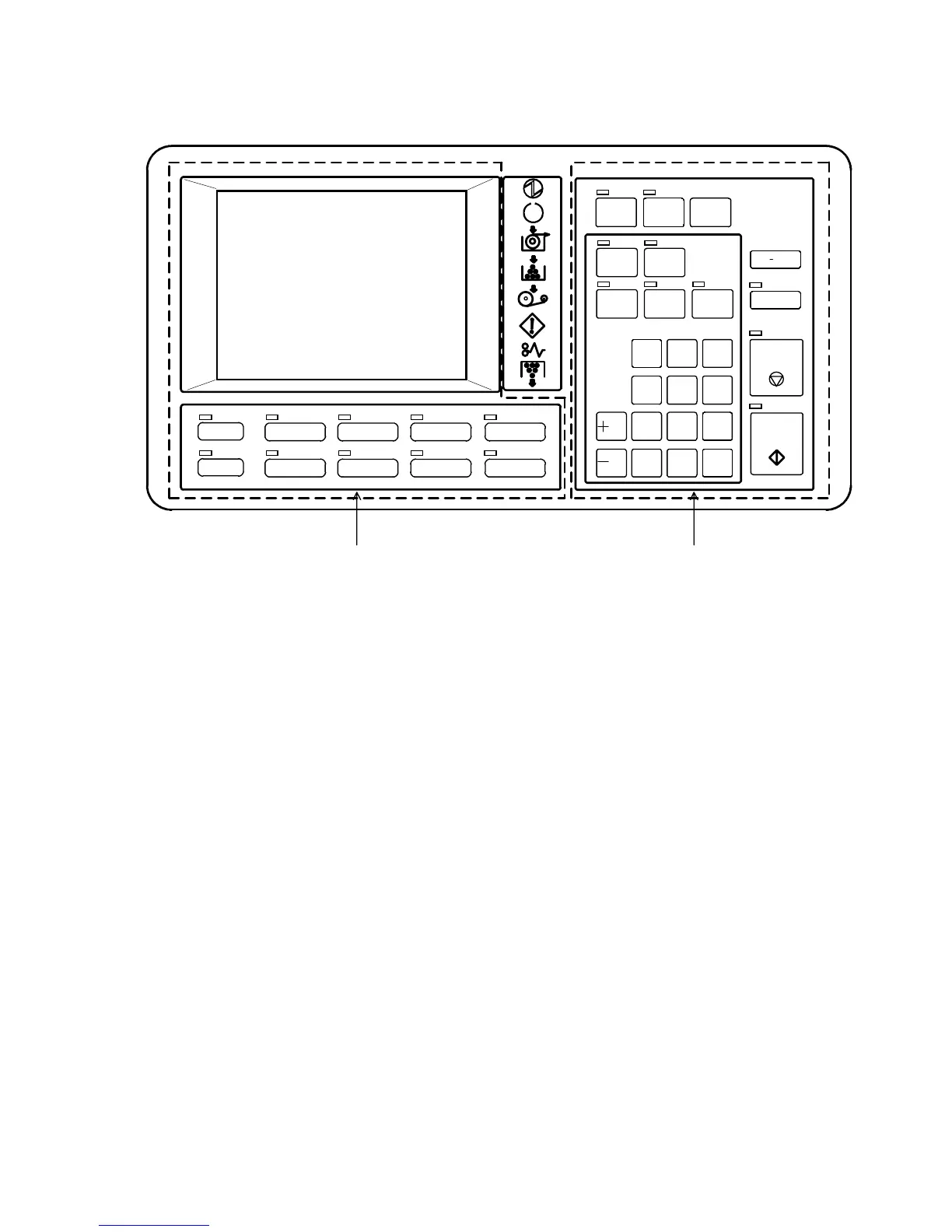
The Operation Panel can be divided into two parts such as LCD/Key Part and Key Part.
LCD/Key Part Key Part
In the LCD/Key Part, all settings are done using both LCD and keys below the LCD.
Push some key below the LCD such as Paper Key and Zoom Key.
If you do so, the corresponding setting screen such as Paper Setting Screen is indicated on the LCD.
Then, change each setting by pressing the required setting item on the LCD.
In the Key Part, all settings are done using only keys in that part.
POWER
INTTERUPT RESET
RE COP Y
SAMPLE
START
STOP/
/L
/R
SET COPY
AUTO ZOOM
CONCURRENT
AUTO PAPER
ROTATE
MENU
REFERENCE
BASI C SCREEN
MOD E ME MORY
PAPER
FUNCTION
ZOOM
DATE ST AMP
IMAGE QUALITY
LAYOUT/SORT
SAVE
PRINT
EJECT
0
1
4
7
.
2
5
8
C
3
6
9



 To Next Page