A75UM3E8 (Ver. E.2)
3-44
3.5 Image Quality Settings
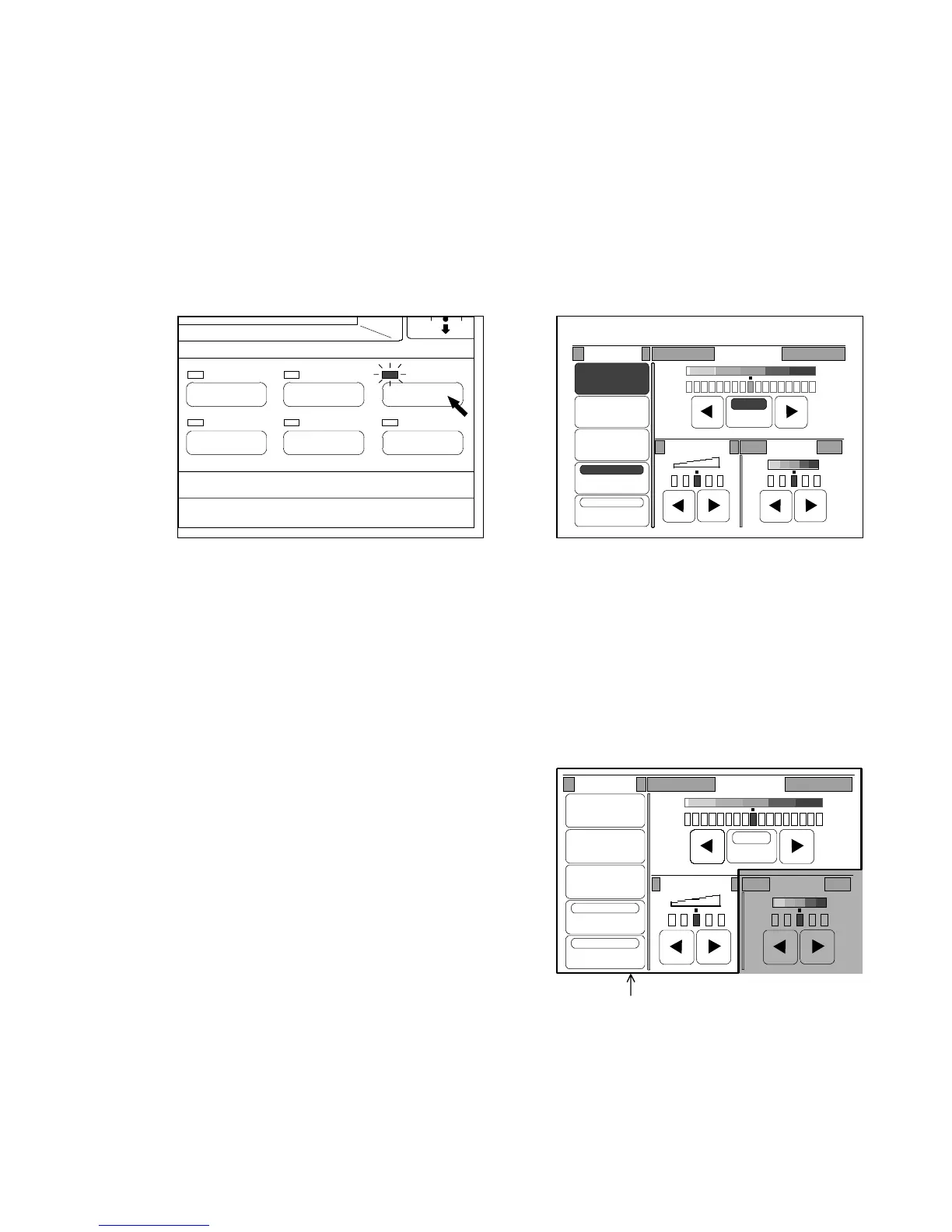
If you push the Image Quality Key below the LCD, the Image Quality Setting Screen is indicated on the
LCD and it becomes possible to change and decide the following settings.
The LED lamp of the Image Quality Key lights up when the LCD is indicating the Image Quality Setting
Screen.
1. Selecting original’s image type
2. Background
3. Despeckle
4. Threshold
5. Sharpness
6. Density
(Image Quality Key) (Image Quality Setting Screen)
Note : Except for Density, each image quality setting works at the time of scanning in order
to process the image data before it is sent and stored in the memory.
When you do re-copying, therefore, it is no use to change these settings because the
image data has already been in the memory and the change of image quality setting
you do is not applied to the re-copy image.
Make sure to change these settings before scanning.
We recommend you to do Sample Copy in order to check the result of copy with your
image quality setting.
Make sure to finish to change these settings
before scanning.
Original Threshold
Line
Line/Photo
Photo
Background
Despeckle
Sharpness
Auto
Density
IMAGE QUALITY
LAYOUT/SORT
ZOOM
DATE STAMPFUNCTION
PAPER
0%
001
Original Threshold
Line
Line/Photo
Photo
Background
Despeckle
Sharpness
Density
Auto



 To Next Page