A75UM3E7 (Ver. E.2)
3-40
3.4.7 XY Zoom Mode
[Function]
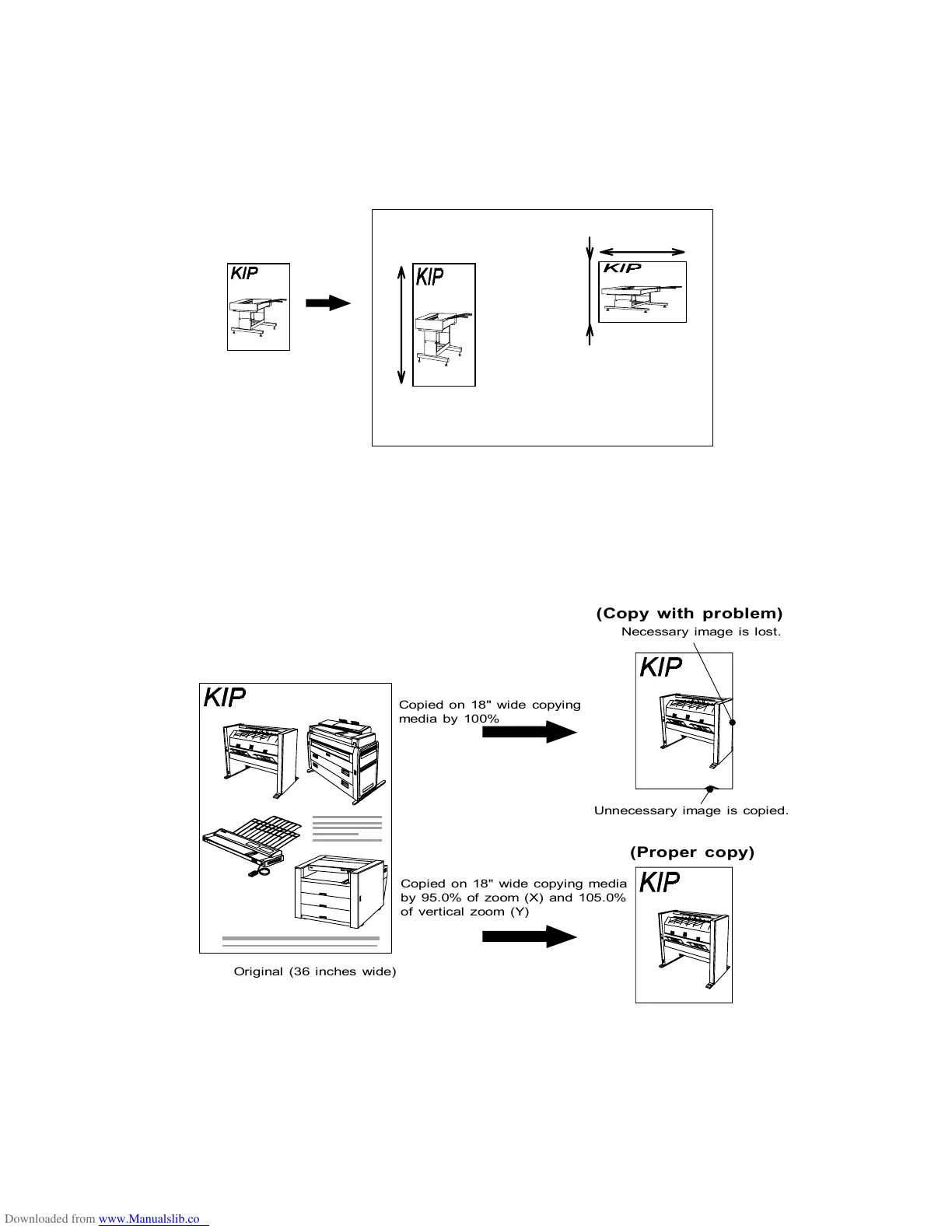
Since this scanner has XY Zoom Mode, it is possible to do copying although horizontal zoom ratio (X)
and vertical one (Y) are different from each other.
The XY Zoom Mode is used together with either “% Mode” or “Zoom Program Mode”.
(Example of usage)
If a little necessary image is lost because the copy image is a little larger than the size of copying
media, or if a little unnecessary image is copied on the edge of the copy, adjust horizontal zoom ratio
and vertical one to fix these kinds of problem.
Note : It would be better that the difference between horizontal zoom ratio (X) and vertical one (Y) is
as small as possible since the copy image is extremely transformed if they are greatly different
from each other.
Original
Zoom (X) is 100.0%.
Zoom (Y) is140.0%.
Y
X
Y
Zoom (X) is 140.0%.
Zoom (Y) is 70.0%.
Original (36 inches wide)
Copied on 18" wide copying
media by 100%
Necessary image is lost.
Unnecessary image is copied.
Copied on 18" wide copying media
by 95.0% of zoom (X) and 105.0%
of vertical zoom (Y)
(Copy with problem)
(Proper copy)



 To Next Page