A75UM3E2 (Ver. E.2)
3-5
3.2.1 Copy Count setting (Number of copies)
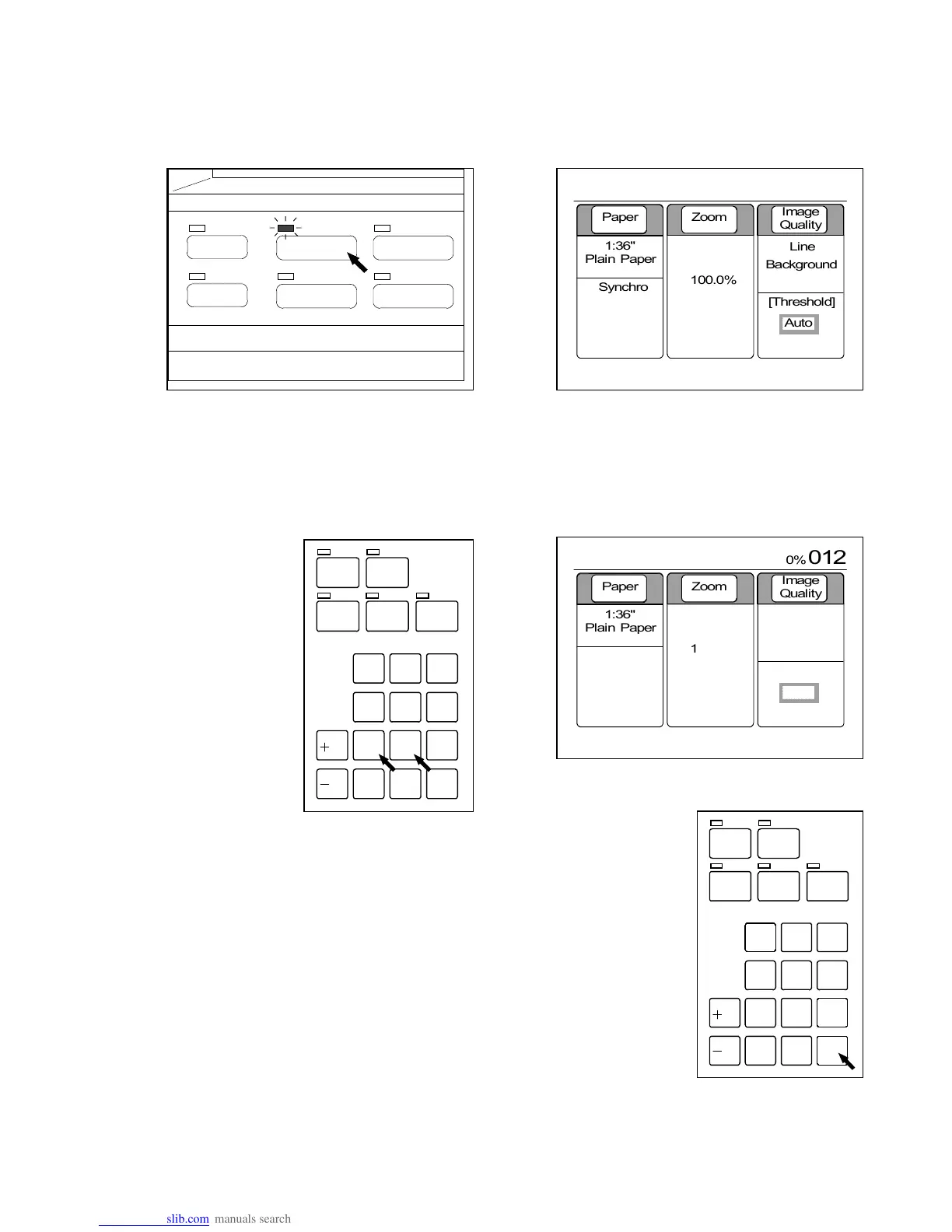
Decide the Copy Count in the following way.
Note that it is possible to decide the Copy Count only in the Basic Screen.
1) Push the Basic Screen Key to indicate the Basic Screen on the LCD.
(Basic Screen Key) (Basic Screen)
2) Input the required Copy Count with Ten Keys.
The inputted value is indicated in the Basic Screen.
The maximum Copy Count is 999 copies.
(Example : 12 copies are to be printed out.)
If you inputted a wrong number, push the Clear Key to clear it, and then
input the correct number again.
(Reference)
It is possible in the Reference Screen to check which copy is now on printing during a multiple
sheets of copying.
As for the detail, refer to “Reference Screen” on the page 3-173.
/
L
/
R
SET COPY
ROTATE
AUTO ZOOM AUTO PAPER
CONCUR RENT
PRI NT
0
1
4
7
.
2
5
8
C
3
6
9
/
L
/
R
SET COPY
ROTATE
AUTO ZOOM AUTO PA PER
CONCURRENT
PRI NT
0
1
4
7
.
2
5
8
C
3
6
9
PAPER
FUNCTION
BASIC SCREEN
MODE MEMORY
MENU
REFERENCE
0%
001



 To Next Page