A75UM2E4 (Ver. E.2)
2-15
2.7 Pre-scan
[Function]
Even if the printer is not ready for copying, it is possible to scan the original in advance.
The image data of the original is stored and kept in the memory as Copy Job until the printer gets
ready.
When the printer gets ready, it is sent to the printer and is printed out.
[How to do pre-scan]
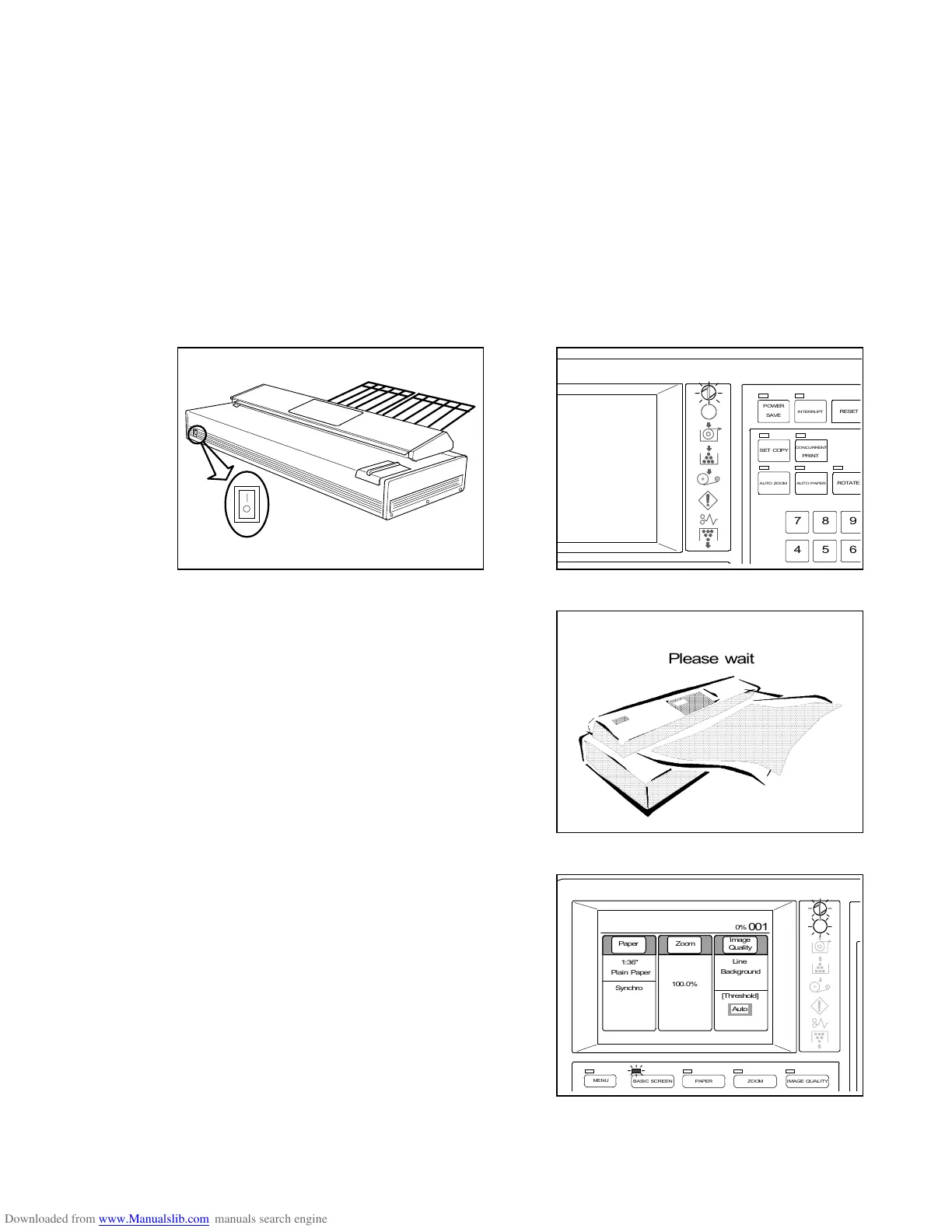
1) Push the bar “|” side of the Power Switch to turn on the Scanner.
The Power Indicator lights up.
Also, turn on the connected printer.
2) “Please wait” is indicated on the LCD until the
scanner gets ready.
3) When the scanner gets ready, the LCD indicates the
Basic Screen as the right figure.
If the printer is not ready for copying yet, the Ready
Indicator blinks.
Please wait
POWER
INT ERRUPT
RESET
SET COPY
AU TO ZOO M
CONCURRENT
AUTO PAPER
ROTA TE
4
7
5
8
6
9
PRI NT
SAVE
MENU
BASIC SCREEN PAPER ZOOM
IMAGE QUALITY
0%
001
Paper Zoom
Image
Qual i ty
1:36"
100.0%
Synchro
Line
Background
[Threshold]
Auto
Plain Paper



 To Next Page