A75UM3E9 (Ver. E.2)
3-51
3.5.3 Despeckle Mode
[Function]
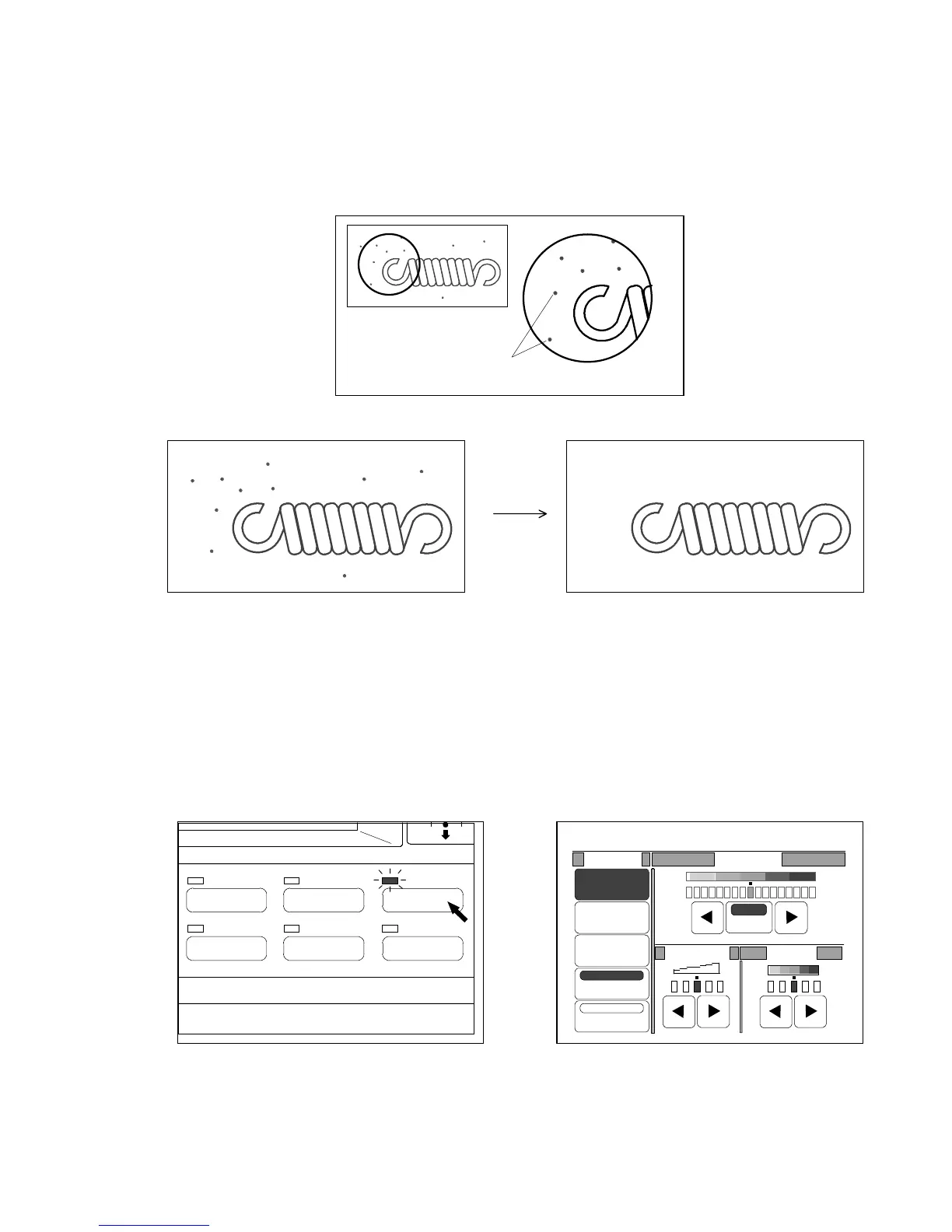
Supposing there is an isolated speckle image on the original.
If you select the Despeckle Mode, it judges the speckle as unnecessary image (dirt) and converts the
speckle image to the “white image” at the time of scanning.
As the result of it, it is possible to gain a proper copy without speckle images.
(Original) (Result of copy in the Despeckle Mode)
(Notes)
1. If speckles are not isolated but come together some degree, the Despeckle Mode judges
them as necessary image (mass of speckles) and does not convert them to white images.
Therefore, the copy will have those speckle images.
2. It is impossible to use the Despeckle Mode if you select “Photo”.
[How to Select the Despeckle Mode]
1) Push the Image Quality Key to indicate the Image Quality Setting Screen on the LCD.
(Image Quality Key) (Image Quality Setting Screen)
Isolated speckles
IMAGE QUALITY
LAYOUT/SORT
ZOOM
DATE STAMPFUNCTION
PAPER
0%
001
Original Threshold
Line
Line/Photo
Photo
Background
Despeckle
Sharpness
Density
Auto



 To Next Page