A75UM3E8 (Ver. E.2)
3-48
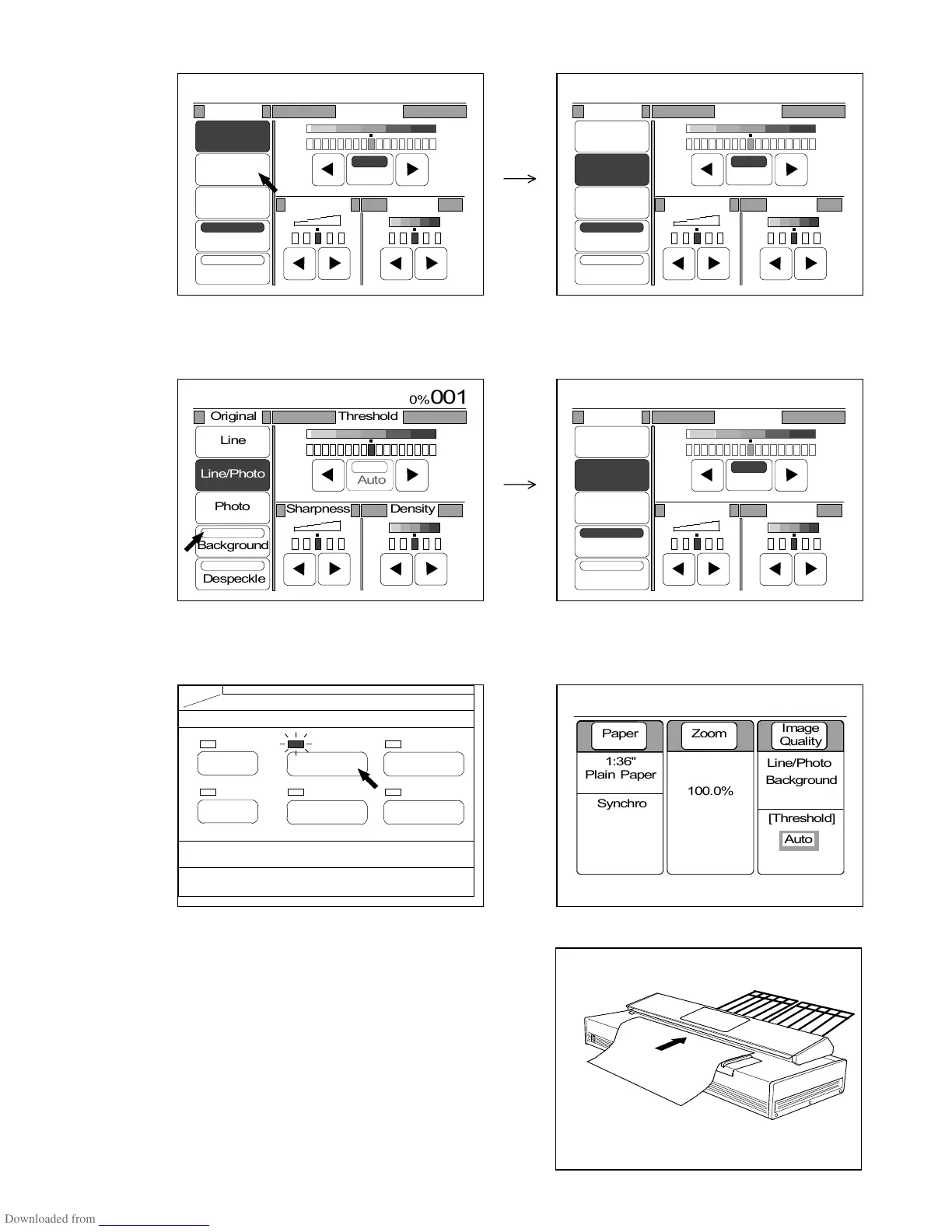
2) Select either Line Mode or Line/Photo Mode pressing either “Line” or “Line/Photo”.
3) If “Background” is not colored, press “Background” to select the Background Mode.
“Background” is colored when selected.
Also, “Auto” (Auto Threshold) is validated automatically.
4) Push the Basic Screen Key to indicate the Basic Screen on the LCD.
“Background” is indicated in the Basic Screen since the Background Mode is selected.
(Basic Screen Key) (Basic Screen)
5) Set the original to the scanner, and then push the
Start Key to start copying.
PAPER
FUNCTION
BASIC SCREEN
MODE MEMORY
MENU
REFERENCE
0%
001
Original Threshold
Line
Line/Photo
Photo
Background
Despeckle
Sharpness
Density
Auto
0%
001
Original Threshold
Line
Line/Photo
Photo
Background
Despeckle
Sharpness
Density
Auto
0%
001
Original Threshold
Line
Line/Photo
Photo
Background
Despeckle
Sharpness
Density
Auto
0%
001



 To Next Page