18
ADDITIONAL FEATURES AND SETTINGSMANUAL COOKING
Manual Cooking Modes
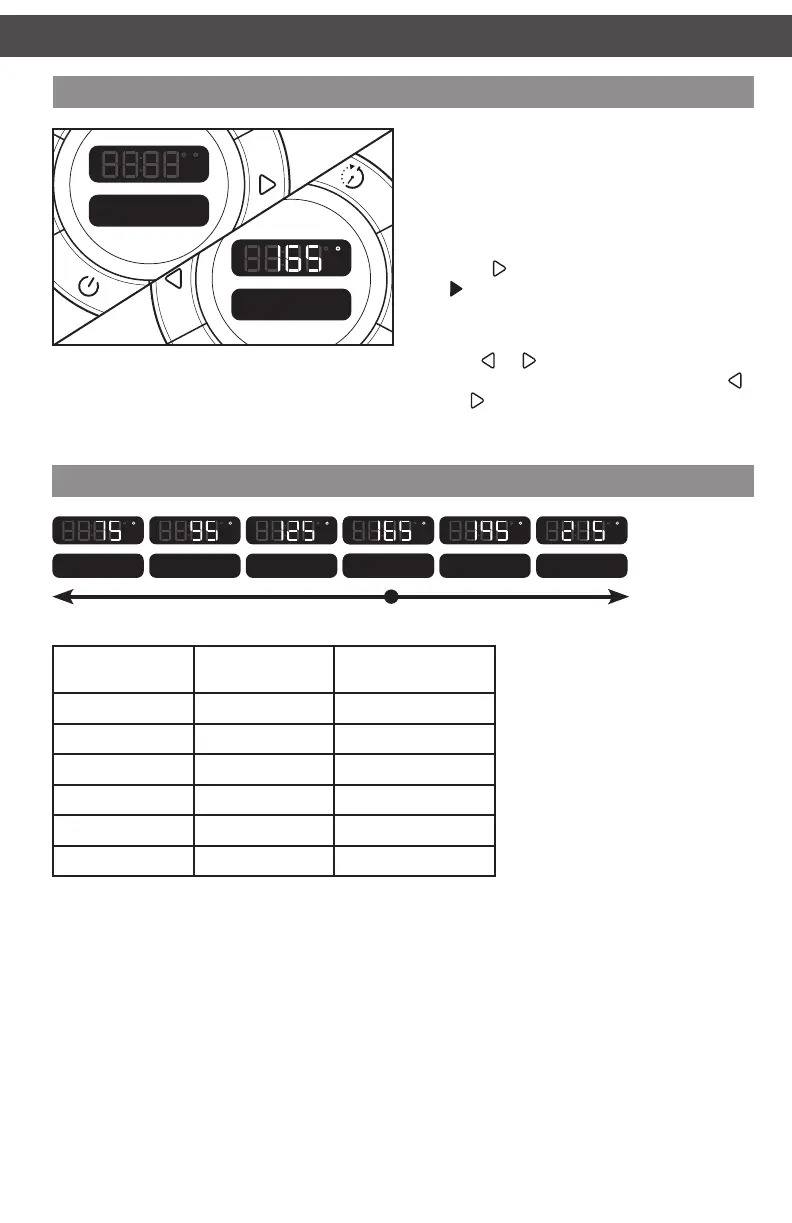
Manual cooking mode has 6 preset ranges to
allow you to cook like on a regular stove top:
Warm, Low, Med-Lo, Medium, Med-Hi, and
High. Each range is adjustable based on the
chart below.
To select and adjust a manual mode:
1. Press
to scroll to Manual mode. Press
to select.
2. Medium will appear in the display, with a
temperature of 165° C.
3. Tap
or to adjust the temperature
in 5° C increments, or press and hold
or
to jump between Manual cooking
modes.
Manual
Cooking Mode
Preset
Temp* in ° C
Max. Temp
in ° C
High 215° C 230° C
Medium High 195° C 210° C
Medium 165° C 190° C
Medium Low 125° C 160° C
Low 95° C 120° C
Warm 75° C 90° C
* Preheating will appear in the display until the selected temperature is reached.
Warm
F C
h
Low
F C
h
Med-Lo
F C
h
Manual
F C
h
Medium
F C
h
Med-Hi
F C
h
High
F C
h
Manual Cooking Modes
W10663380C_01_EN_v02.indd 18 2/17/15 2:37 PM



 To Next Page