21
English
GETTING STARTEDADDITIONAL FEATURES AND SETTINGS
Before rst use
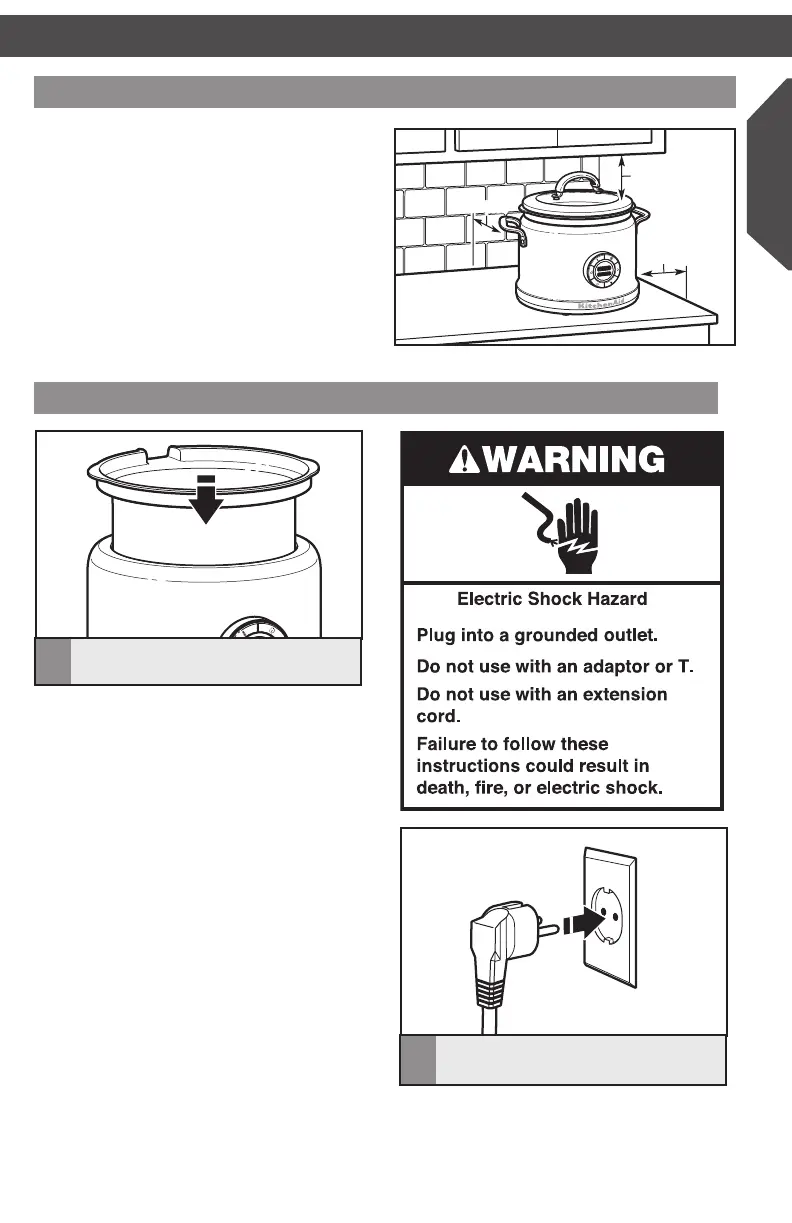
1. Place the Multi-Cooker on a dry, flat, level
surface such as a countertop or table.
2. Be sure the sides and back of the
Multi-Cooker are at least 10 cm away
from any walls, cabinets, or objects on the
counter or table. Allow room above the
Multi-Cooker to remove the lid and avoid
steam buildup on cabinets.
3. Remove all packaging materials, if present.
4. Wash lid and cooking pot in hot, sudsy
water. Dry thoroughly.
Setting up the Multi-Cooker
2
Plug into a grounded (earthed) outlet.
The Multi-Cooker is now ready to use.
F
Sear
F
Sear
10 cm
10
cm10 cm
10 cm
1
Insert the cooking pot into the
Multi-Cooker.
W10663380C_01_EN_v02.indd 21 2/17/15 2:37 PM



 To Next Page