20
GETTING STARTEDADDITIONAL FEATURES AND SETTINGS
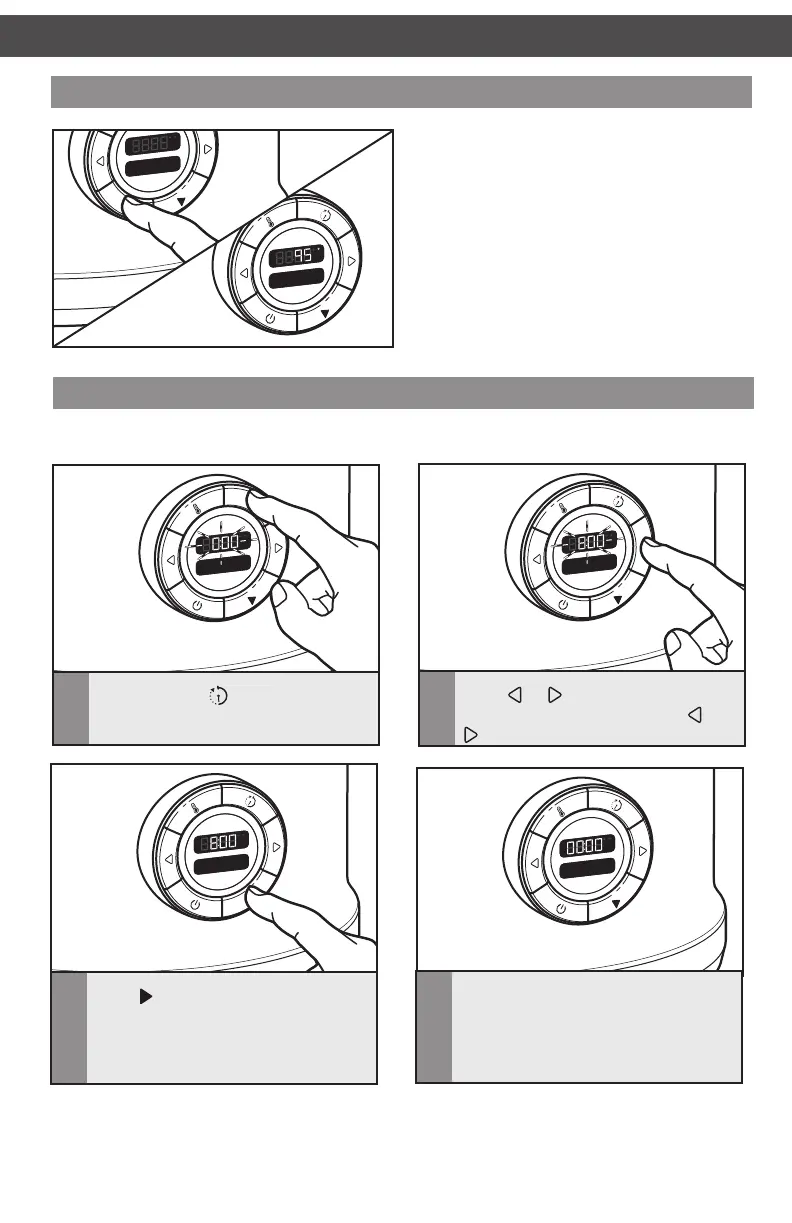
Using the timer as a kitchen timer
The Multi-Cooker timer can be used as a kitchen timer when not in a cooking mode.
F
Sear
F
h
C
Set Tim
1
Press and hold .
F
Sear
F
h
C
Set Tim
2
Press or to adjust the time up
or down. Pressing and holding
or
will change the time more rapidly.
F
Sear
F
h
C
Set Tim
3
Press to start the timer
countdown. A single tone will sound
when the time reaches 1 minute,
then the time will continue counting
down in seconds.
F
Sear
F
h
C
4
When the timer reaches 00:00, three
tones will sound.
Last selections used
If the Multi-Cooker remains plugged in, it will
remember the last cooking method or mode
and temperature settings used the next time
it is turned on.
F
Sear
Simmer
F
h
C
F
Sear
Set Tim
F
h
C
W10663380C_01_EN_v02.indd 20 2/17/15 2:37 PM



 To Next Page