A-61635 December 2010 4-69
Setting up your e-mail
options
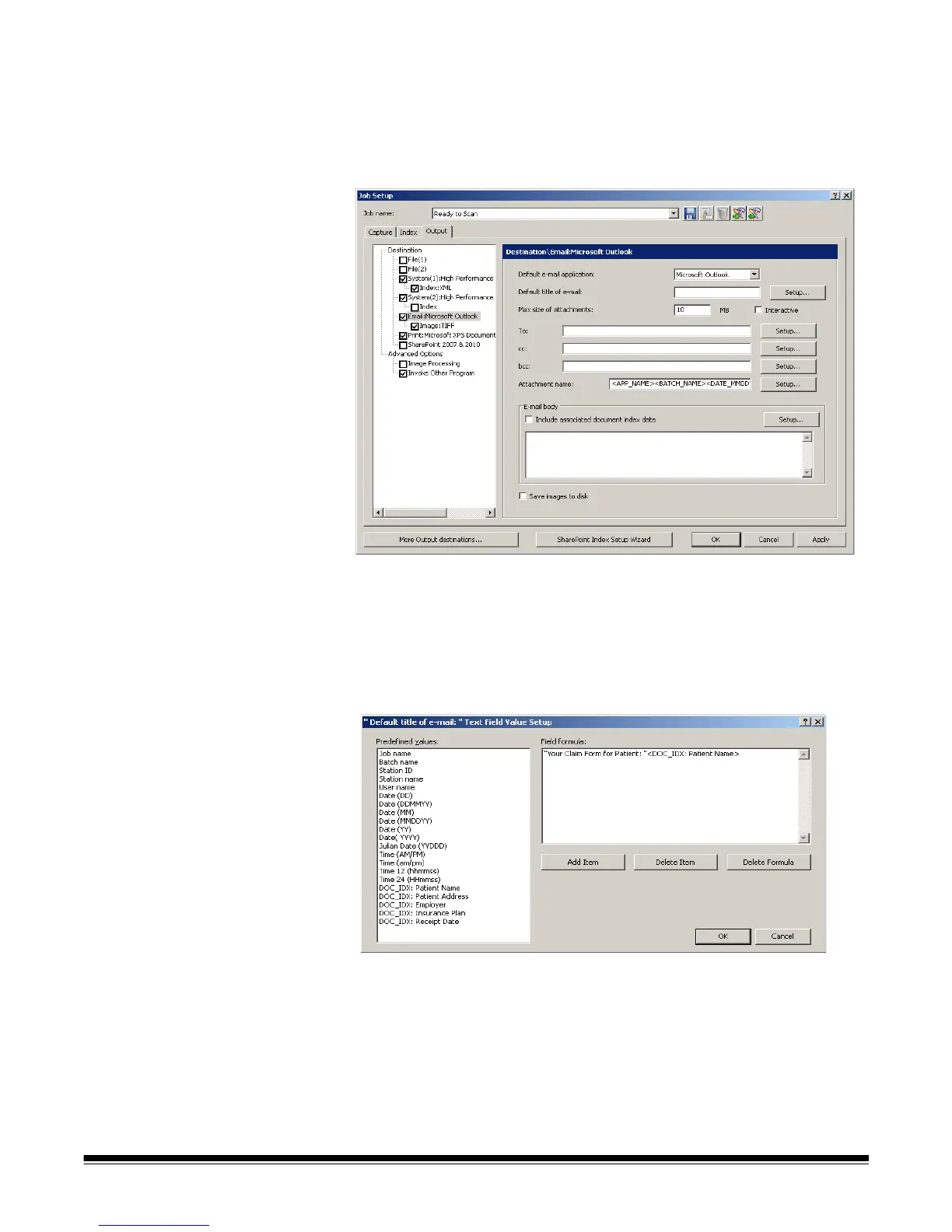
The E-mail option on the Output tab allows you set up the software to
automatically e-mail output batches, with or without index data.
1. Open the Job Setup dialog box and click the Output tab.
2. Click the E-mail option. The Destination\E-mail: dialog box will be
displayed.
3. Select an e-mail software application to send e-mails from the Default e-
mail application drop-down list.
4. Enter the information you want to appear as the subject line of the e-mail in
the Default title of e-mail field. You can select a predefined value to this
subject line (e.g., date, name, etc.) by clicking Setup. The Default Title of
e-mail Text Field Value Setup dialog box will be displayed in which you can
select additional items to add to the e-mail title.
• Select the values you want to add to the e-mail title from the Predefined
values list. With each addition, click Add Item.
• Click OK when finished.
NOTE: If you want to delete the last value, click Delete Item. To
delete the entire formula, click Delete Formula.



 To Next Page