English
68
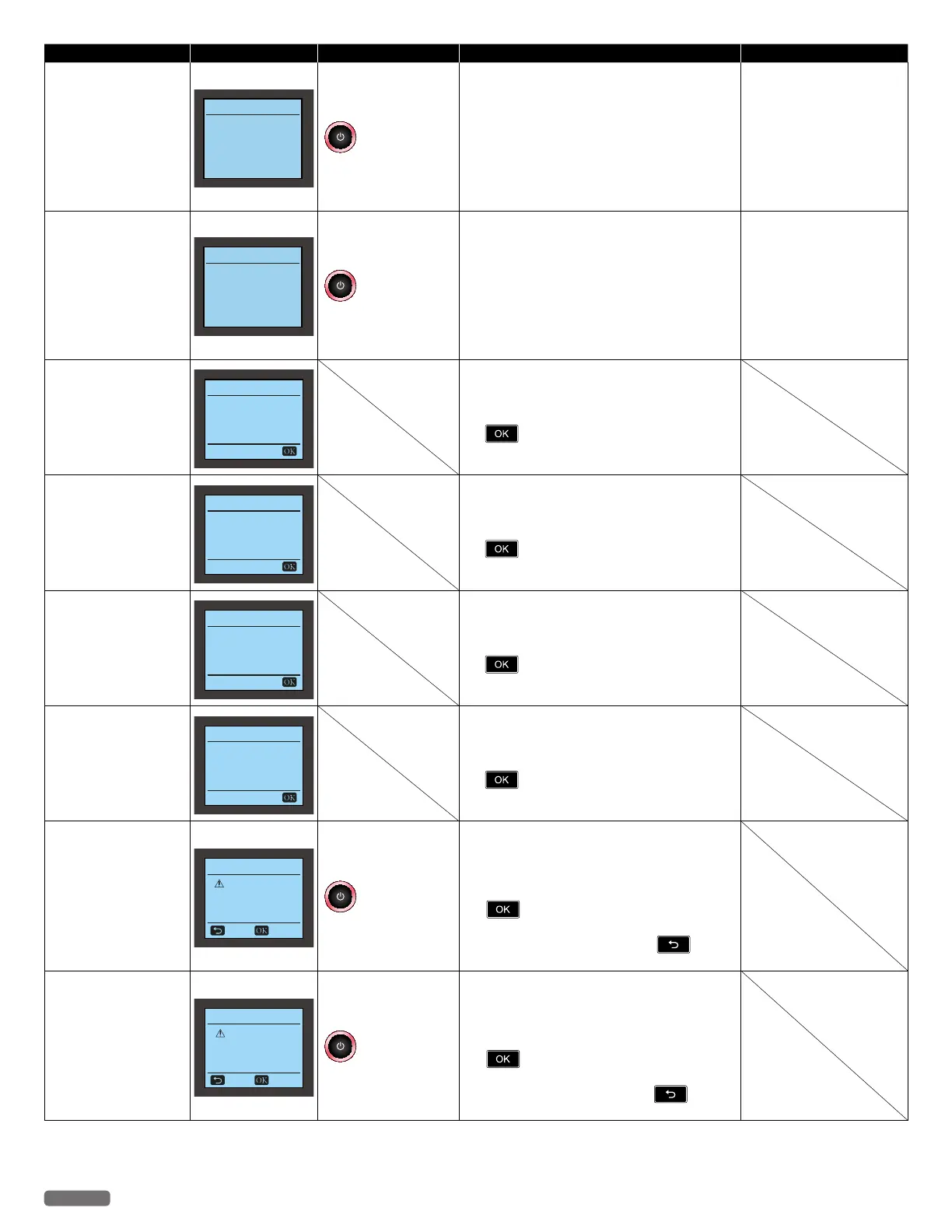
Status messages LCD messages LED behaviors Unit status or possible causes Refer to
Both Inks Error
Both Inks Error
Please replace
both ink cartridges.
blinks as pattern 1
Ink cartridges error.
– Clean the surface of the nozzles and contacts on
the Ink cartridges with a dampened soft cloth
then let them dry before reinserting cartridge.
– Replace the current Ink cartridges with
authorized Ink cartridges.
•If this error occurs occasionally, try to replace
the current Ink cartridges with new Ink
cartridges.
“Cleaning the ink cartridge
nozzles and contacts”
on page 59.
“Changing the ink cartridge”
on page 57.
Defective Cartridge
Ink Error
Defective cartridge.
Check the ink.
blinks as pattern 1
Ink cartridge(s) error.
– Clean the surface of the nozzles and contacts on
the Ink cartridge(s) with a dampened soft cloth
then let them dry before reinserting cartridge.
– Replace the current Ink cartridge(s) with
authorized Ink cartridge(s).
•If this error occurs occasionally, try to replace
the current Ink cartridge(s) with new Ink
cartridge(s).
“Cleaning the ink cartridge
nozzles and contacts”
on page 59.
“Changing the ink cartridge”
on page 57.
Black ink is empty.
Black Ink Empty
Printing in
color-only mode.
Black ink is empty in the ink cartridge.
– You get good printed results with Color mode
when you make prints in this condition, and the
warning indication continues until you press
.
•If you want to use both Ink cartridges, please
replace with a new Black Ink cartridge.
Color ink is empty.
Color Ink Empty
Printing in
mono-only mode.
Color ink is empty in the ink cartridge.
– You get good printed results with Mono mode
when you make prints in this condition and the
warning indication continues until you press
.
•If you want to use both Ink cartridges, please
replace with a new Color Ink cartridge.
Black ink cartridge is
not detected.
Black Ink Missing
Printing in
color-only mode.
Black ink is not inserted.
– You get good printed results with Color mode
when you make prints in this condition, and the
warning indication continues until you press
.
•If you want to use both Ink cartridges, please
replace with a new Black Ink cartridge.
Color ink cartridge is
not detected.
Color Ink Missing
Printing in
mono-only mode.
Color ink is not inserted.
– You get good printed results with Mono mode
when you make prints in this condition, and the
warning indication continues until you press
.
•If you want to use both Ink cartridges, please
replace with a new Color Ink cartridge.
Print Warning: Color
ink cartridge is not
detected.
Print Warning !
Color Ink Missing
You can't print
photo correctly.
Cancel Continue
blinks as pattern 1
Attempting to print with Glossy Photo type
Paper without a Color ink cartridge installed.
– You get good printed results with Mono mode
when you make prints in this condition, and the
warning indication continues until you press
.
•If you want to use both Ink cartridges, please
cancel the print job, then press
and
install a new Color Ink cartridge.
Print Warning: Color ink
is empty.
Print Warning !
Color Ink Empty
You can't print
photo correctly.
Cancel Continue
blinks as pattern 1
Attempting to print with Glossy Photo type
Paper with an empty Color ink cartridge.
– You get good printed results with Mono mode
when you make prints in this condition, and the
warning indication continues until you press
.
•If you want to use both Ink cartridges, please
cancel the print job then press
and
replace with a new Color Ink cartridge.
Continued on next page.


 To Next Page