CVS-841/851 Chapter 7
Functional Registration
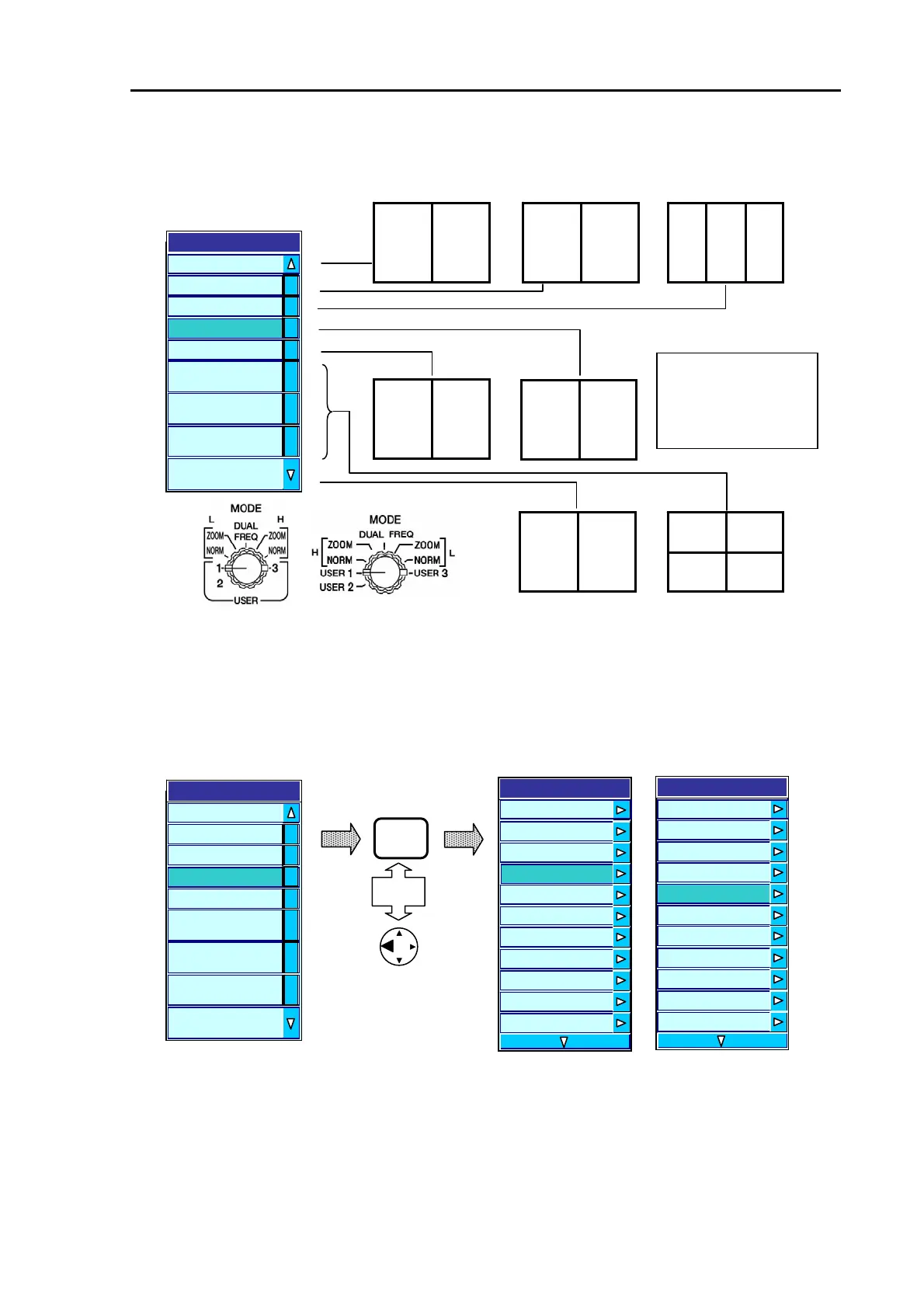
The items and their image arrangements available in the USER 1 menu are as follows:
CVS-841 CVS-851
(7) Press the MENU key or the left arrow key to fix the H/Enhance (See NOTE) selection. The display
will return to an upper level menu, showing USER 1 H/Enhance under the DISPLAY menu.
NOTE: The H/Enhance function is defaulted to 25 dB. To change the setting, refer to Para 7.5 “Setting
the Enhance effect”.
CVS-841 CVS-851
(8) To continue the settings for USER 2 , repeat the procedure from step (3).
(9) To exit this menu, press the MENU key or the left arrow key twice.
MIX NORM
Enhance NORM(H)
User 1
L H MIX
MIX NORM
Enhance NORM(L)
NORM (H)
LK
H
NORM (H)
LK
L
BZ(L)
Scale
Position
L/MIX
H/MIX
H/L/MIX
H/EN
L/EN
H/BTM/L/BTM
H/B.D./L/B.D.
H/ZOOML/ZOOM
H/B.X/L/B.Z
Acronym:
NORM: Normal Display
BZ: Bottom Zoom Display
LK: Bottom Lock Display
MIX: Video Mixed Display
Figure 7.6 Available image modes in the USER 1 menu
Figure 7.7 Fixing the entry to the USER 1 menu
MENU
Or
Display
A Scope OFF
Information Window OFF
Display
User 1
L/MIX
H/MIX
H/L/MIX
H/EN
L/EN
H/BTM/L/BTM
H/B.D./L/B.D.
H/ZOOML/ZOOM
H/B.X/L/B.Z
A Scope OFF
Scale Value Small
Zoom Type ZOOM
Zoom Range
5.0
Zoom T
e ZOOM
Zoom Range 5.0
User 1 H/EN
User 2 B.D
User 3 H(1)/H(2)/L
Depth Value Large
Depth Value Position Bottom
Scale Single
Scale
User 1 H/EN
User 2 B.D
User 3 H(1)/H(2)/L
Depth Value Large
Depth Value Position Bottom
Scale Single
Scale Position Side
93132682-00 7-5



 To Next Page