11. EXPLANATION OF COMPONENTS
11.5 OPERATOR’S SEAT
The seat adjustment should be checked at the beginning of each
shift and when operators change.
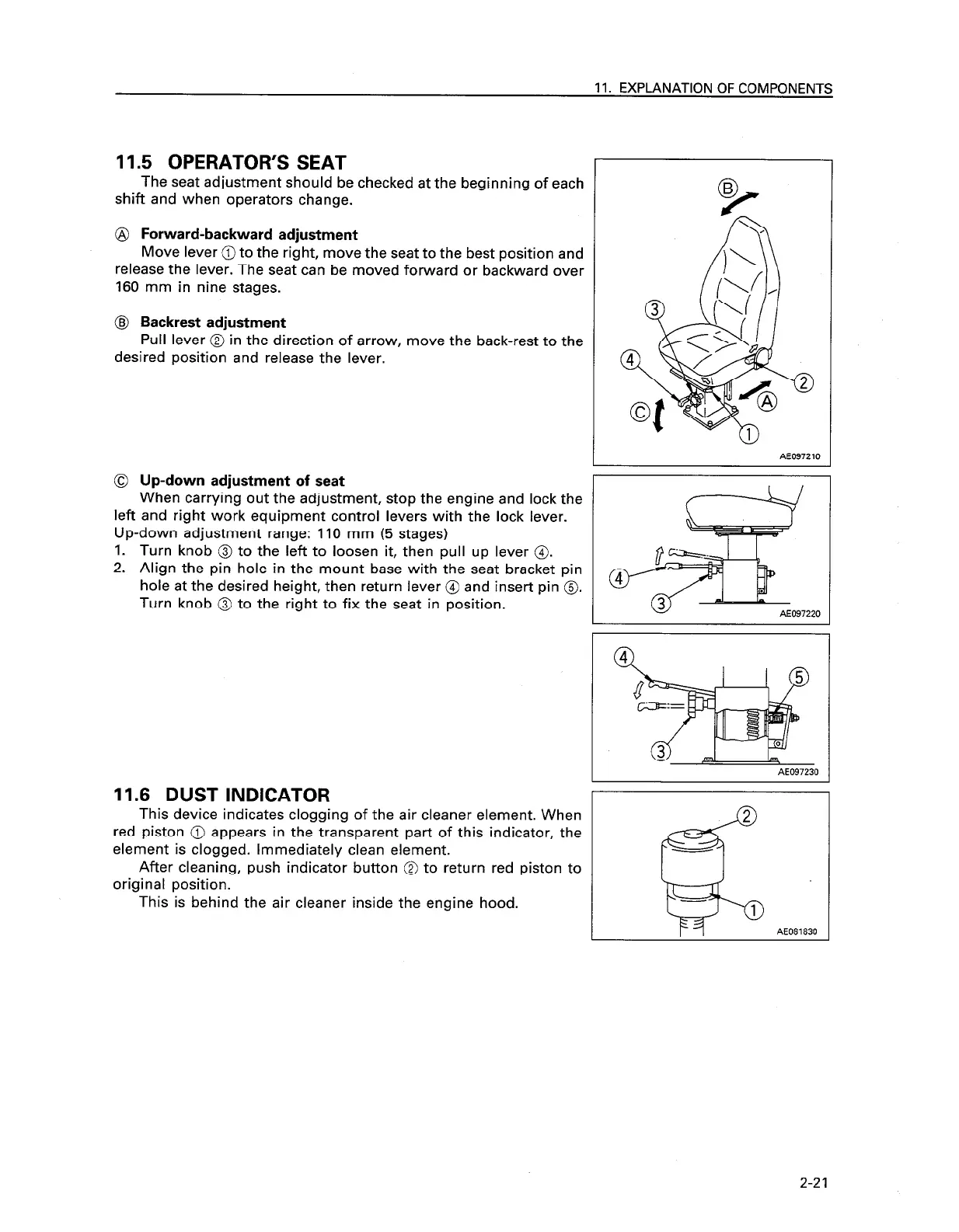
@ Forward-backward adjustment
Move lever @ to the right, move the seat to the best position and
release the lever. The seat can be moved forward or backward over
160 mm in nine stages.
@ Backrest adjustment
Pull lever @ in the direction of arrow, move the back-rest to the
desired position and release the lever.
0
Up-down adjustment of seat
When carrying out the adjustment, stop the engine and lock the
left and right work equipment control levers with the lock lever.
Up-down adjustment range: 110 mm (5 stages)
1.
Turn knob @ to the left to loosen it, then pull up lever 0.
2.
Align the pin hole in the mount base with the seat bracket pin
hole at the desired height, then return lever @ and insert pin 0.
Turn knob @ to the right to fix the seat in position.
AE097210
AE097230
11.6 DUST INDICATOR
This device indicates clogging of the air cleaner element. When
red piston @ appears in the transparent part of this indicator, the
element is clogged. Immediately clean element.
After cleaning, push indicator button @ to return red piston to
original position.
This is behind the air cleaner inside the engine hood.
2-21




 To Next Page