11. EXPLANATION OF COMPONENTS
11.12 FUSE
NOTICE
Before replacing a fuse, be sure to turn off the starting switch.
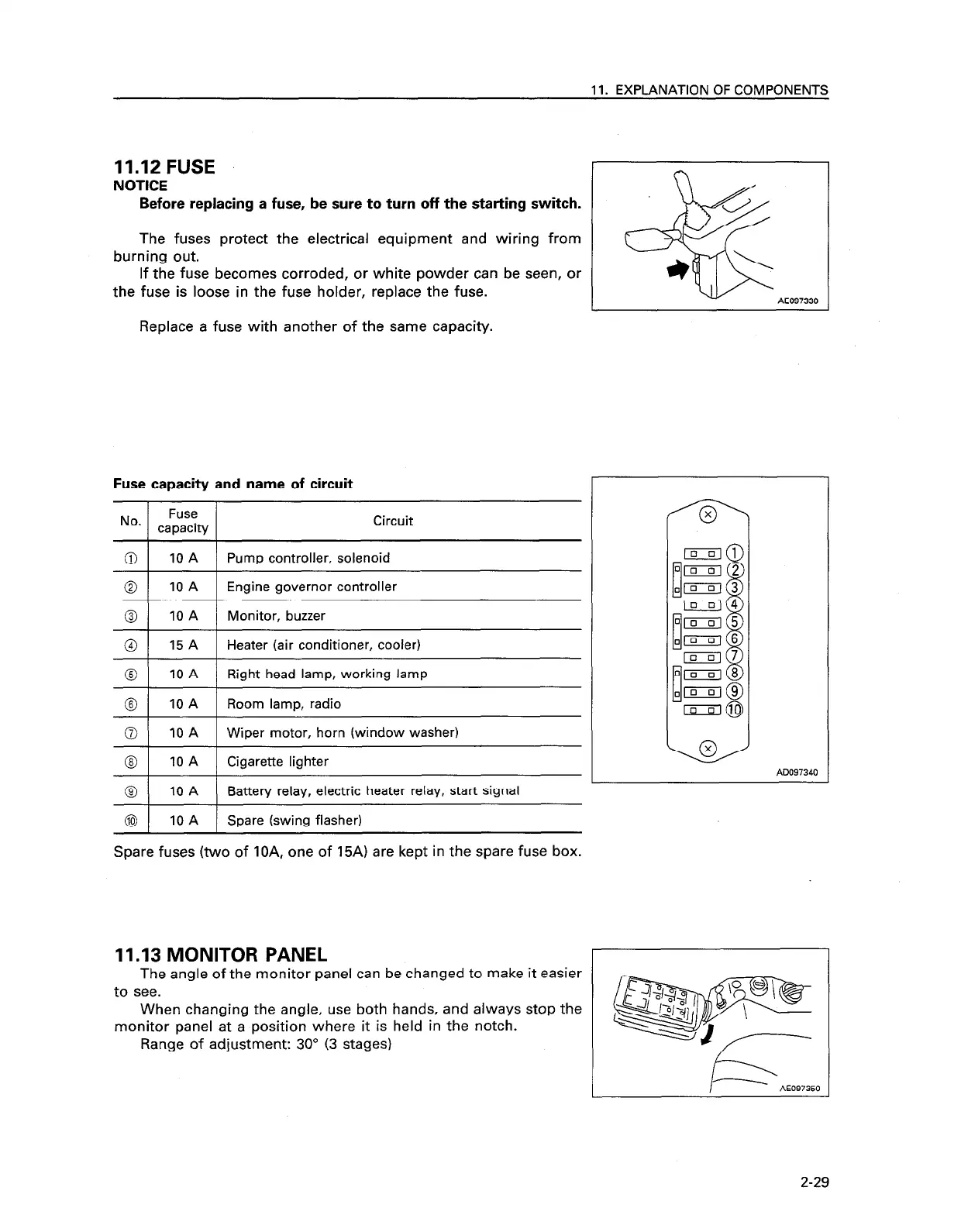
The fuses protect the electrical equipment and wiring from
burning out.
If the fuse becomes corroded, or white powder can be seen, or
the fuse is loose in the fuse holder, replace the fuse.
Replace a fuse with another of the same capacity.
Fuse capacity and name of circuit
Circuit
a
10 A
Pump controller, solenoid
0
10 A
Engine governor controller
@I
10 A Monitor, buzzer
@ 1 15 A 1 Heater (air conditioner, cooler)
0
10 A
Right head lamp, working lamp
@
10 A
Room lamp, radio
0
10 A
Wiper motor, horn (window washer)
@I
10 A
Cigarette lighter
@ 1 10 A 1 Battery relay, electric heater relay, start signal
@
10 A
Spare (swing flasher)
Spare fuses (two of IOA, one of 15A) are kept in the spare fuse box.
11.13 MONITOR PANEL
AE097330
AD097340
The angle of the monitor panel can be changed to make it easier
to see.
When changing the angle, use both hands, and always stop the
monitor panel at a position where it is held in the notch.
Range of adjustment: 30” (3 stages)
P
AE097350
2-29










 To Next Page