General description
Control box
Quantron S
13
Display
The screen displays information relative to the current
machine status, with the possibility to select of modify
the values.
The main information relative to the machine's use are
displayed during work.
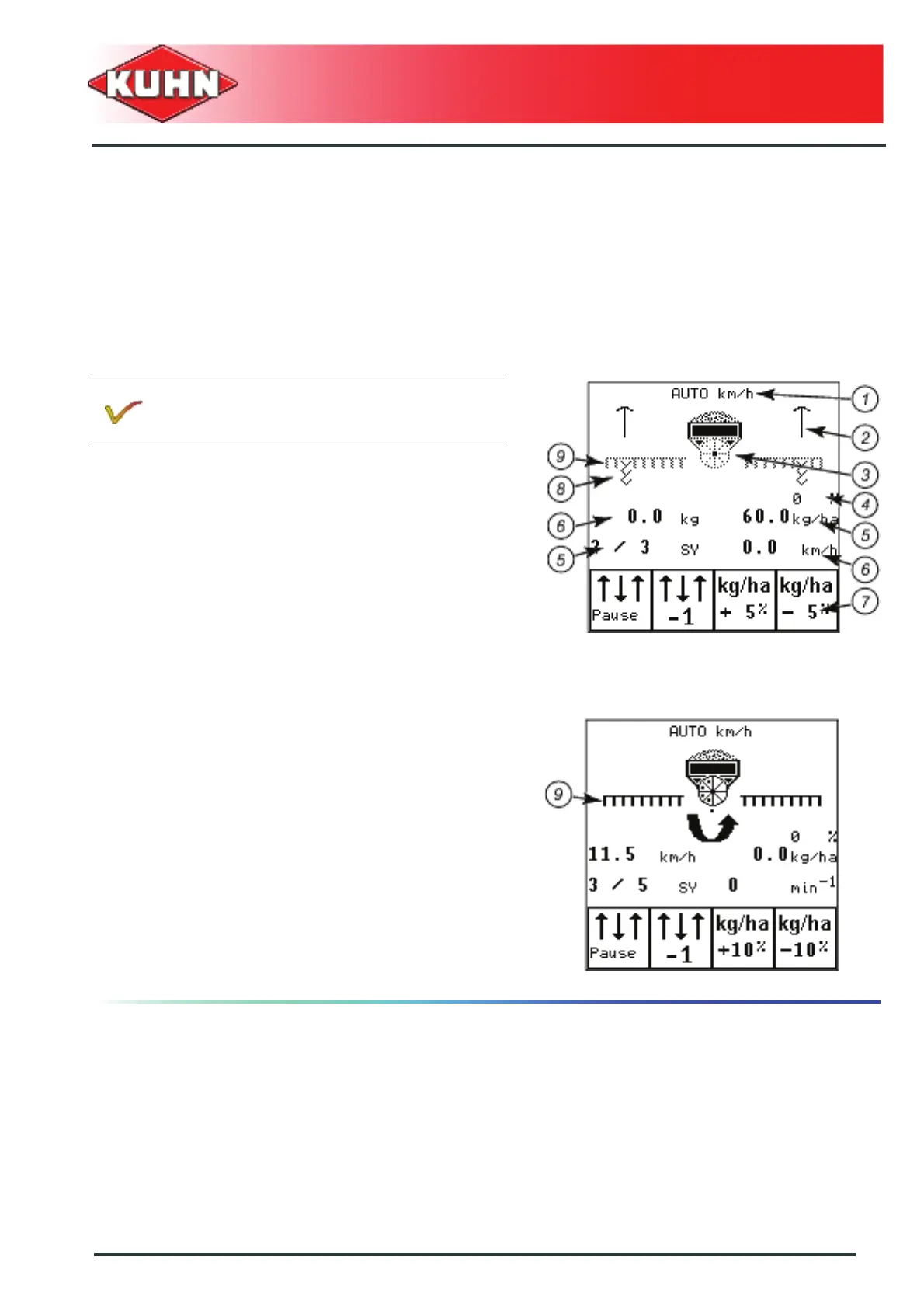
Description of screen zones
Meaning of symbols:
- Mode selection (1): Definition of the work mode used.
• AUTO km/h uses the speed signal of the radar or
the wheel impulse sensor.
• Man Km/h: Using the manual mode
The manual working mode can be used for ex. if the
speed sensor is faulty.
- Markers (2)
- Metering unit and hopper (3)
- Application rate adjustment (4)
- Screen areas that can be parameterized at will (6)
- The 2 other zones (5) always display the tramlining
rhythm and the seed application rate.
- Function area (7): the symbols displayed depend on
the machine configuration
• Access to these functions by selecting the function
placed below
- The tramlining (8): The paths for tramlining are being
made.
- Coulter bar (9):
• The work screen shows the coulter bar in a dotted
line. This symbol indicates that the coulter bar is
lowered but not sowing.
• The work screen shows the coulter bar in bold. The
coulter bar is in working position and sowing.
• The coulter bar does not appear on the screen. The
coulter bar is raised.
The precise definition of the work screen
varies according to the currently set
adjustments.


 To Next Page