Machine use
Control box
Quantron S
31
4. Stationary calibration test
Select type of seed
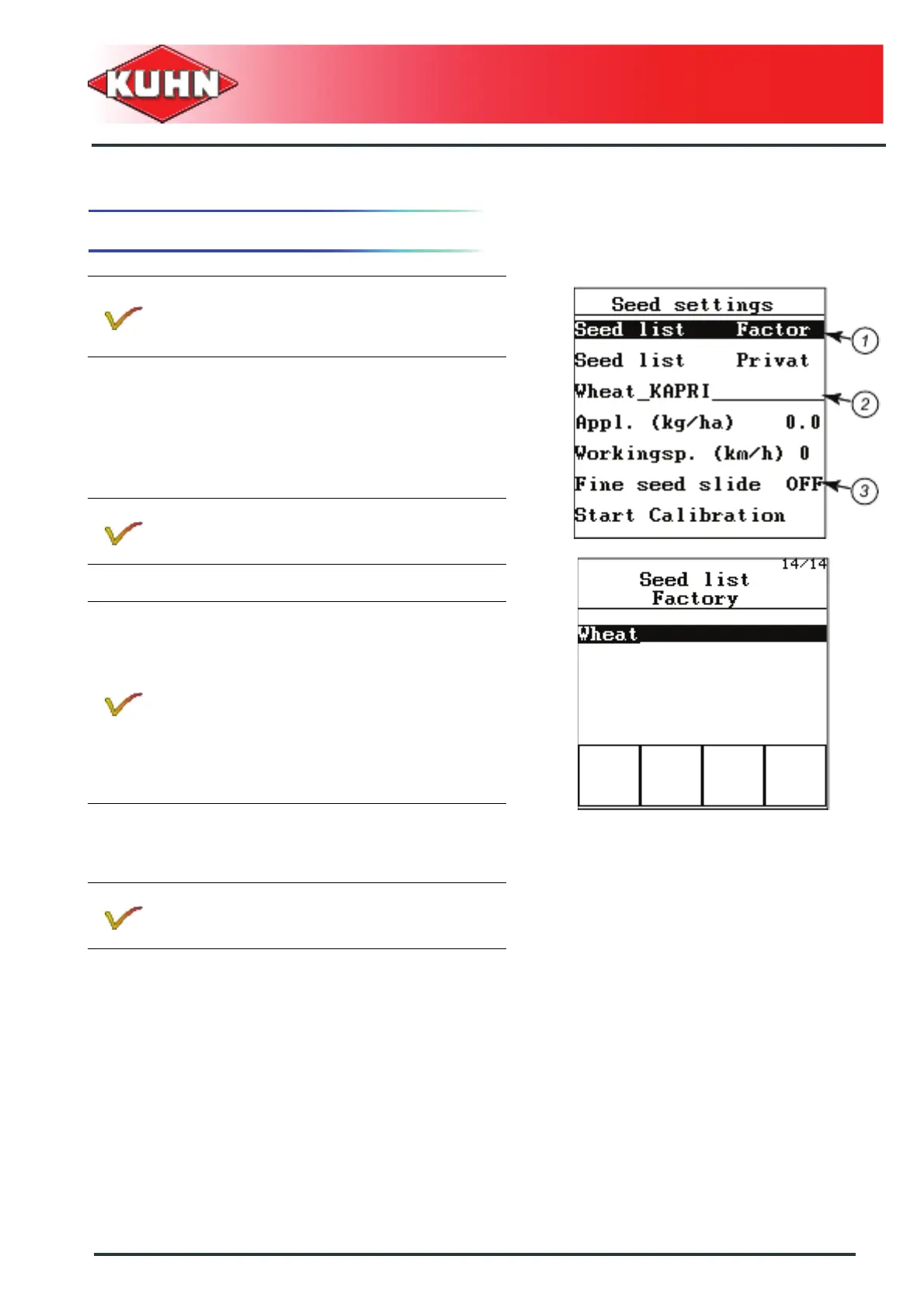
- As from the "main menu", select the "seed settings"
submenu.
- Select "Seed list Factory " sub-menu (1).
- Press Enter key.
- Select the required seed variety.
- Press Enter key.
The selected seed will be saved in the "PRIVATE" list.
The screen displays the previous menu.
- For small seeds, the "small seed" slide must be
positioned by hand in the metering unit (3).
Values relative to this seed variety are stored in the
"PRIVATE" list.
Before loading the seeds and carrying out the
flow test, set the metering unit in the position
adapted to the seed variety (small or large
seeds).
A list comprising 14 seeds is stored in
alphabetical order.
If the required seed is not included in the Factory
list, select a seed with similar specifications
(Seed weight, Volume).
For small and large seed mix (ex. oat and grass
mix) to seed at low application rate,
we recommend to use the Grass seed < 25kg in
the Factory list.
For maize, select a variety with a high Thousand
Grain Weight. Required application rate:
minimum 22 kg/ha.
The control box indicates the required metering
unit outlet or small seed slide position.


 To Next Page