Control box
56
Quantron S
Service: Machine configuration
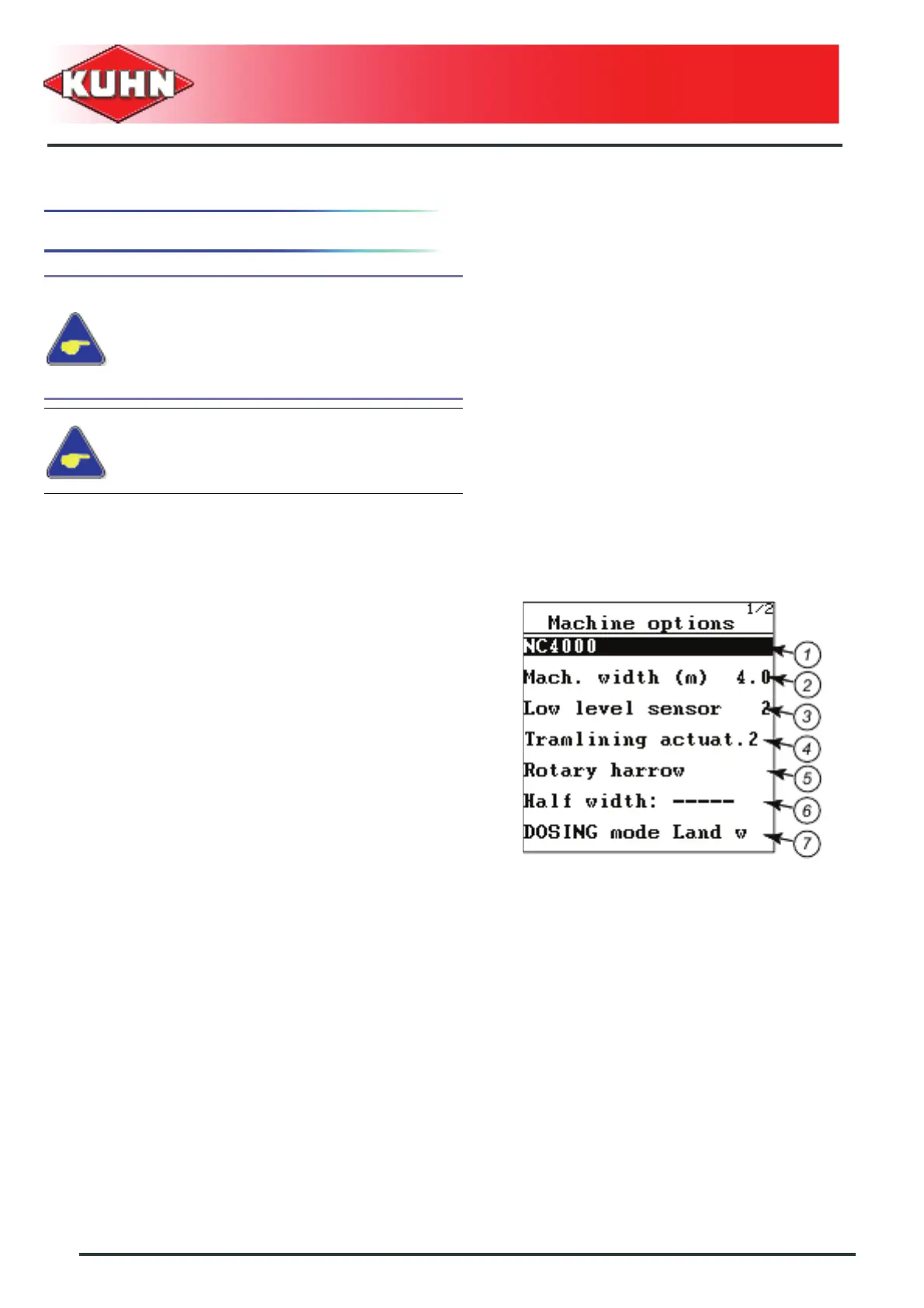
2. Machine options
(1) Identification area: Check machine name.
- Press Enter key.
- Enter new designation.
(2): Width of seed drill (m)
- Press Enter key.
- Enter machine width.
(3): Number of low level sensors mounted
- Press Enter key.
- Enter number of sensors.
(4): One or two tramlining motors are mounted
• Press Enter button to select one of the 2 possible
values.
(5): Power harrow sensor
• A check mark at the end of the line indicates that this
option is mounted.
(6): Not used
(7): Metering unit drive:
- Press successively key Enter to select the functioning
mode.
• Electrical drive
• Hydraulic drive
• Mecanical drive through a skeleton wheel
Check the equipments mounted on the drill,
before changing values in the menu
"Machine options".
Wrong entries may influence the working
quality and even provoke damage the
machine.
Contact your authorised Kuhn dealer to get
the password.


 To Next Page