Control box
38
Quantron S
Machine use
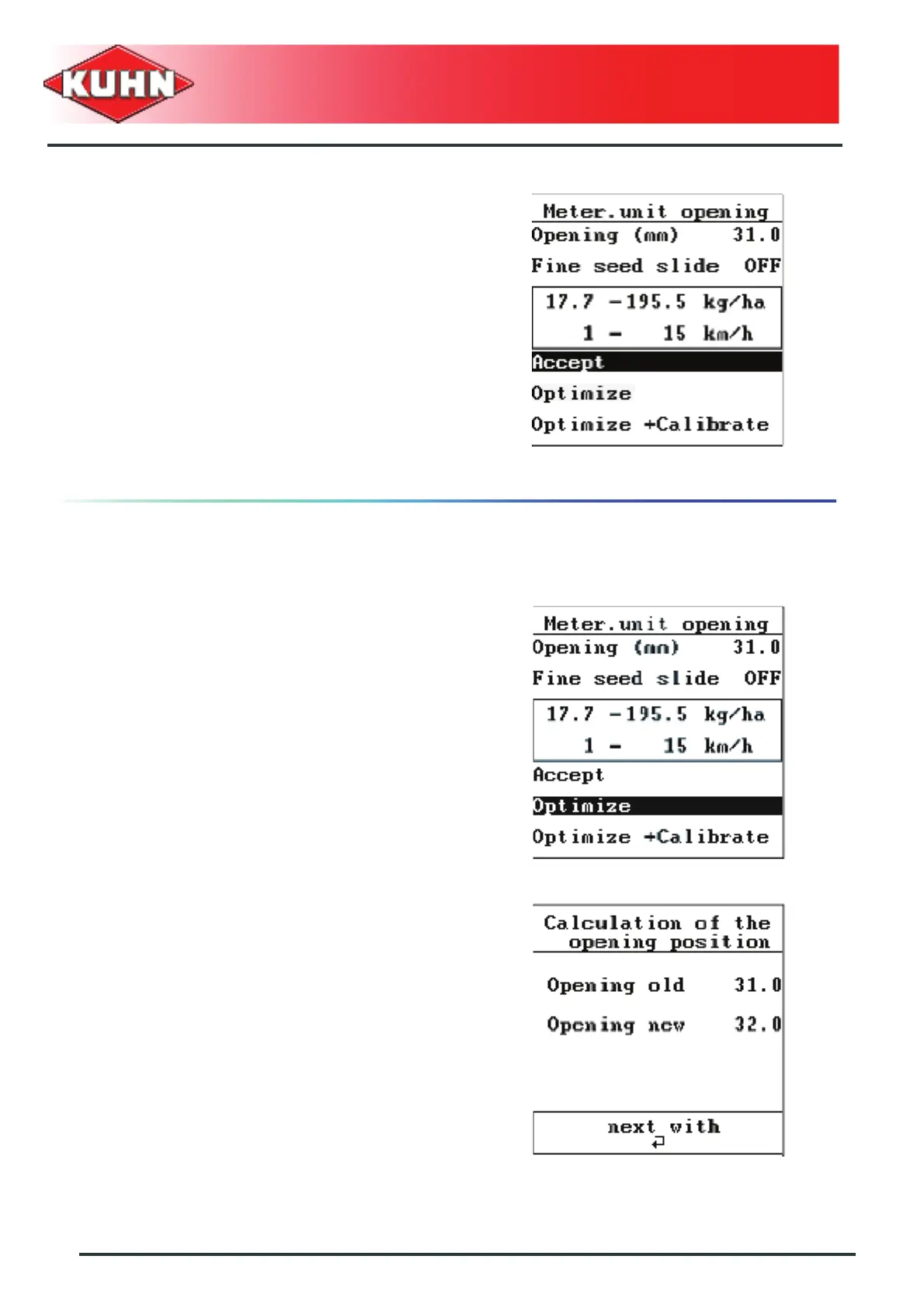
The screen displays:
• Metering unit "opening position"
• Required small seed slide position
• Minimum and maximum application rate values
• Minimum and maximum travel speed values
Accept
- If the possible working zones (outlined values) are
convenient, confirm by selecting "Accept".
- Press Enter key.
The regulation adapts the application rate or speed
modification by means of the drive speed. The new
opening is identical to the former one.
Optimizing the working zone
If the working zones (outlined values) must be optimized,
there are two possibilities.
Optimize
- Select "Optimize".
- Press Enter key:
• The control box calculates the new opening
required and displays it on the screen.
• According to the application rate or travel speed
modification, the control box will suggest a new
optimized working zone.
- Adapt metering unit opening according to the value
displayed on the screen (See corresponding manual).
- Press Enter key.


 To Next Page