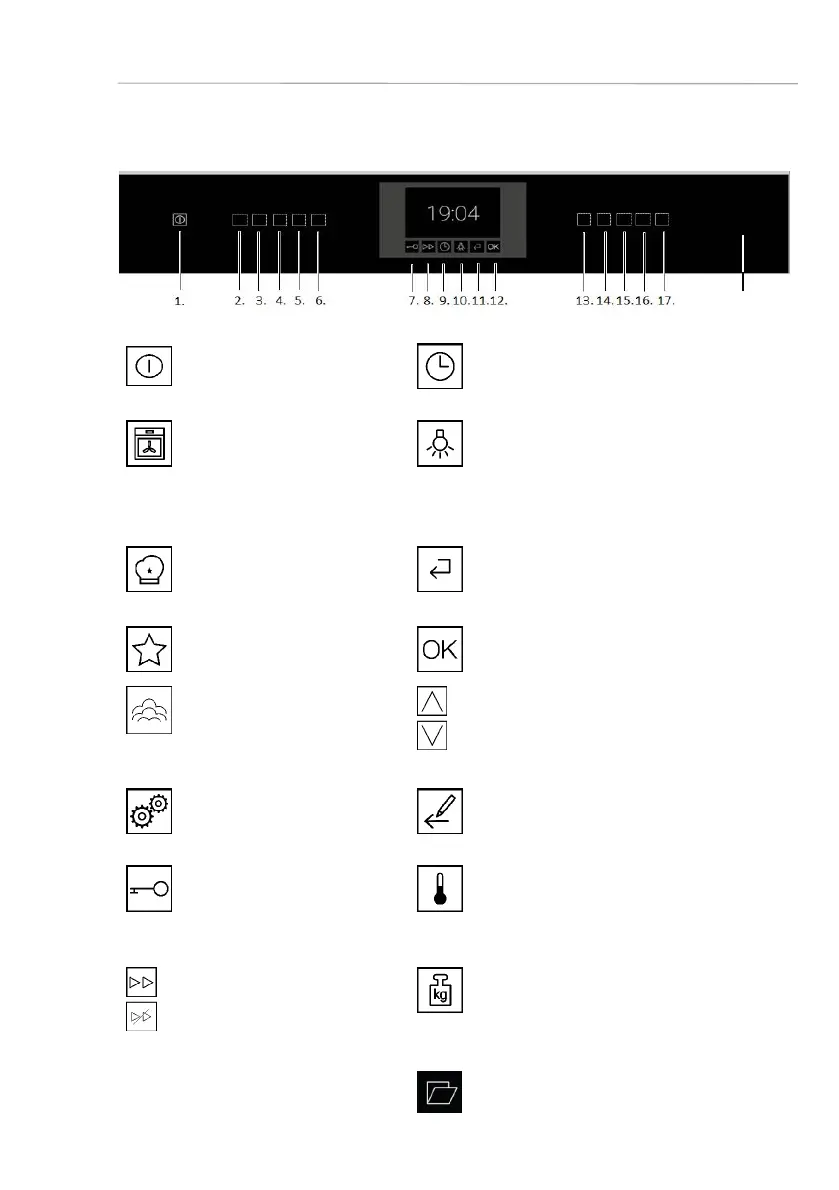
Overview of your oven
User's guide
29
7.1. Control panel - sensor keys and displays
1
ON/OFF
You can switch off an on your
appliance.
9
Time settings / Timer
With this sensor you have access to the
menu Time setting.
2
Functions
With this sensor you can se-
lect the cooking functions.
10
Light
To activate permanent lightning, press
this sensor for 3 seconds until an
acoustic signal sounds. Press this
sensor again to switch off the lightning.
3
Programmes
Select the automatic
programmes.
11
back
With this sensor you turn to the in a pre-
vious step.
4
Favorits
Open a saved programme
12
OK for selection/confi rmation
Confi rm your selection or start a process.
5
Steam cooking
Call the steam cooking func-
tions or switch on the steam
boost function for a process.
13
14
up - down
With these sensors you can scroll up and
down in a menu.
6
Settings
With this sensor you have access
to the setting menu.
15
Time setting of cooking functions
Setting the cooking time or end of
cooking time
7
Childproof lock
With this sensor you can acti-
vate or deactivate the rapid
heating function.
16
Temperature
With this sensor you can change the
temperature which has been set.
8
Rapid heating
With this sensor you can
activate or deactivate the
rapid heating function.
17
Weight
With this sensor you can change the
weight settings.
18
Panel opening
With this sensor you open the panel.
18









 To Next Page