Camera and Video 131
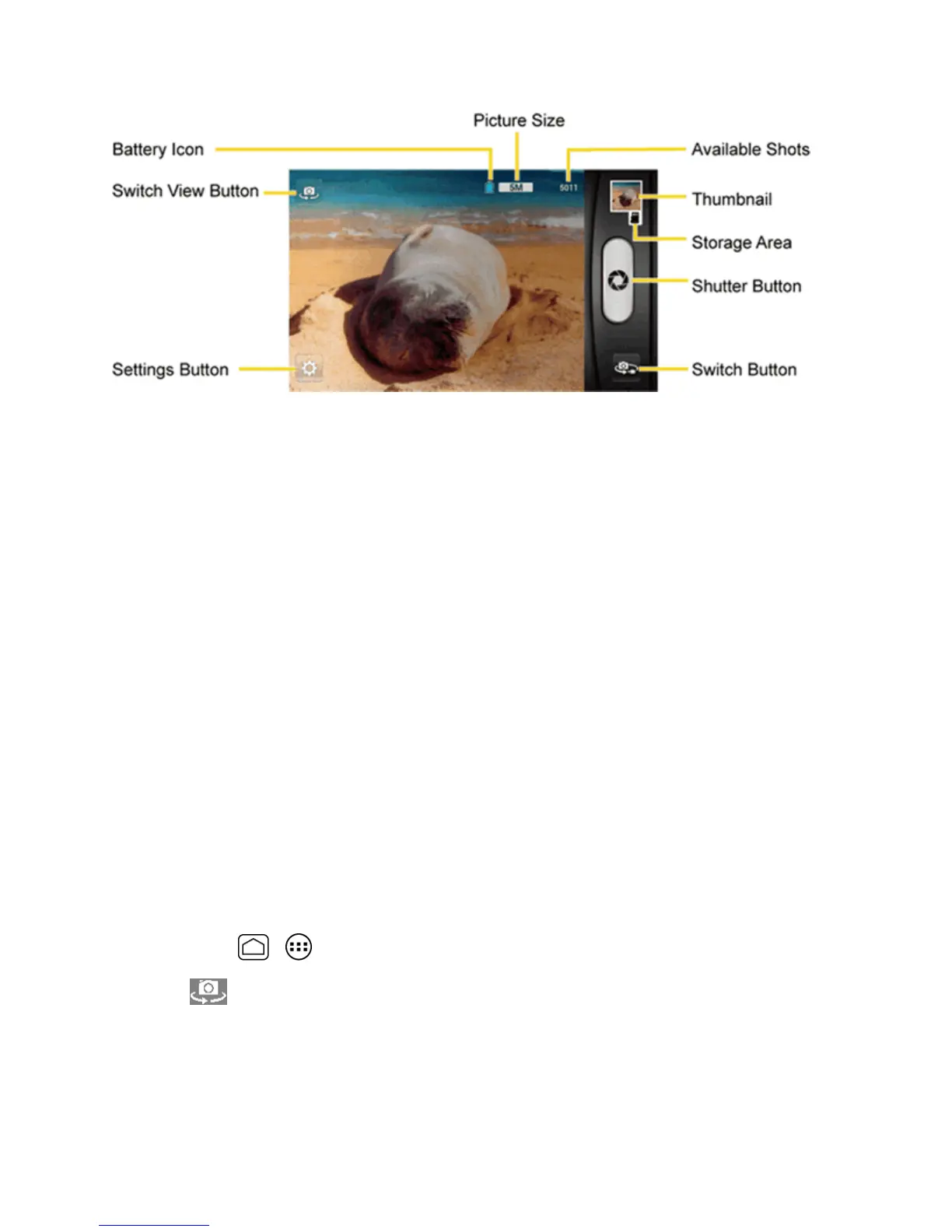
n Switch View Button:Switchesbetweenthebackcameralensandthefront-facingcamera
lens(forself-portraits,forexample).
n Settings Button:Opensthecamerasettingsmenuandletsyouchangethecamerasettings.
Formoreinformation,seeCameraSettings.
n Battery Icon:Displayshowfullthebatteryis.
n Picture Size:Displaysthecurrentpicturesize.
n Available Shots:Displaysremainingshotswiththecurrentsettings.
n Thumbnail:Displaysthethumbnailofthelatestimage.Touchtoviewandmanage.
n Storage Area:Displayswherethepicturesyoutakewillbesaved.
n Shutter Button:Takesapicture.
n Switch Button:Switchesbetweenthecameramodeandthevideocameramode.
Take a Picture
Youcantakehigh-resolutionpicturesusingyourphone’sdigitalcamera.
1. Pressandholdthecamerabuttononthelowerrightsideofthephone.
–or–
PressHome > >Camera.
2.
Touch ifyouwanttoselectthefront-facingcamera.
3. Changethesettingsifnecessary.SeeCameraSettings.
4. Beforetakingthepicture,youcanzoominonyoursubject.











 To Next Page