Get Started 4
Insert a SIM Card
YourphonecomeswithapreinstalledSIM(SubscriberIdentityModule)card.
Note:YourSIMcardshouldbepreinstalled.IfyouneedtoreinstallyourSIMcard,followthe
instructionsbelow.
Note:TheSIMincludedcontainsinformationspecifictoyourphoneandshouldberetainedwiththe
phone.
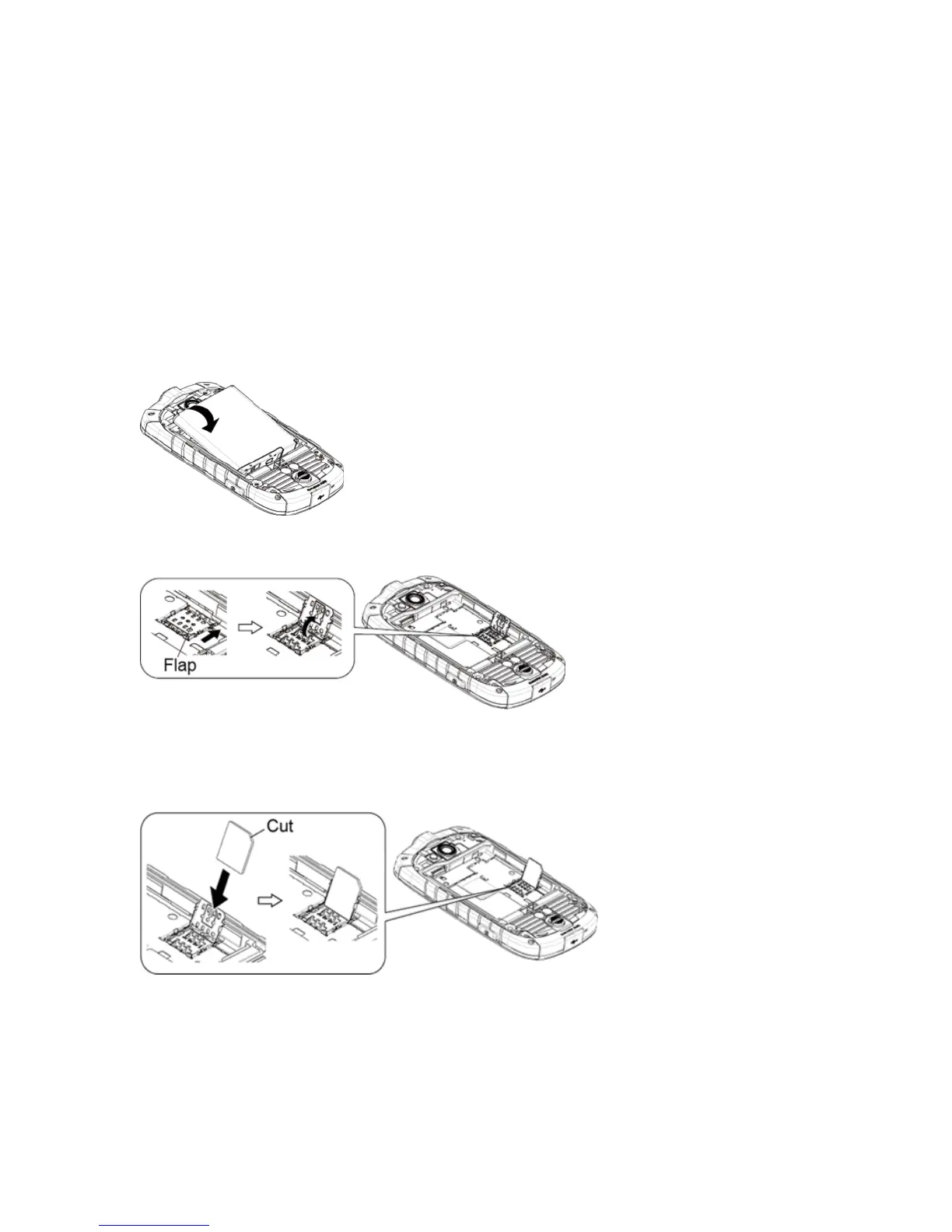
1. Removethebatterycover.SeeInsertandChargetheBattery.
2. Liftthebatteryandremoveit.
3. SlidetheflapoftheSIMcardholderinthedirectionofthearrowtounlockitandlifttheflap.
4. HoldtheSIMcardsothatthemetalcontactsontheSIMcardfacedownandthecutoffcorner
pointstothebottom-leftcornerofyourphone.InserttheSIMcardintotheflapoftheSIMcard
holder.











 To Next Page