Camera and Video 140
l
toaddadditionaleffect.
l
toundotheaction.
l
toredotheaction.
5. Whenfinished,touchSAVE.
Rotate and Save a Picture
1.
PressHome > >Gallery.
2. Touchanalbum.
3. Touchthepictureyouwanttorotate.
4.
PressMenu >Rotate leftorRotate right.
Crop a Picture
1.
PressHome > >Gallery.
2. Touchanalbum.
3. Touchthepictureyouwanttocrop.
4.
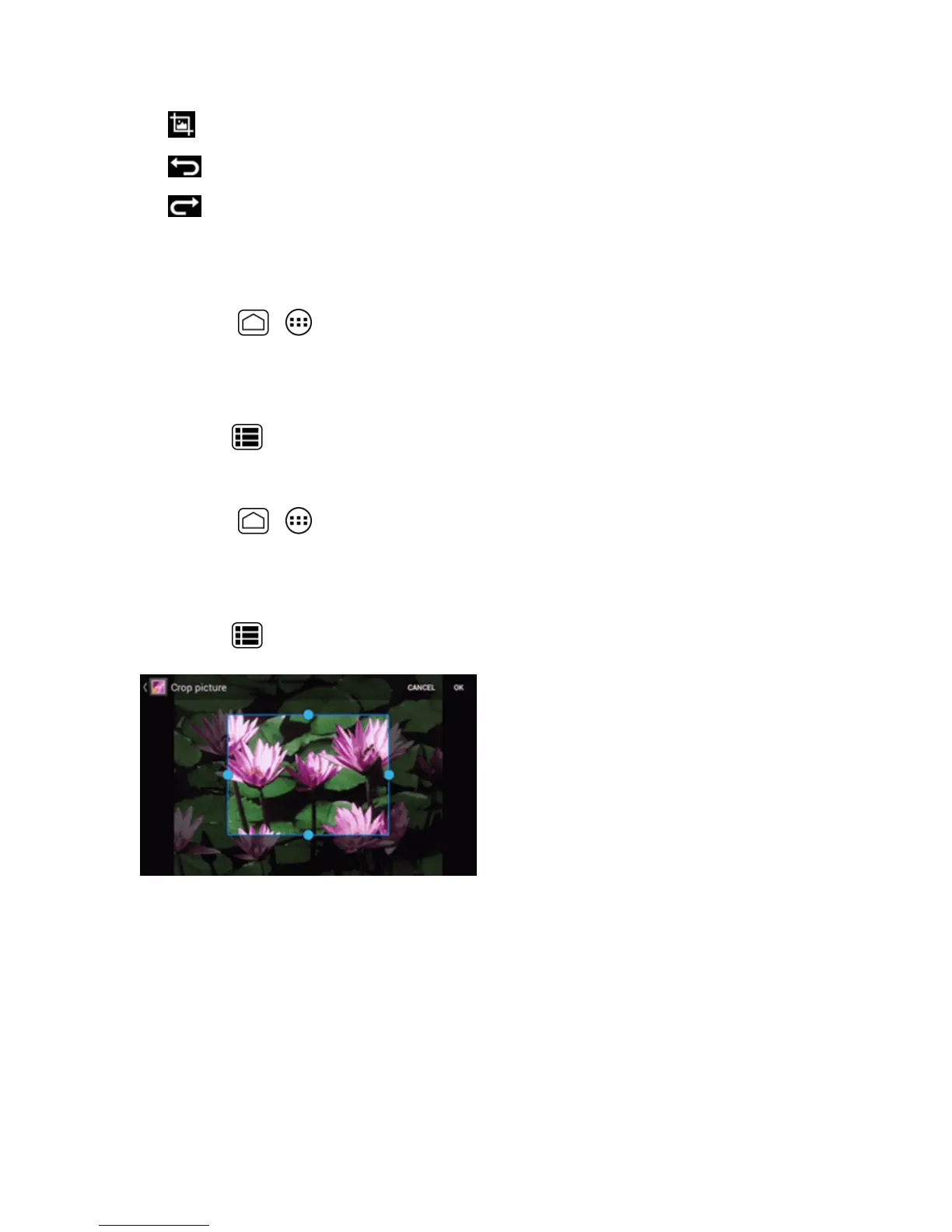
PressMenu >Crop.Acropboxappearsonthepicture.
5. Toadjustthecropboxsize,touchandholdtheedgeofthebox.Whendirectionalarrowsappear,
dragyourfingerinwardtooroutwardtoresizethecropbox.
6. Tomovethecropboxtothepartofthepicturethatyouwanttocrop,dragthecropboxtothe
desiredsizeandposition.
7. TouchOKtoapplythechangestothepicture.
Thecroppedpictureissavedinthealbumasacopy.Theoriginalpictureremainsunedited.











 To Next Page