Phone Basics 30
Tocopyandpastethetext:
1. Opentheapplicationorreceivedmessagethatyouwanttocopytextfrom.
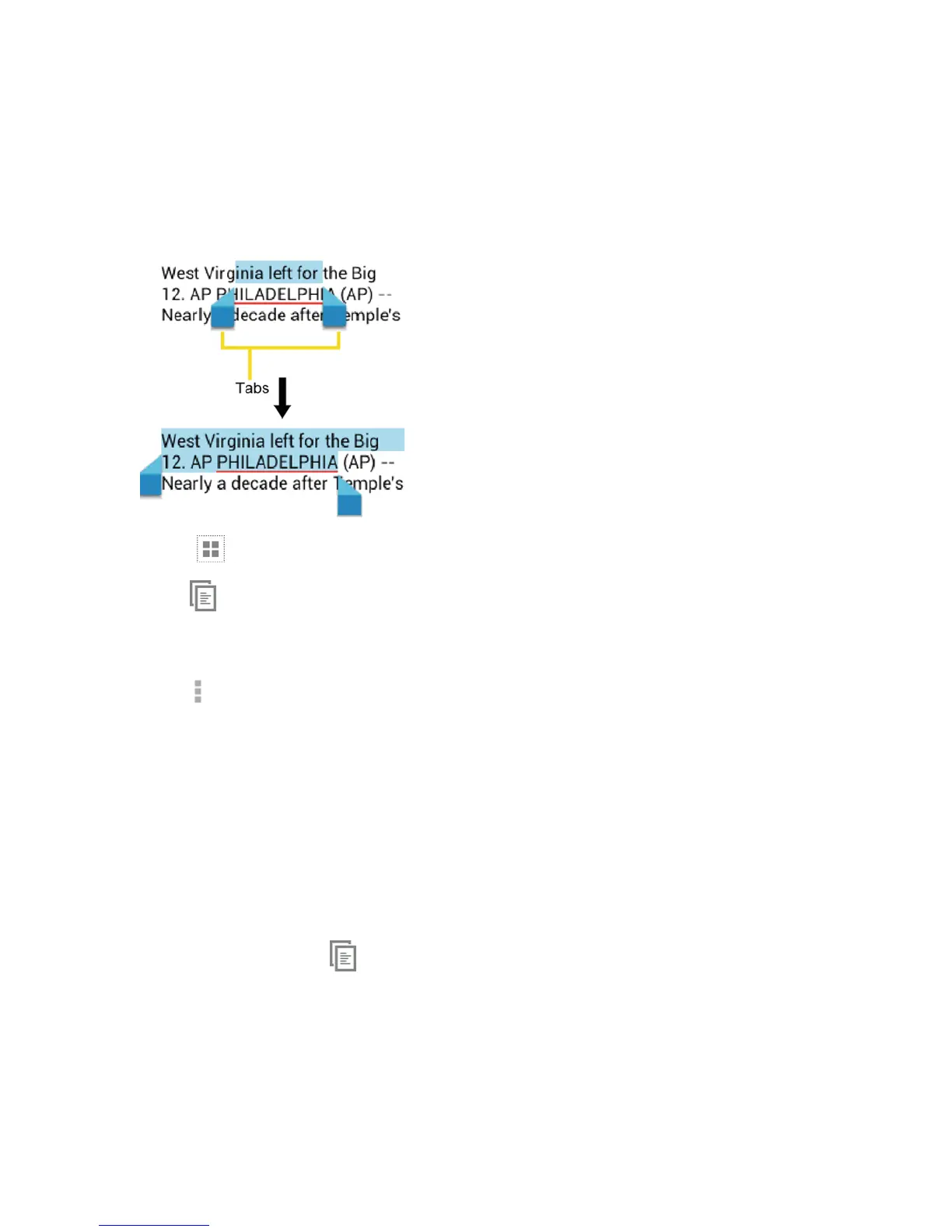
Touchandholdthetextbody.Selectiontabsappearandthecurrentlyselectedwordsor
charactersarehighlighted.Dragthetabstoexpandorreducetherangeoftheselectedtext.
Tip:Touch orSELECT ALLtoselectallthetextonthepage.
2.
Touch .
–or–
Touch >Copy.
3. Opentheapplicationthatyouwanttopastethetextto.
4. Touchandholdthetextboxwhereyouwanttopastethetextto,andtouchPASTE.
l Ifyouwanttoaddtheselectedtexttothecurrenttext,placeacursortothepositionwhere
youwanttoinserttheselectedwordsorcharacters.Touchandholdthetextbox,andtouch
PASTE.
TocopyaURL:
1. TocopyaURL,touchandholdtheURLtodisplaytheoptionsmenu.
2.
TouchCopy link URLor .
3. Opentheapplicationthatyouwanttopasteinto.
4. TouchandholdthetextboxwhereyouwanttopastetheURLto,andtouchPASTE.











 To Next Page