Phone Calls 43
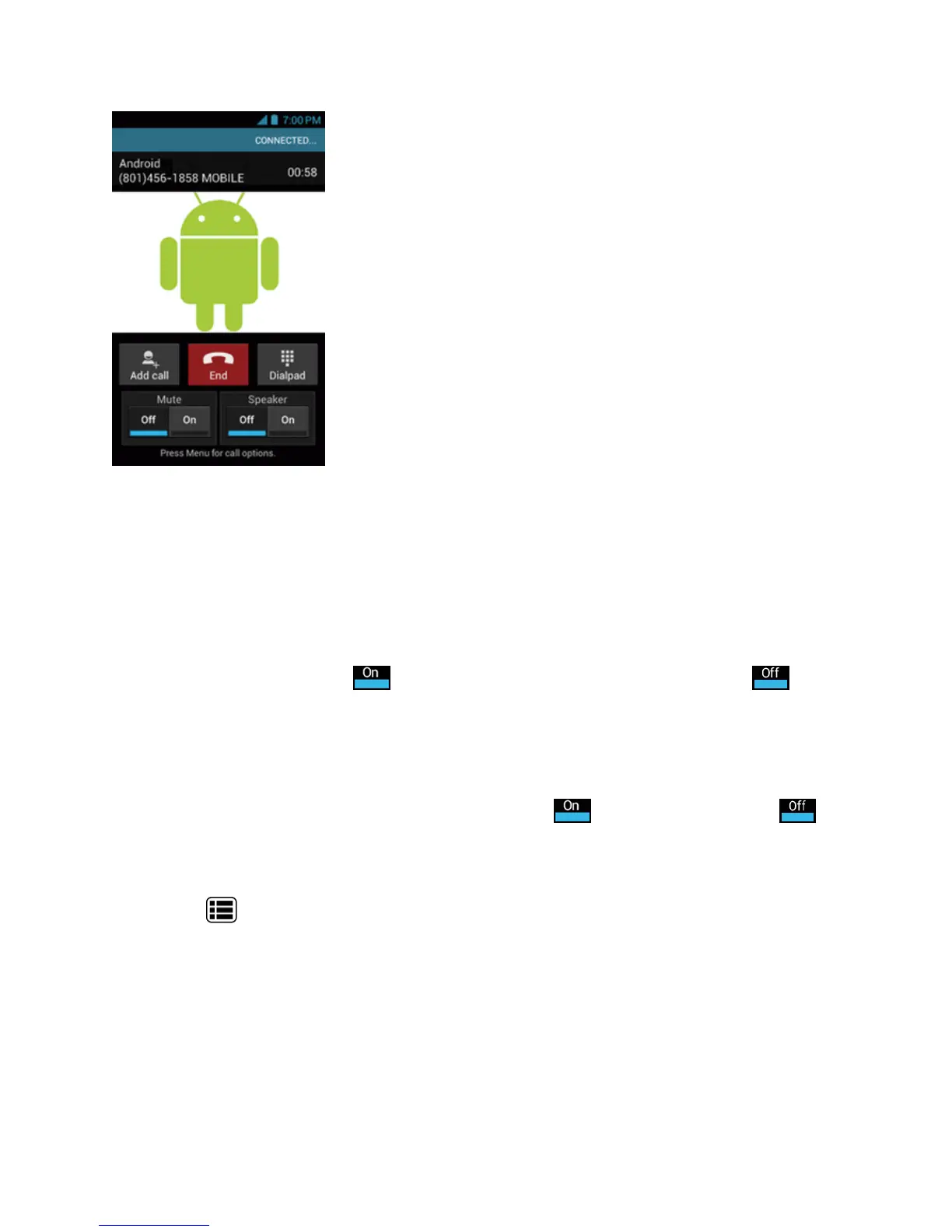
n Add call:Touchtoinitiatea3-waycall.
n End:Endthecurrentcall.
n Dialpad/Hide:Toggletheappearanceoftheonscreendialpadtoenteradditionalnumberssuch
asanextensionoraccesscode.
l Forexample:Whenyoucallyourbank’s800number,useyourdialpadtoenteryouraccount
numberandPIN.
n
Mute:Mutethemicrophone( )duringanactivecall,orunmutethemicrophone( ).
Note:IfMuteisactivated,thespeakermodeisdeactivated.
Note:WhenMuteisactivated,themicrophonewillbeunmutedwhiletheDC Buttonispressedand
held.
n
Speaker:Routethephone’saudiothroughthespeaker( )orthroughtheearpiece( ).
Warning:Becauseofhighervolumelevels,donotplacethephonenearyourearduring
speakerphoneuse.
PressMenu duringacalltodisplayalistofadditionalin-callfeatures.Touchanoptiontoselect
it.
n Contacts:Displayyourcontactslist.
n Bluetooth:Routethephone’saudiothroughaconnectedBluetoothheadsetwhenselected.











 To Next Page