27
ENGLISH
INTRODUCTION SETUP GUIDE
CLINICAL
SIMULATION PC UTILITIES
DETAIL
SPECIFICATIONS
TROUBLE-
SHOOTING
REMOTE
CONTROL
Blood Pressure and Pulse parameters
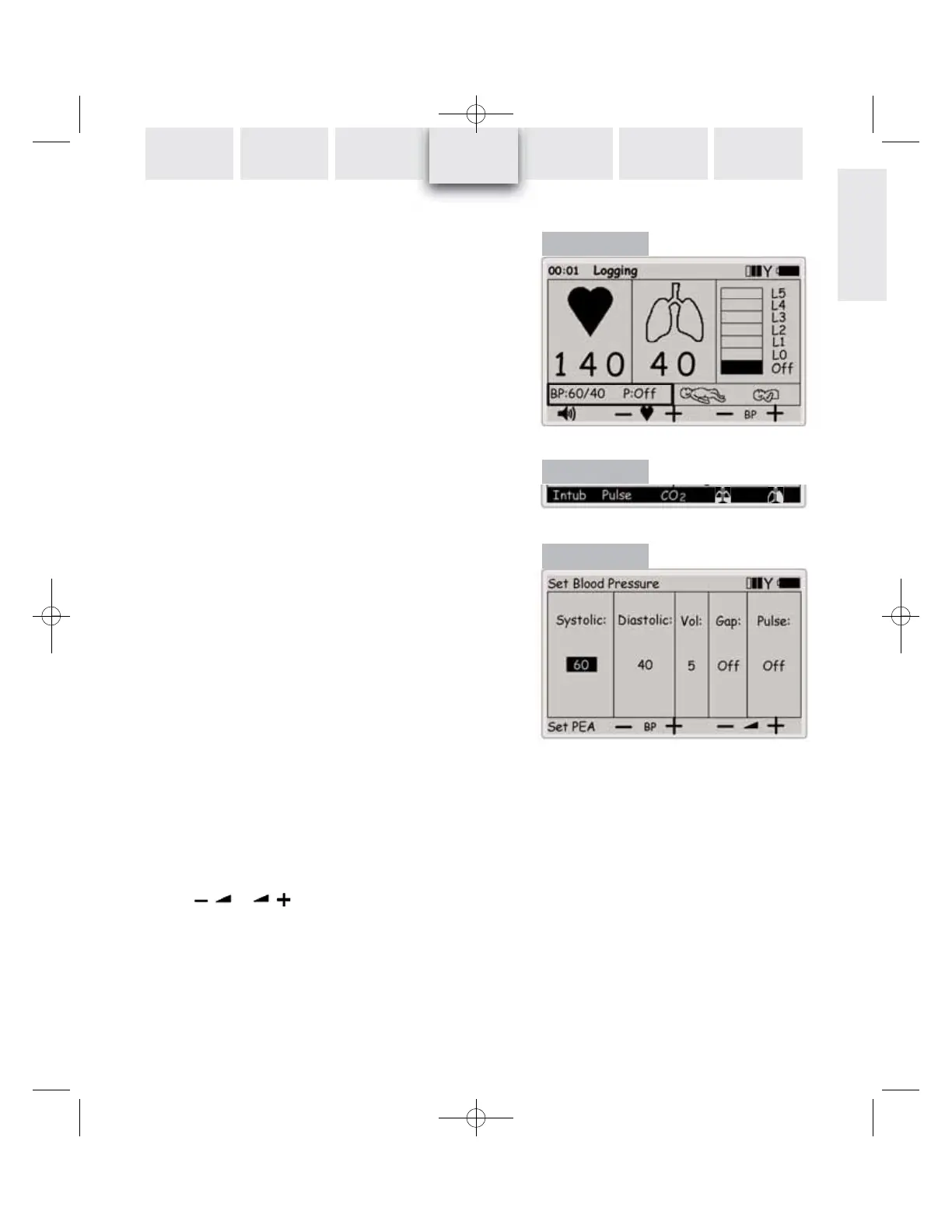
On the main display, use the navigation keys to select the Blood
Pressure (BP) functional area (Figure 13), which shows the cur-
rent BP and the manikin’s pulse status (on / off).
Use the
BP- and BP+ quick execution keys to change both sys-
tolic and diastolic blood pressures in steps of 2, their original
difference being maintained.
Pressing the Shift-key reveals the alternative quick execution
functions (Figure 14). Selecting
Pulse will toggle the manikin’s
pulse function on / off, as indicated in the BP functional area:
P: On or P: Off.
Set Blood Pressure menu
When the BP functional area is selected, press OK to open the
Set Blood Pressure menu (Figure 15). Use the left / right navi-
gation keys to select the parameter you wish to change, then
use the up / down navigation keys or the numeric keys to ad-
just each setting.
Using the
BP- and BP+ quick execution keys
- When
Systolic is selected (as in Figure 15), only systolic will
change, but diastolic will be kept at least 10 mmHg below
systolic.
- When
Diastolic is selected, only diastolic will change, but sys-
tolic will be kept at least 10 mmHg above diastolic.
- When
Vol, Gap or Pulse is selected, both systolic and diastolic
will change, and will maintain the difference, each time the
BP- or BP+ quick execution keys, are used.
Set PEA quick execution key will set BP to 0/0 and breathing
rate to 0.
Reset PEA will set the parameters back to what they
were before Set PEA was selected. Increasing the BP or
breathing rate from a PEA state in the main display will auto-
matically reset PEA.
If the running rhythm is a rhythm with no BP, i.e. VF or Asystole,
BP will automatically be set to 0/0. The BP is not automatically
set back to normal if a perfusing rhythm is chosen.
Use the or quick execution keys to alter volu-
me of Korotkoff sounds directly.
Auscultatory
Gap (Korotkoff sound disappears in part
of Phase II) can be toggled on / off using the up / down naviga-
tion keys.
Press OK to activate selections.
Figure 13
Figure 14
Figure 15














 To Next Page