HVM200 Reference Manual Connecting the HVM200 to a Mobile Device 2-6
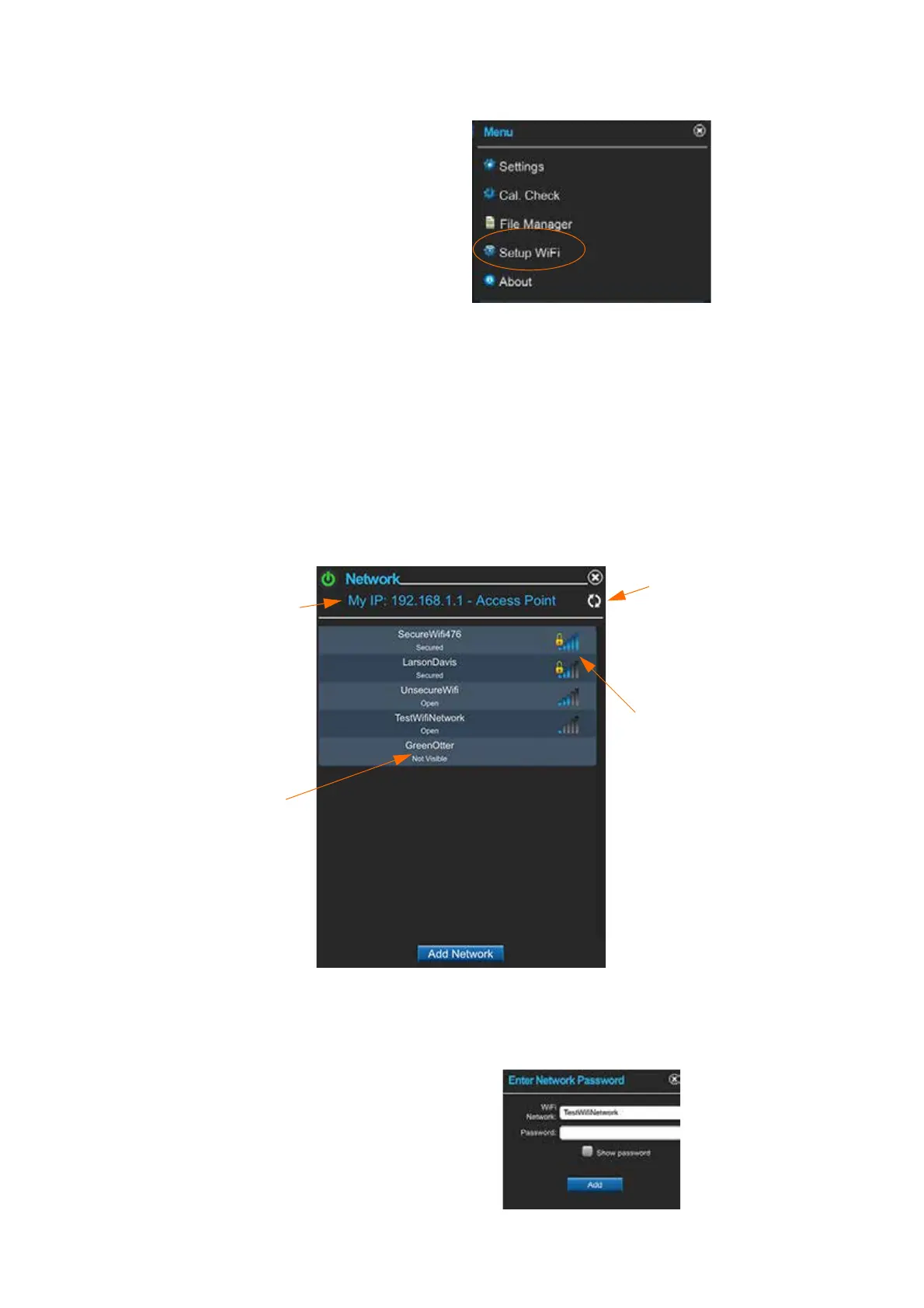
FIGURE 2-9 WiFi Setup
LEARN MORE Networks are listed
in the order of greatest signal
strength.
Step 3 Select an available network. If no network appears on the
list, click the refresh button. To connect to a hidden network,
click Add Network and provide network name.
TAKE NOTE If you have already
entered a password and saved a net-
work, the HVM200 automatically
connects to the network with the
greatest signal strength.
FIGURE 2-10 Network Settings.
TAKE NOTE The HVM200 supports
WPA and WPA2 WiFi security. Lar-
son Davis recommends using secure
WiFi networks.
Step 4 Enter the network password, if required, and click Add
FIGURE 2-11 Enter Network Password
Signal strength indi-
cator and Secured
network icon
(requires password)
Not visible net-
works are previ-
ously used but not
currently detected.
Refresh
This meter is set as
an Access Point



 To Next Page