HVM200 Reference Manual Downloading Data 3-13
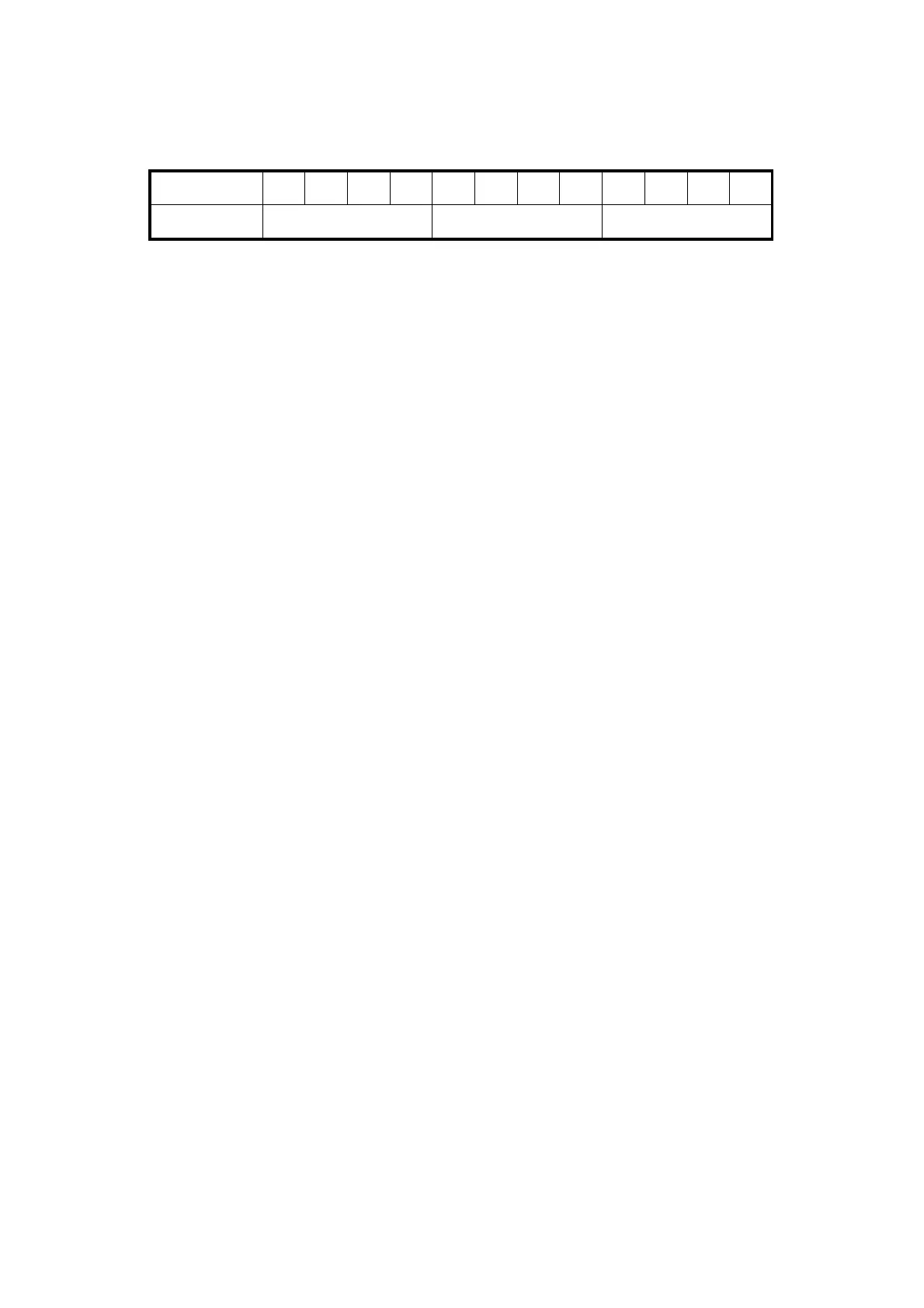
The raw data file is a binary file that contains raw data samples in a float
format for the x, y, and z axes after sensitivity has been applied. Each
sample contains 12 bytes in the following format:
The byte order within each float is little endian.
TAKE NOTE The resulting data will
be in acceleration, which is the stan-
dard method of displaying the data,
and will need to be integrated into
velocity or displacement if needed.
In order to work with a RAW file, you will need MATLAB, GNU Octave,
or similar program. The following script can be used to parse the data.
The file name will need to be adjusted to match the file name of your
RAW file. After parsed, "Weighting Filters for Raw Data" to adjust
weighting filters for hand arm or whole body vibration purposes.
%% Example Matlab / GNU Octave code for parsing HVM200 raw data format
close all; clear all; clc;
%% Number of Samples to read
Sample_Rate = 7161.45833;% Hz (Hard wired sample rate)
Sample_Time = 10; %second
num_samples_to_read = Sample_Rate*Sample_Time;
%% Open file, Read, Close
%% filename = 'HVM_SERIAL_NUMBER_BASENAME_DATESTAMP.00.raw';
filename = 'HVM_0000056_HVMD_151216_180801.00.raw';
rawsavename = 'HVM_0000056';
filteredsavename = 'HVMFilt_0000056';
FID = fopen(filename,'r');
A = fread(FID,[num_samples_to_read*3],'float');
fclose(FID);
%% Build Axis data
axis_counter = 1;
x_axis = zeros(1,floor(num_samples_to_read));
y_axis = zeros(1,floor(num_samples_to_read));
z_axis = zeros(1,floor(num_samples_to_read));
x_axis = A(1:3:end);
y_axis = A(2:3:end);
z_axis = A(3:3:end);
%% Remove DC bias from data (optional)
x_axis = x_axis - mean(x_axis);
y_axis = y_axis - mean(y_axis);
z_axis = z_axis - mean(z_axis);
Byte 01234567891011
Definition X Axis Sample Y Axis Sample Z Axis Sample



 To Next Page