PLMNL0243 REV. A, Effective Date: 03/24/16 29 FiberMINI ™ 2.0 Operation Manual
5.5 Servicing the Focus Lens
The focus lens can be changed
while the head is mounted to the
machine by using the procedure that
follows:
Before opening any part of the head,
clean off the dust and/or process
debris using an exterior cleaning
towel (PLTLS0023) or equivalent.
Always wear powder free gloves or
finger cots when handling optics and
optic holders.
1. Remove the tip retainer assembly
according to Section 5.4.
Your configuration may not have all
of the spacers listed in the steps
below.
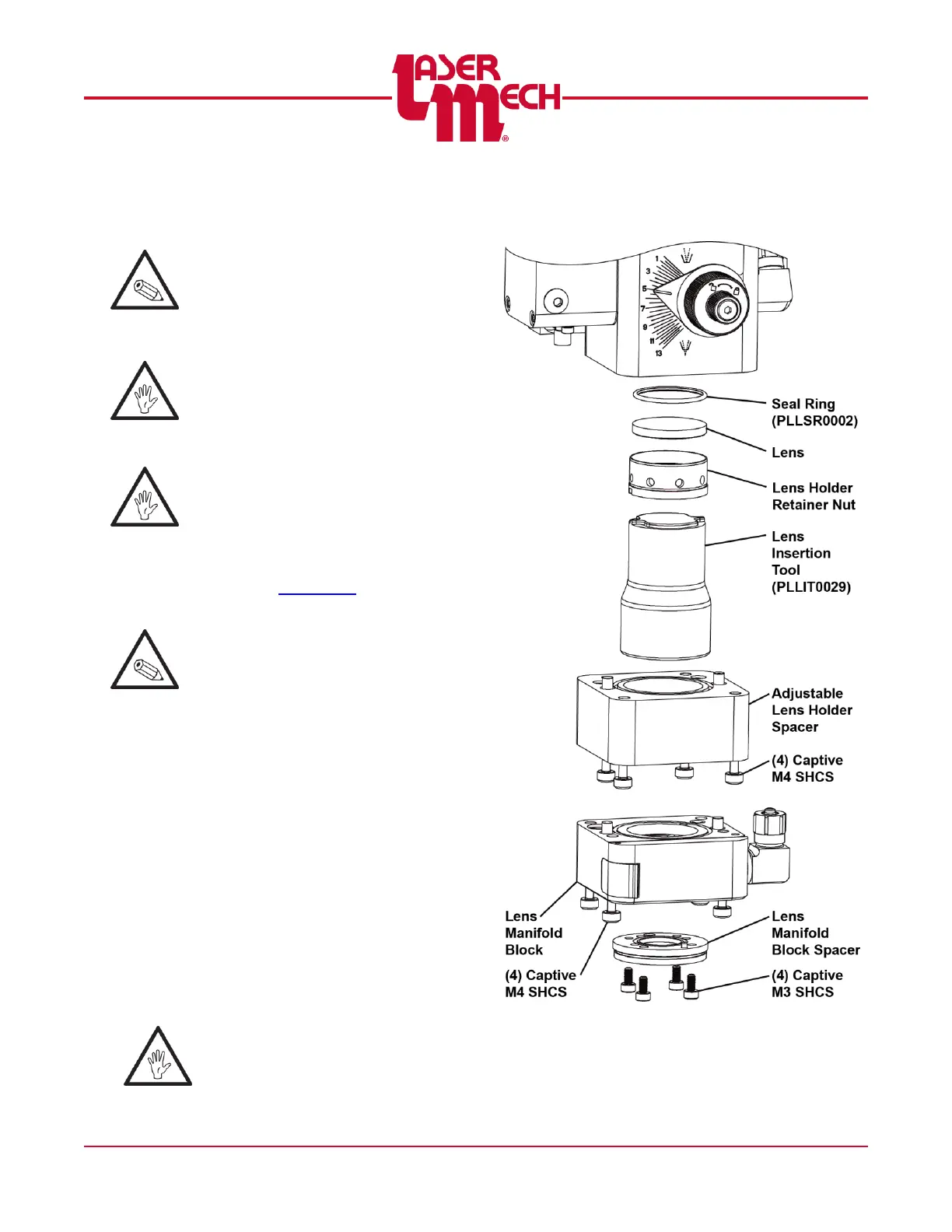
For steps 2 to 5, see Figure 39.
2. Unthread the (4) M3 SHCS in the
lens manifold spacer and remove it, if
necessary.
3. Loosen the (4) captive M4 SHCS in
the lens manifold block and remove
it, if necessary.
4. Loosen the (4) captive M4 SHCS in
the adjustable lens holder spacer and
remove it, if necessary.
5. Use lens insertion tool (PLLIT0029)
to unthread the lens holder retainer
nut.
As the lens holder retainer nut is
removed, be sure to keep it
vertical to prevent the lens from
falling out.
Figure 39



 To Next Page