PLMNL0286 REV. B, Effective Date: 06/06/19 7 FiberMINI
®
with Auto Focus (AF) Operation Manual
8. Rotate the brightness knob and adjust
the camera to full brightness (see
Figure 7).
If it is too bright, rotate the
brightness knob slightly, to suit.
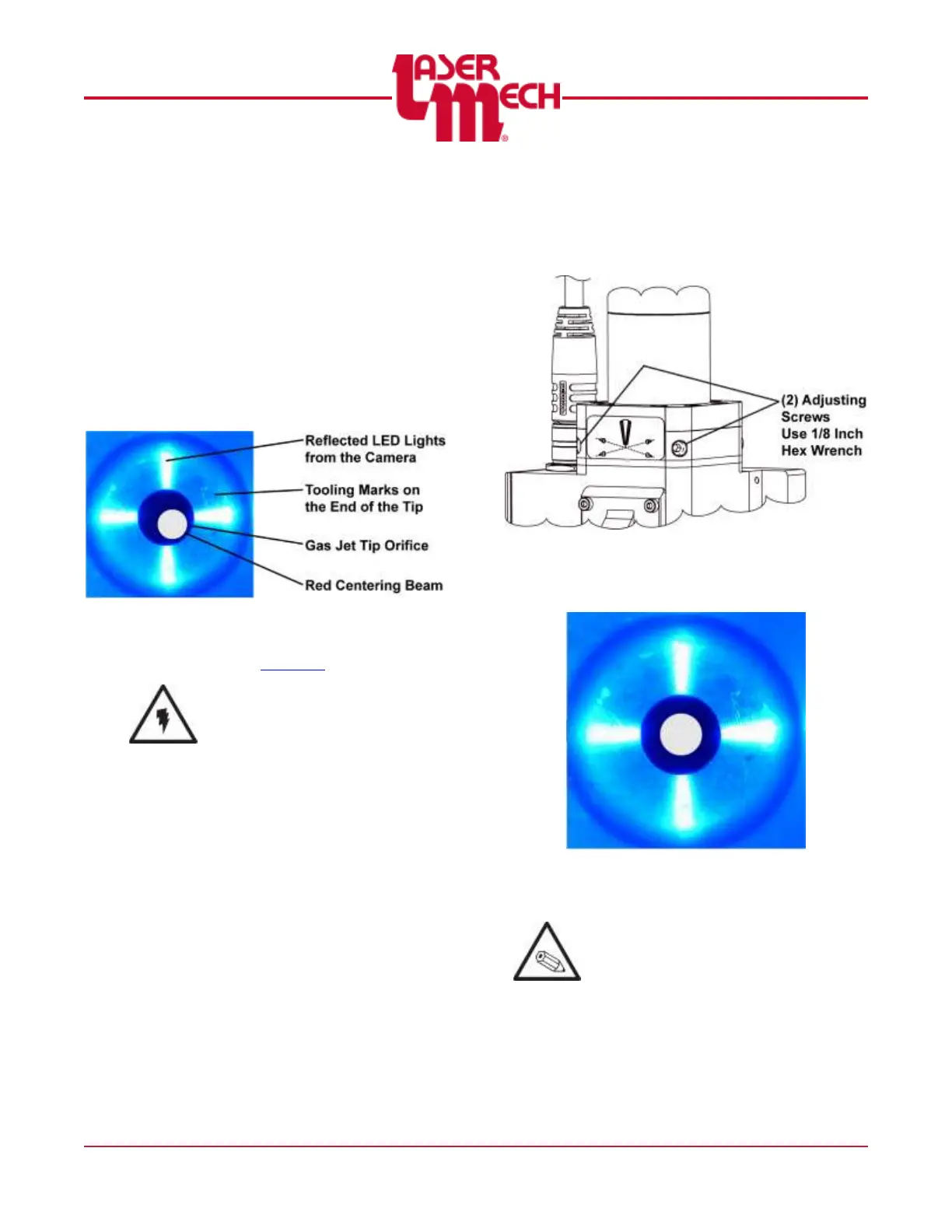
9. Rotate the camera focus knob
(see Figure 7) until the end of the gas
jet tip is in focus with a clear image.
See Figure 8.
You should be able to see tooling
marks on the end of the tip.
Figure 8
10. Move the focus lens to the center of
travel. See Section 4 for more details.
Do not look directly into the red
beam.
If the beam is not centered in the tip
orifice, proceed to step 11.
11. Use a 1/8 inch hex wrench to loosen
or tighten the (2) adjusting screws so
the beam is centered in the tip orifice.
See Figure 9.
Figure 9
The image on the screen should
be similar to Figure 10.
Figure 10
Beam is centered
It is sometimes helpful to rotate the
camera while it is seated against the tip
retainer assembly to confirm the beam
centering.


 To Next Page