LAUNCH
X-431 PRO5 User Manual
30
Combine – This option is mostly used in graph merge status for data comparison. In this case, different items
are marked in different colors.
On-screen Buttons:
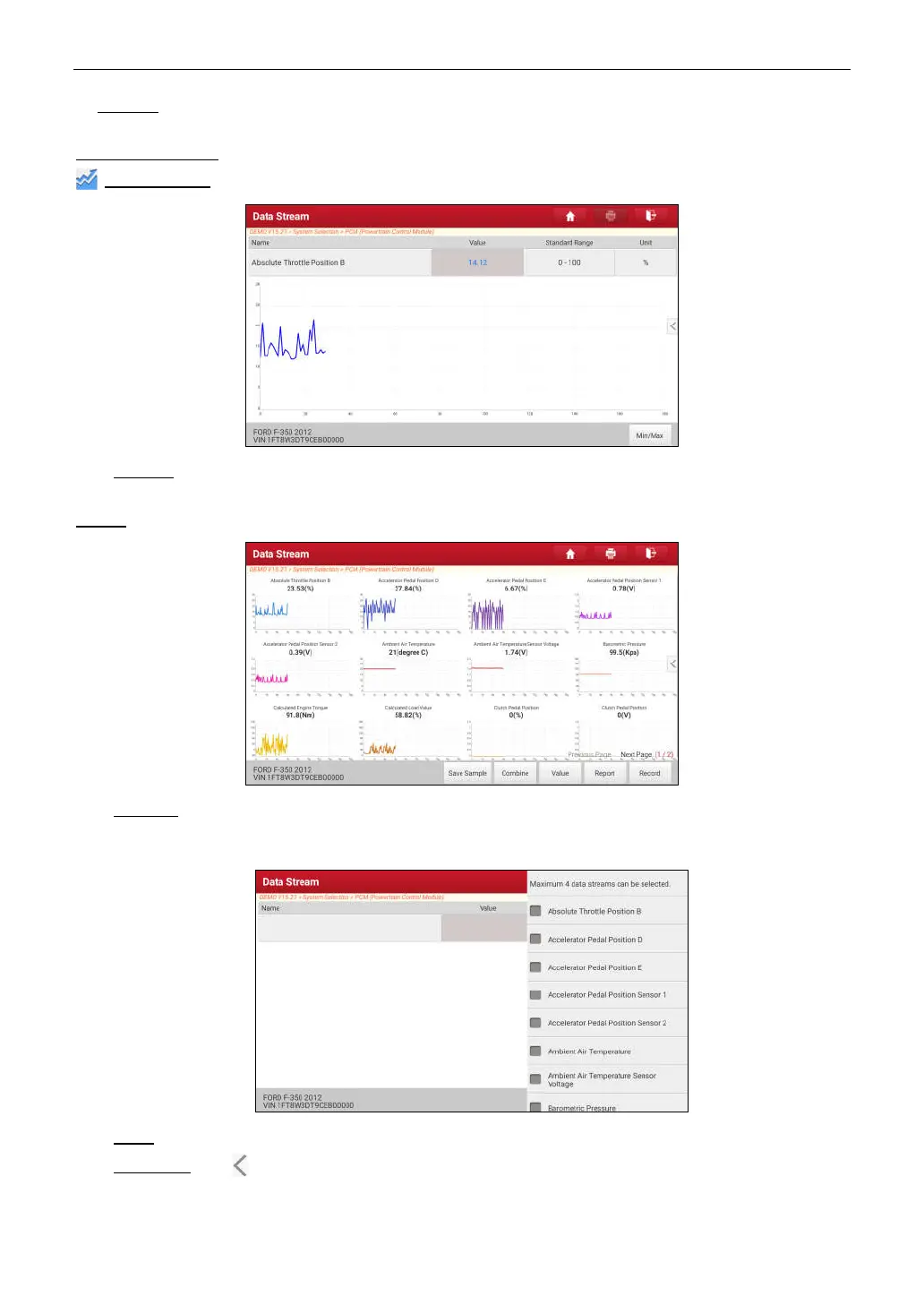
Graph(Single):
Tap to view the parameter in waveform graph.
•
Min/Max
: Tap to define the maximum / minimum value. Once the value goes beyond the specified value, the
system will alarm.
Graph:
Tap to view the parameters in waveform graphs.
•
Combine
: This option is mostly used in graph merge status for data comparison. In this case, different items
are marked in different colors (maximum 4 items can be displayed on the same screen simultaneously). If the
graph is more than one page, swipe the screen from the left to jump to the next page.
•
Value
: Switches the current graph display mode to the Value display mode.
•
Customize
: Tap , a pull-down list of the data stream items appears on the screen. Select / deselect the
desired items, and then screen will display / remove the waveforms corresponding to these items immediately.



 To Next Page