LAUNCH
X-431 PRO5 User Manual
50
1. Turn off the vehicle ignition.
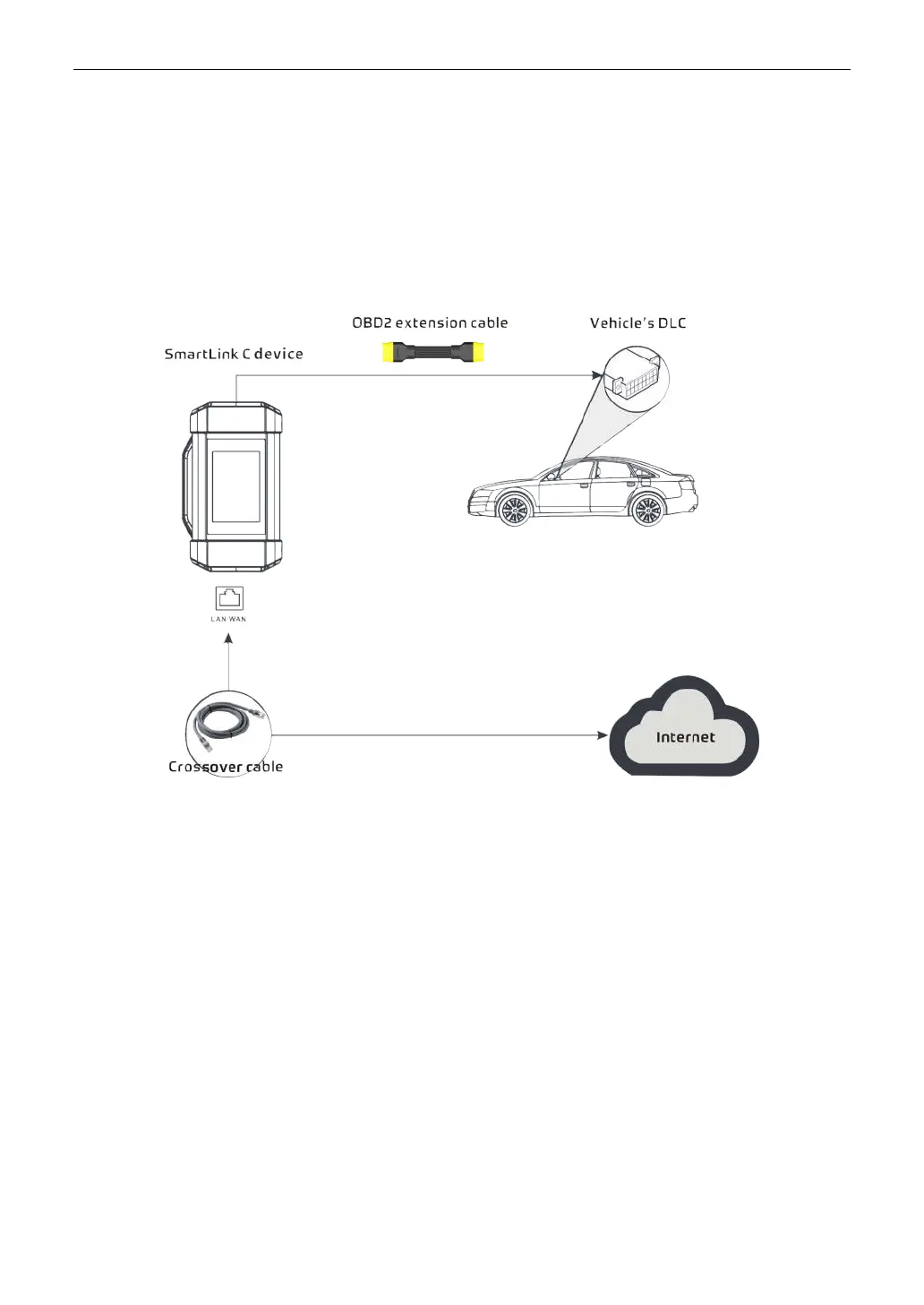
2. Connect one end of the OBD II extension cable into the OBD-16 diagnostic port of the SmartLink C device, and
the other end into the vehicle’s DLC port.
*Remarks: During the SmartLink diagnosis, especially during remote online programming, it is recommended that the
vehicle battery is connected to a charging power source. Doing so can prevent the vehicle from running out of power and
failing to start due to long diagnosis time.
3. Plug one end of CAT-6 crossover cable into the LAN/WLAN port of the SmartLink C device, and the other end
into the LAN port of network modem.
*Note: The network broadband of 100MB and above is required for this operation.
4. After a successful network connection, the SmartLink C screen displays prompt information asking whether to
enter the super remote diagnostic mode. Tap Yes, the system will automatically read the vehicle information and
connect to the remote diagnosis server.
*Note: One SmartLink C can only accept one remote diagnostic operation at one time.
5. Turn on the vehicle ignition.
*Remarks: After receiving the order, the SmartLink B master technician will accept the order and contact you via phone or
E-mail address.
6. After a successful connection between the SmartLink C and SmartLink B is established, the following message
will be displayed on the SmartLink C screen.



 To Next Page