6300 Rev H User’s Manual
125-9106A Page 76
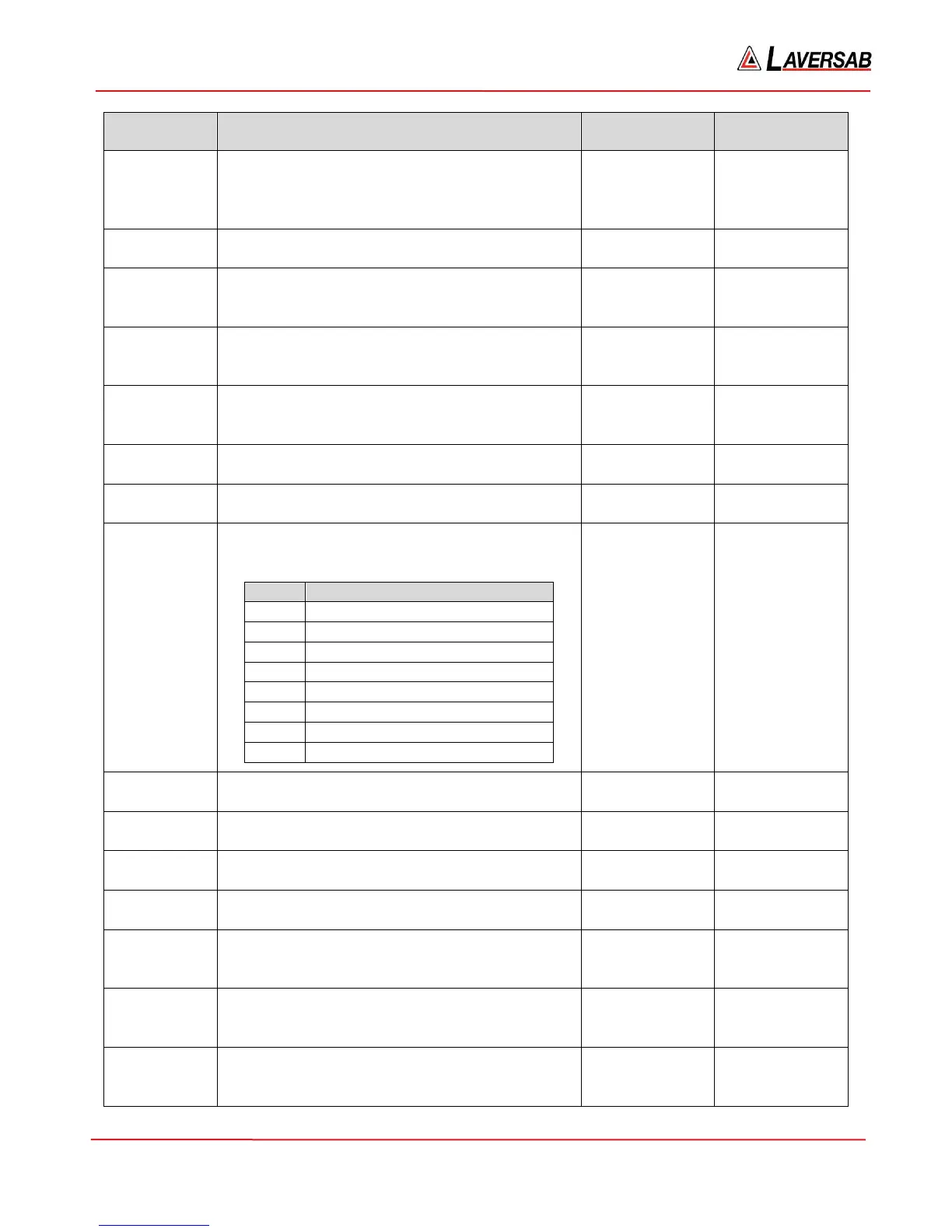
Command Description
Data sent from
PC
Data sent from
6300
Lm=n Set Limit m (where m is defined in the table
shown in the cell above) to the value n.
Note: This command requires the Limit password
(LP) to be set.
n 0 if OK; or
Error code
LP=n Set the Limit Password to n. The Limit password
is reset on power-up
n 0 if OK; or
Error code
ER Read the Error code for 6300 operational errors.
These are errors different than those returned in
response to a command.
None Error code (0 if
no error)
GO Activate or execute commands that set up various
parameters. Functions exactly like the GO key on
the Remote.
None 0 if OK; or
Error code
CN Cancel commands that set up various parameters.
Functions exactly like the CANC key on the
Remote.
None 0 if OK; or
Error code
GG Executes the Go-to-Ground function None 0 if OK; or
Error code
SF=1 Starts the Self-test function None 0 if OK; or
Error code
SF=0 Read the Status of the Self-test as value n per the
table below.
n Self-test status
0 Self-test passed
1 Memory test failed
2 Static measurement system failed
3 Pitot measurement system failed
4 Solenoids failed
5 Pumps failed
6 Static control system failed
7 Pitot control system failed
None Status code n
HC Read the current value for Height correction None Ht.correction
value
HC=n Set the Height correction value to n n 0 if OK; or
Error code
Tm Read the current value for Leak-Timer m, where
m is 1 to 3.
None Value of Leak-
Timer m
Tm=n Set Leak-Timer m to value n n 0 if OK; or
Error code
EN Read the 10-bit Encoder value. The 10-byte
ASCII-string returned has A1 as the MSB and D4
as the LSB. Each byte is either ‘0’ or ‘1’
None 10-byte string
indicating
encoder value
FL Read the Flight level represented by the 10-bit
encoder code. The value is always 3 bytes and is
‘xxx’ for invalid codes.
None 3-byte string
indicating flight
level
CP=n Set the Calibration password to n. n 0 if OK; or
Error code



 To Next Page