136 Version 3.3
Operator’s Manual Configuration
selection is changed to Yes, you can turn on individual data records
one by one. Refer to the installation manual of the device you
interfaced with the receiver to determine which output records are
required. Refer to Installation & Service Manual for receiver
hardware interface information.
Note: Preplan your interface requirements to ensure
all of your interfacing needs are met. When two
receiver’s are interfaced in a dual head
configuration, Port 4 is reserved for this
interface. Ports 1 and 2 are the only ports
where the Print function will operate. Ports 1, 3,
and 4 are all RS-422 electrically. Port 2 can be
configured as either RS-422 or RS-232
electrically and is the only port which should be
connected to a computer or other “single
ended” interface.
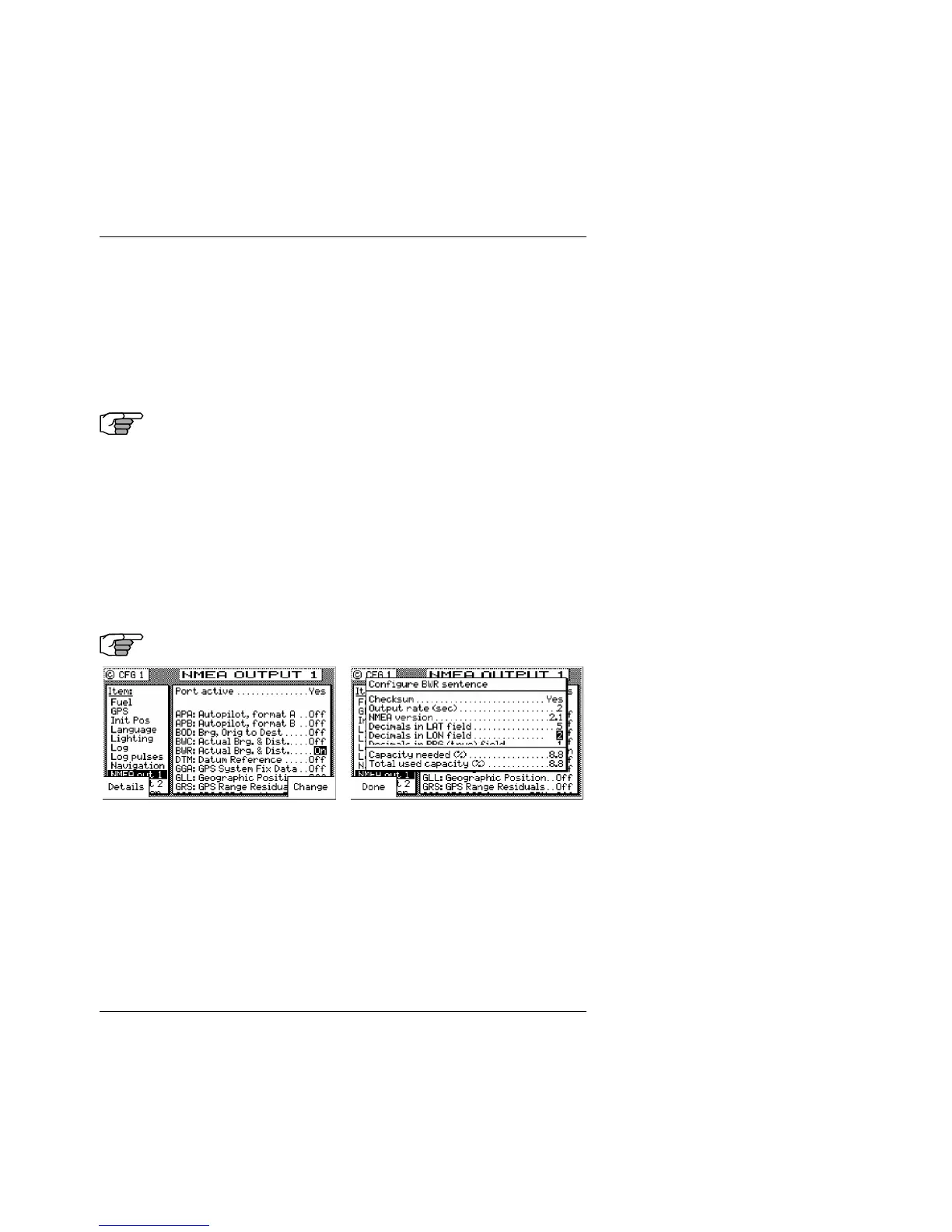
The default condition of each port is Off. When you want to output
data on a NMEA port, scroll down the Item menu to the appropriate
NMEA Out port number and change Port Active to Yes. In doing so,
the receiver will display all available NMEA 0183 output records.
Scroll down the list using the cursor key until you identify a NMEA
0183 records that you need. Use the Change softkey or right arrow
key on the cursor to select On.
Press the Details softkey to view the characteristics for the NMEA
record you select. If you notice that the top of some text is cut off
by the Capacity Needed window (as in the example above), this
indicates that there are more selections available than can fit in the
window. Use the cursor key to scroll down the list. Each record is
controlled separately. Generally speaking, the following controls



 To Next Page