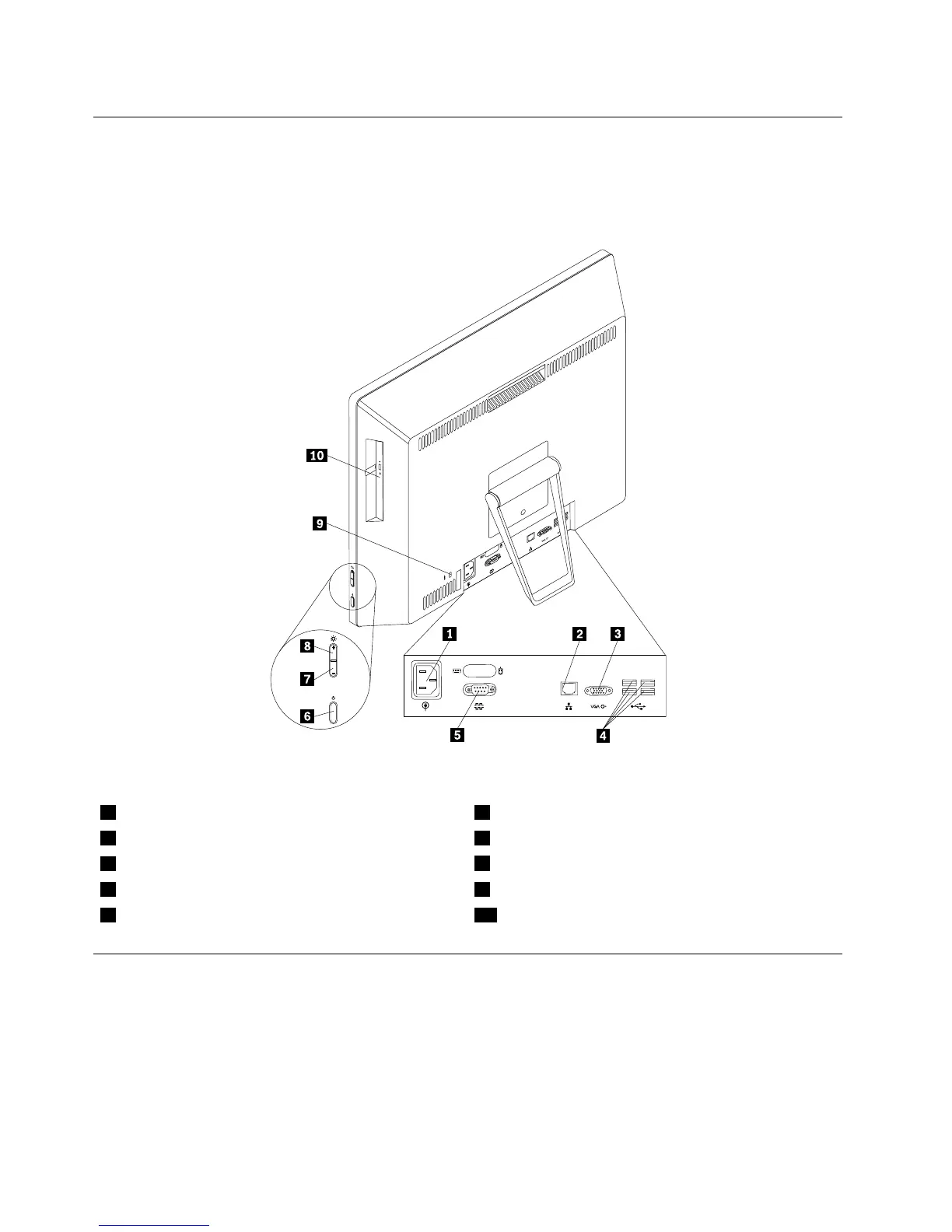
Locatingconnectorsontherearofyourcomputer
Figure2“Rearconnectorlocations”onpage66showsthelocationsoftheconnectorsontherearofyour
computer.Someconnectorsontherearofyourcomputerarecolor-codedtohelpyoudeterminewhereto
connectthecablesonyourcomputer.
Figure2.Rearconnectorlocations
1Powercordconnector6Powerbutton
2Ethernetconnector7Brightness-downcontrol
3VGA-outconnector
8Brightness-upcontrol
4USB2.0connectors(USBports3to6)9Security-lockslot
5Serialport(availableinsomemodels)10Opticaldrive
LocatingmajorFRUsandCRUs
Figure3“LocatingmajorFRUsandCRUs”onpage67showsthelocationsofthemajorFRUsandCRUsin
thecomputer.Toremovethecomputercover,see“Removingthecomputercover”onpage75.
66ThinkCentreE73zHardwareMaintenanceManual












 To Next Page