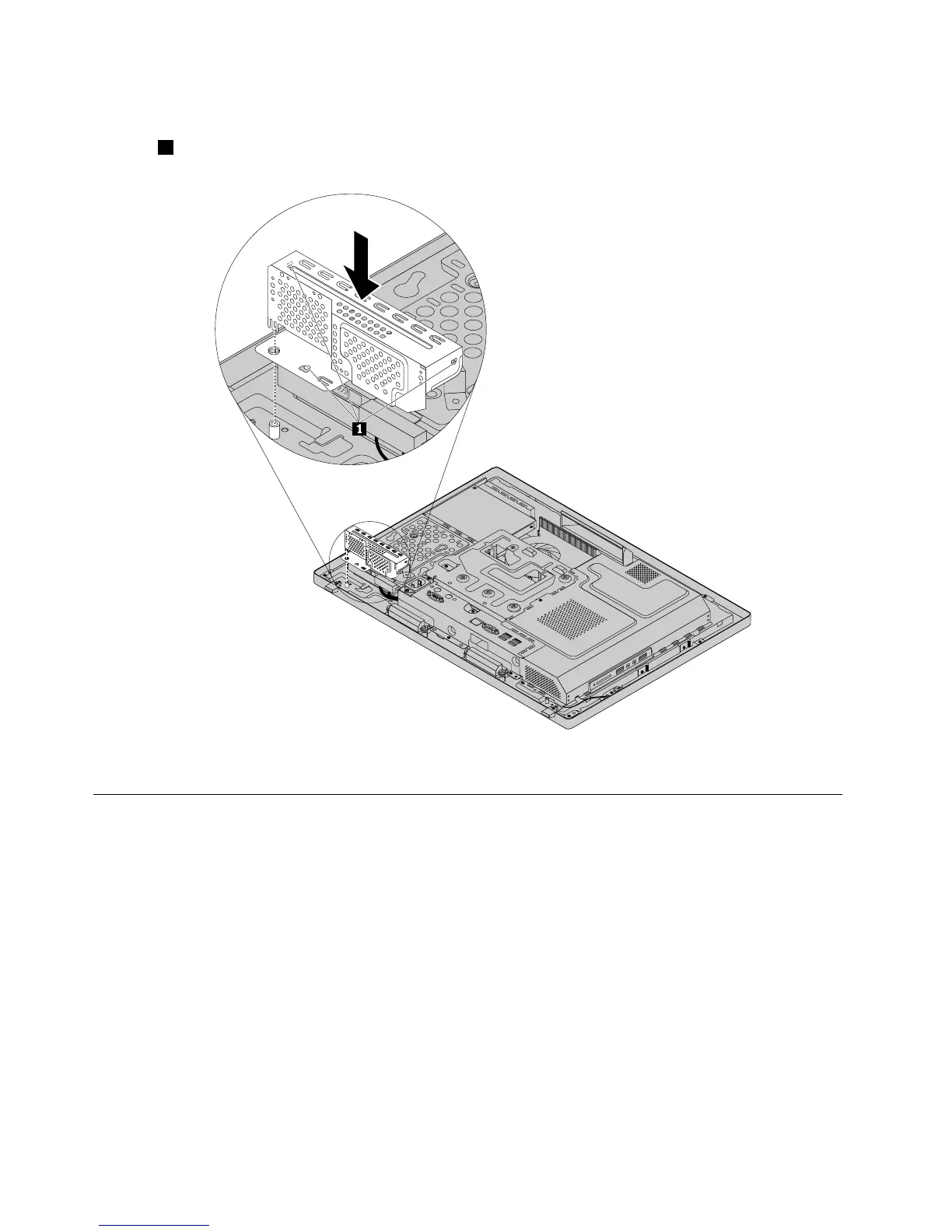
6.Toinstallthehard-disk-driveEMIshield,aligntheholeintheEMIshieldwiththestandoffinthechassis
asshown.Then,pushtheEMIshieldstraightdownuntilitissecuredbythestandoffrmlyandthethree
tabs1ontheEMIshieldalsoaresecuredbythecorrespondingholesinthechassis.
Figure13.Installingthehard-disk-driveEMIshield
Replacingthe3.5-inchharddiskdriveorhybridharddiskdrive
Attention:DonotopenyourcomputerorattemptanyrepairbeforereadingandunderstandingtheChapter
2“Safetyinformation”onpage3
.
Thissectionprovidesinstructionsonhowtoreplacethe3.5-inchharddiskdriveorhybridharddiskdrive.
Note:The3.5-inchhybridharddiskdriveisavailableonlyinsomemodels.Toreplacethe3.5-inchhybrid
harddiskdrive,followthestepsofreplacingthe3.5-inchharddiskdrive.
Toreplacethe3.5-inchharddiskdrive,dothefollowing:
1.Removeallmediafromthedrivesandturnoffallattacheddevicesandthecomputer.Then,disconnect
allpowercordsfromelectricaloutletsanddisconnectallcablesthatareconnectedtothecomputer.
2.Placeasoft,cleantowelorclothonthedeskorsurface.Holdthesidesofyourcomputerandgentlylay
itdownsothatthescreenisagainstthesurfaceandthecoverisfacingup.
3.Removethecomputerstand.See“Removingandinstallingthecomputerstand”onpage71.
4.Removethecomputercover.See“Removingthecomputercover”onpage75.
78ThinkCentreE73zHardwareMaintenanceManual












 To Next Page