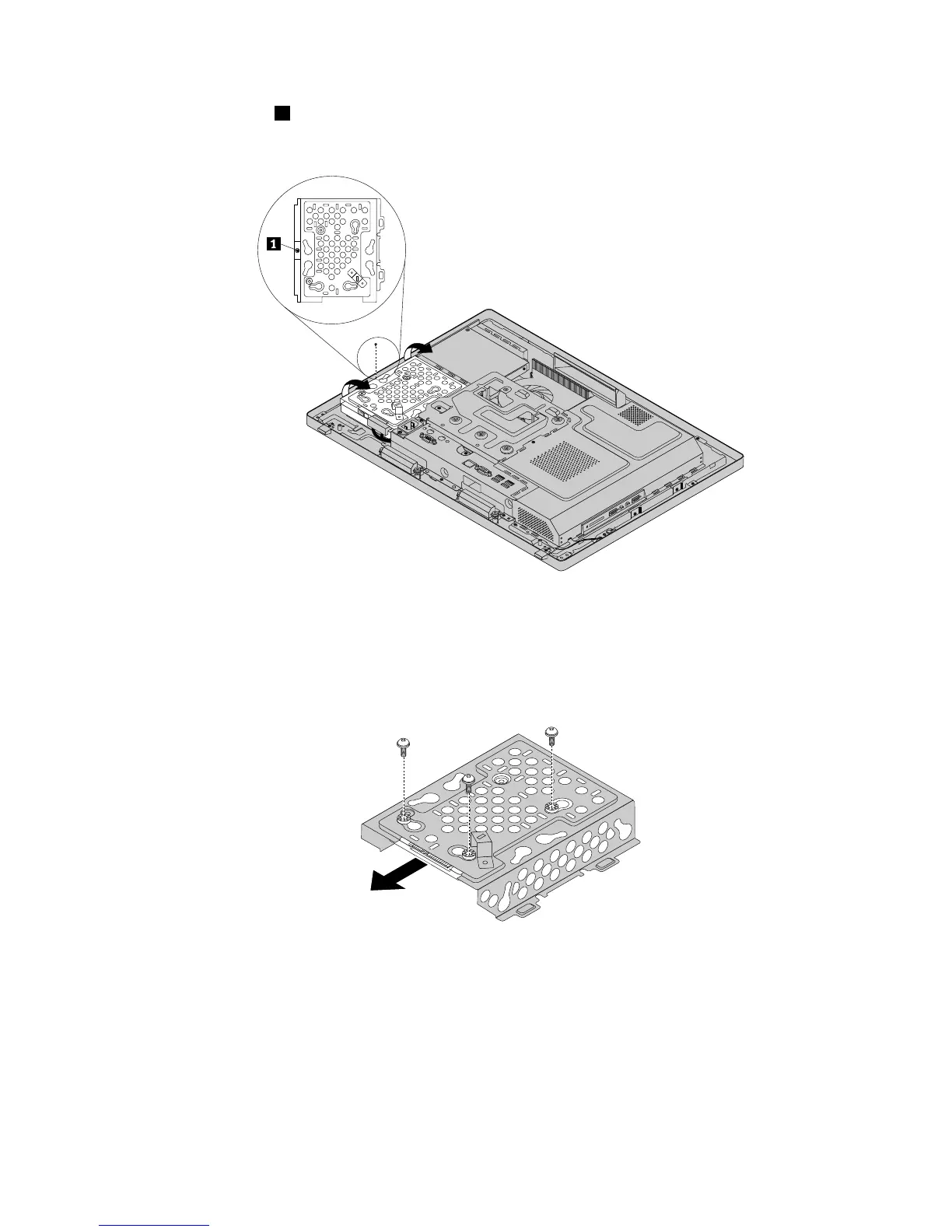
6.Removethescrew1,andthenpivotthehard-disk-drivebracketwiththeharddiskdriveasshownto
removeitfromthechassis.
Figure16.Removingthehard-disk-drivebracketwiththeharddiskdrive
7.Disconnectthecablefromtheharddiskdrive.
8.Removethethreescrewsthatsecuretheharddiskdrivetothebracket,andthenremovetheharddisk
drivefromthebracket.Donottouchthecircuitboardonthebottomoftheharddiskdrive.
Figure17.Removingtheharddiskdrivefromthebracket
9.Toinstallthenewharddiskdrive,positionthenewharddiskdriveinthehard-disk-drivebracketsothat
thethreescrewholesintheharddiskdrivealignwiththecorrespondingholesinthebracket.Then,
installthethreescrewstosecuretheharddiskdrivetothebracket.
10.Connectthehard-disk-drivecabletothenewharddiskdrive.
11.Positionthebracketwiththenewharddiskdriveinthechassissothatthescrewholeinthebracket
alignswiththecorrespondingholeinthechassis.Then,installthescrewtosecurethebracketwiththe
harddiskdrivetothechassis.
Chapter9.ReplacingFRUs81












 To Next Page