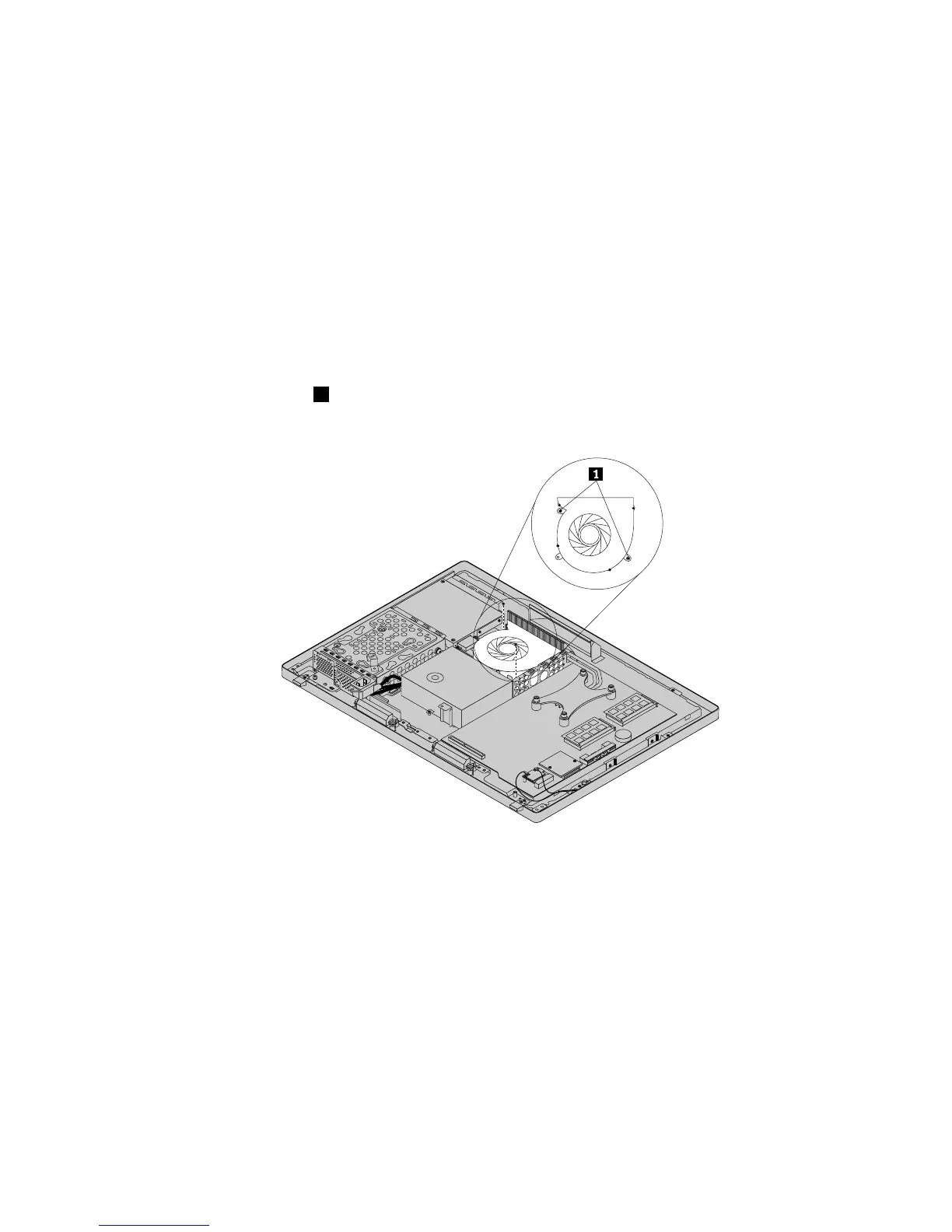
Toreplacethemicroprocessorfan,dothefollowing:
1.Removeallmediafromthedrivesandturnoffallattacheddevicesandthecomputer.Then,disconnect
allpowercordsfromelectricaloutletsanddisconnectallcablesthatareconnectedtothecomputer.
2.Placeasoft,cleantowelorclothonthedeskorotheratsurface.Holdthesidesofyourcomputerand
gentlylayitdownsothatthescreenisagainstthesurfaceandthecoverisfacingup.
3.Removethecomputercover.See“Removingthecomputercover”onpage75.
4.Locatethemicroprocessorfaninthecomputer.See“LocatingmajorFRUsandCRUs”onpage66.
5.Removethemicroprocessorboardshield.See“Removingandreinstallingthesystemboardshield”
onpage83.
6.RemovetherearI/Oassembly.See“ReplacingtherearI/Oassembly”onpage84.
7.RemovetheVESAmountbracket.See“RemovingtheVESAmountbracket”onpage86.
8.Notetheroutingofthemicroprocessorfancable,andthendisconnectthemicroprocessorfancable
fromthesystemboard.See“Locatingpartsonthesystemboard”onpage69.
9.Removethetwoscrews1thatsecurethemicroprocessorfantothemainbracket.Then,liftthe
microprocessorfanoffthemainbracket.
Figure26.Removingthemicroprocessorfan
10.Toreinstallthemicroprocessorfan,positionthenewmicroprocessorfanonthemainbracketandalign
thescrewholesinthenewmicroprocessorfanwiththoseinthemainbracket.Reinstallthetwoscrews
thatsecurethemicroprocessorfantothemainbracket.
11.Connectthenewmicroprocessorfancabletothesystemboard.See“Locatingpartsonthesystem
board”onpage69.
12.ReinstalltheVESAmountbracket.See“RemovingtheVESAmountbracket”onpage86.
13.ReinstalltherearI/Oassembly.See“ReplacingtherearI/Oassembly”onpage84.
14.Reinstallthesystemboardshield.See“Removingandreinstallingthesystemboardshield”onpage83.
15.Reinstallthecomputercover.See“Removingthecomputercover”onpage75.
16.Goto“Completingthepartsreplacement”onpage108.
Chapter9.ReplacingFRUs89












 To Next Page