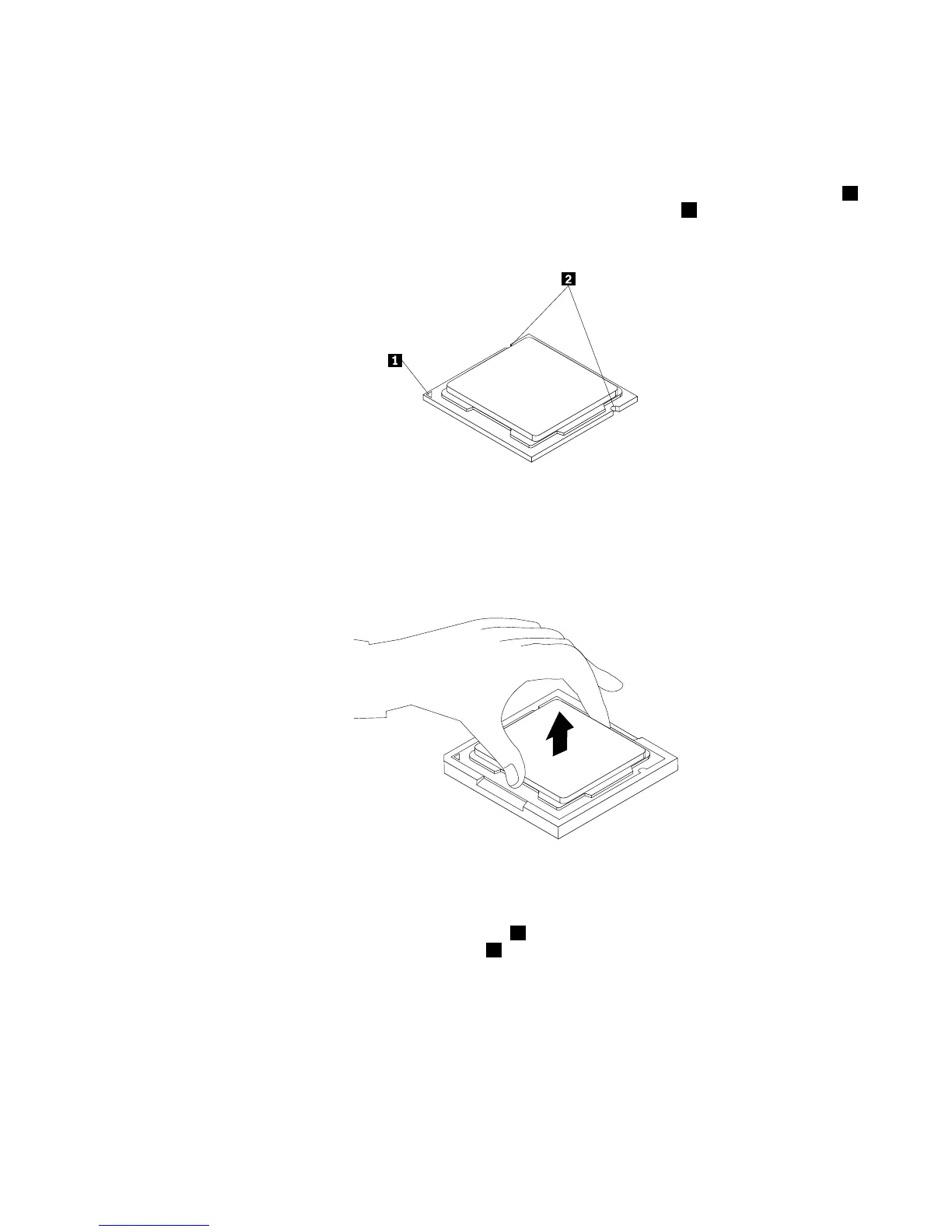
8.Liftthemicroprocessorstraightupandoutofthesocket.
Notes:
a.Yourmicroprocessorandsocketmightlookdifferentfromtheoneillustrated.
b.Notetheorientationofthemicroprocessorinthesocket.Youcaneitherlookforthesmalltriangle1
ononecornerofthemicroprocessorornotetheorientationofthenotches2onthemicroprocessor.
Thisisimportantwheninstallinganewmicroprocessoronthesystemboard.
Figure29.Notingtheorientationofthemicroprocessorinthesocket
c.Touchonlythesidesofthemicroprocessor.Donottouchthegoldcontactsonthebottom.
d.Donotdropanythingontothemicroprocessorsocketwhileitisexposed.Thesocketpinsmustbe
keptascleanaspossible.
Figure30.Removingthemicroprocessor
9.Makesurethatthesmallhandleisintheraisedpositionandthemicroprocessorretainerisfullyopen.
10.Holdthenewmicroprocessorandalignthenotches2onitwiththealignmentkeysinthe
microprocessorsocket,oralignthesmalltriangle
1ononecornerofthenewmicroprocessorwiththe
correspondingbeveledcornerofthemicroprocessorsocket.
Chapter9.ReplacingFRUs93












 To Next Page