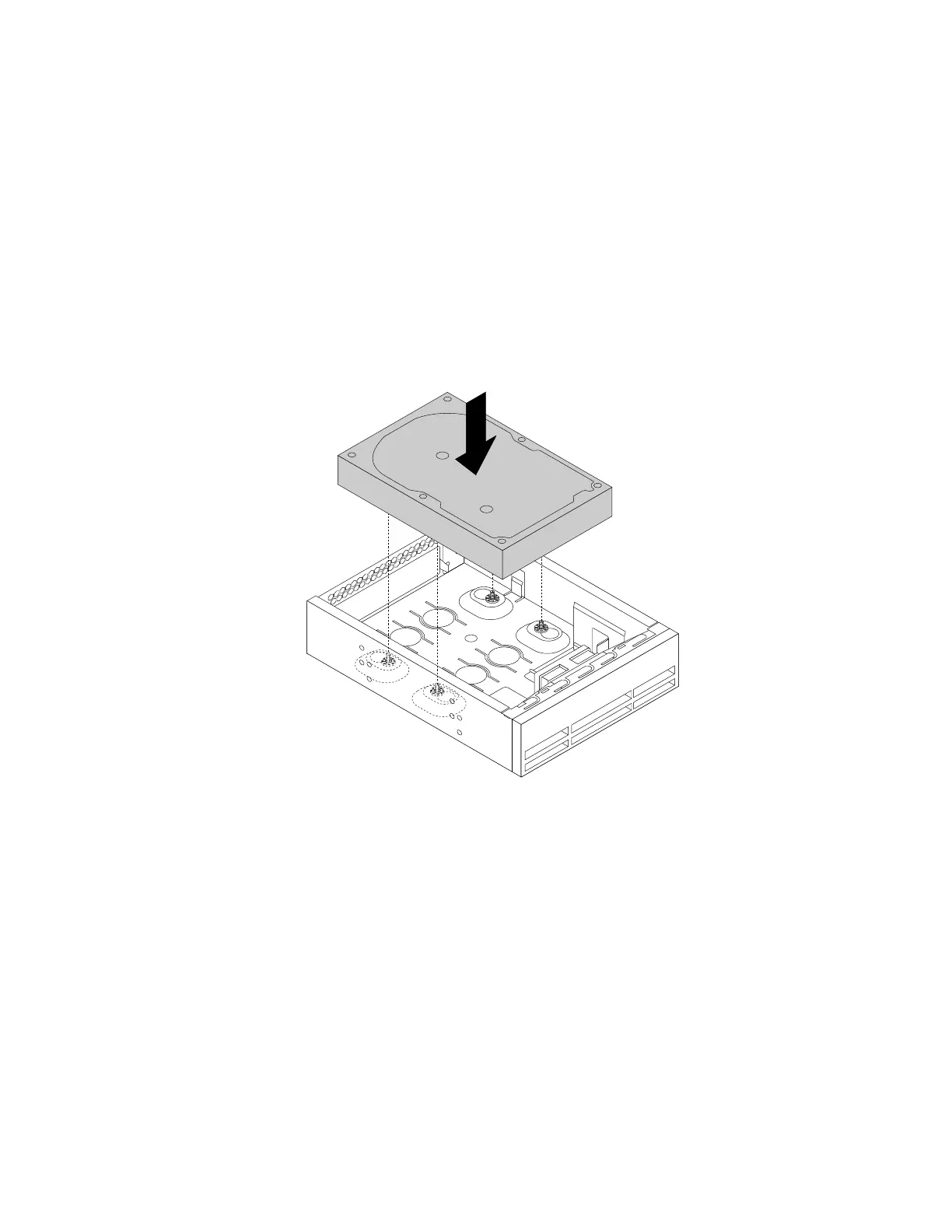
Toinstallatertiary3.5-inchharddiskdriveora2.5-inchsolid-statedrive,dothefollowing:
1.Removeanymediafromthedrivesandturnoffallconnecteddevicesandthecomputer.Then,
disconnectallpowercordsfromelectricaloutletsanddisconnectallcablesthatareconnectedtothe
computer.
2.Removethecomputercover.See“Removingthecomputercover”onpage58.
3.Removethefrontbezel.See“Removingandreinstallingthefrontbezel”onpage59.
4.Removetheplasticpanelinthefrontbezelforthedrivebayyouwanttouse.Ifthereisametalstatic
shieldinstalledinthedrivebay,removethemetalstaticshield.
5.Dependingonwhetheryouareinstallingatertiary3.5-inchharddiskdriveora2.5-inchsolid-state
drive,dooneofthefollowing:
•Installtheharddiskdriveintothe5.25-inchopticaldrivebracket.Then,fullytightenthefourscrews
tosecuretheharddiskdrivetothe5.25-inchopticaldrivebracket.
Figure72.Installingthetertiaryharddiskdrive
•Installthesolid-statedriveintothe5.25-inchopticaldrivebracket.Toinstallthesolid-statedriveinto
the5.25-inchopticaldrivebracket,dothefollowing:
94ThinkStationP310UserGuide













 To Next Page