Commissioning
Status messages of the operating unit
5
58
EDBPM−H310 DE/EN/FR 7.1
5.3 Status messages of the operating unit
You can always query the status of the operating unit and get information
about:
ƒ The name of the loaded driver
ƒ The version of the loaded driver
ƒ The network address of the operating unit
ƒ The last error
If you want to ... Press keys ... Example
A query the status of the operating unit
shift
2x
Driver: Can Lenze M
Ver. : 1.05
B select the next status page
Help
á
or
Info
â
Addr. : NO ADDRESS
Error : RESET
C close the status message
F1
Esc
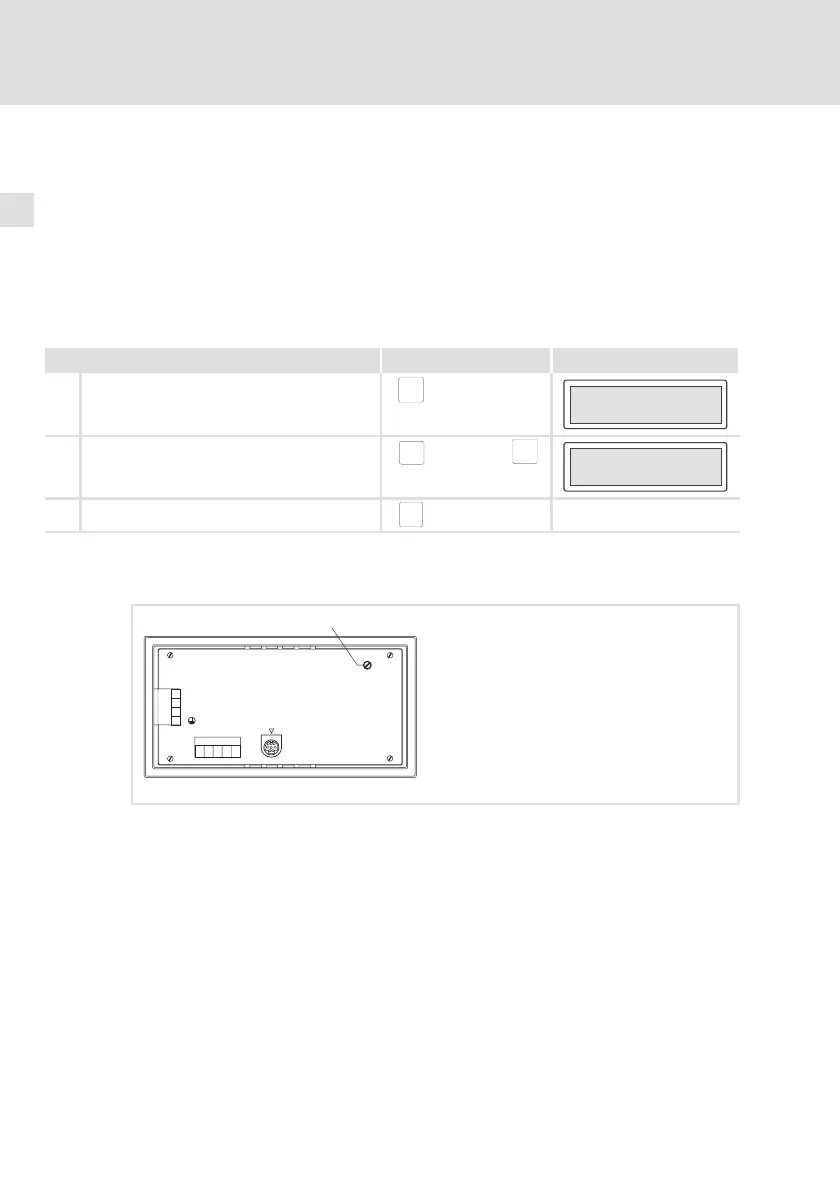
5.4 Contrast setting
LCD ADJ
+24 VDC
INPUT: 18 - 32 V 5W
FUSE 315 mA
0 VDC
N.C.
ASP8
N.C.
CAN+
Shield
CAN-
V-
1
123 4 5
2
3
4
0
h310_008
How to set the contrast:
ƒ Adjust the display contrast with the trimmer LCD adj. at the back of the
operating unit.


 To Next Page