ENGLISH
67
CUSTOMIZING SETTINGS
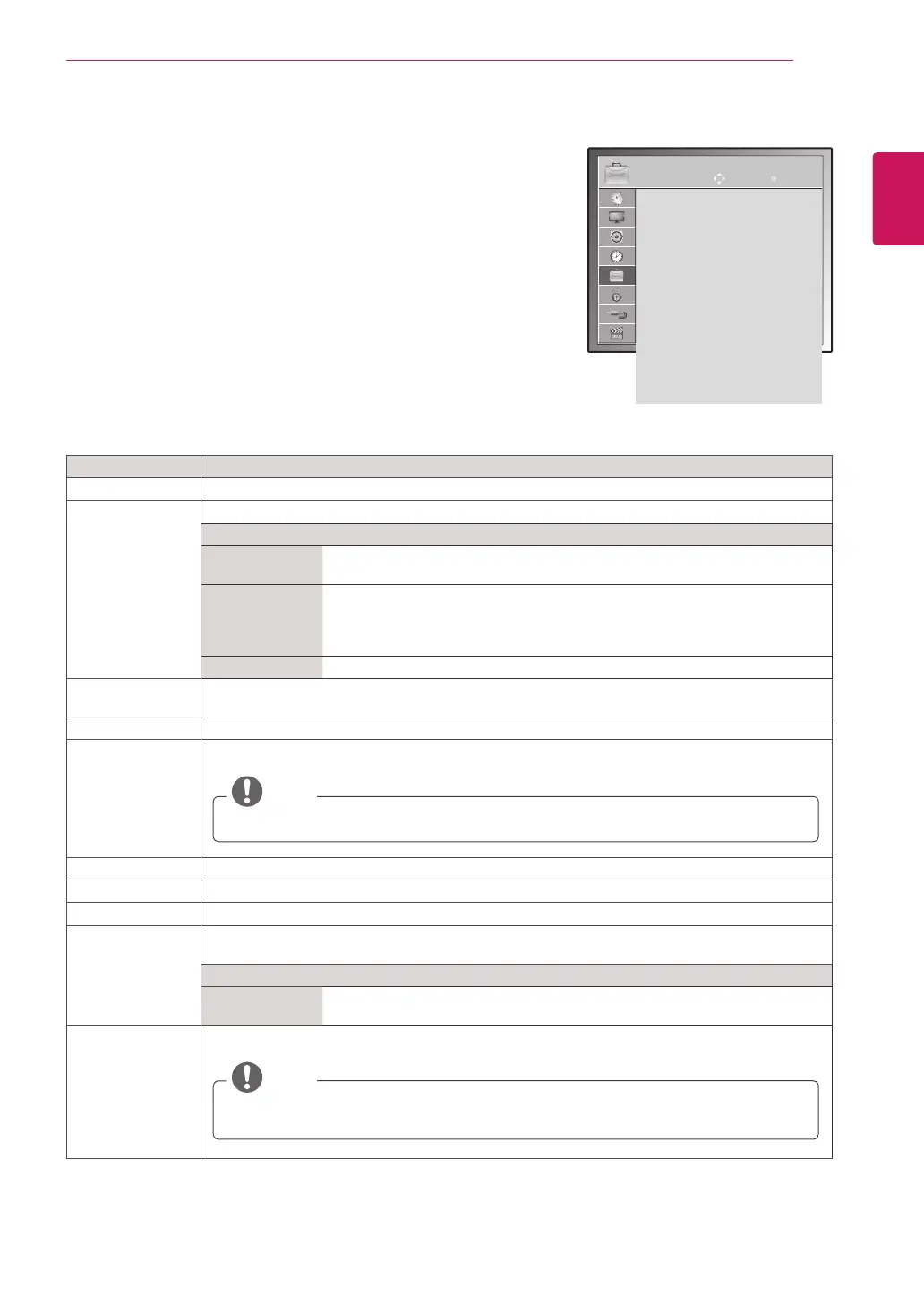
Setting Description
Language Selectsalanguageforthedisplayoraudio(OnlyDTV)(Seep.32).
Disabled
Assistance
(In Digital Mode)
Audiocommentaryorsubtitlesareprovidedforthosewhoarehardofhearingorvisuallyimpaired
Option
HardofHearing Thisfunctionifforthehearingimpaired.
Ifitissettoon,thesubtitleisdisplayedbydefault.
Audio
Description
Thisfunctionisfortheblind,andprovidesexplanatoryaudiodescribing
thecurrentsituationinaTVprogrammeinadditiontothebasicaudio.
WhenAudioDescriptionOnisselected,basicaudioandAudioDescription
areprovidedonlyforthoseprogrammesthathaveAudioDescriptionincluded.
Volume ChangestheAudioDescriptionvolume
Data Service
(only in Ireland.)
ThisfunctionallowuserstochoosebetweenMHEG(DigitalTeletext)andTeletextifbothexistat
thesametime.(Seep.75to77)
Country Selectsadesiredcountry.(Seep.31)
Input Label Selectsalabelforaninputsourcetoidentifyadeviceconnectedtoeachinputsource.
NOTE
IfyouwanttouseHDMI-PCmode,youmustsettheinputlabeltoPCmode.
Set ID AddsanIDtotheconnecteddevices.(Seep.89)
Power Indicator SetstoturnonoroffthePowerindicatorontheTV.
Demo Mode DisplaytheslideshowtoexplainthevariouslogoofthisTV.
Mode Setting CustomizestheTVsettingstosuityourpreference.Theinitialsetupscreenwillappearwhenyou
turnontheTVforthefirsttime.
Setting
ModeSetting SelectsHome Use modeforthehomeenvironment.
Selects Store Demomodefortheretailenvironment.
Factory Reset Thisfunctioninitializesallsettings.
NOTE
InLock System "On",ifyouforgetyourpassword,press'0', '3', '2', '5'ontheremote
controlhandset.
OPTION settings
1
PressMENUtoaccessthemainmenus.
2
PresstheNavigationbuttonstoscrolltoOPTIONandpressOK.
3
PresstheNavigationbuttonstoscrolltothesettingoroptionyou
wantandpressOK.
-Toreturntothepreviouslevel,pressBACK.
4
Whenyouarefinished,pressEXIT.
Whenyoureturntothepreviousmenu,pressBACK.
Theavailableoptionsettingsaredescribedinthefollowing:
OPTION
Menu Language : English
Audio Language : English
Subtitle Language : English
Disabled Assistance
Data Service : MHEG
Country : UK
Input Label
Set ID : 1
Power Indacator : On
Demo Mode : Off
Mode Setting : Home Use
Factory Reset
Move OK
ImageshownmaydifferfromyourTV.



 To Next Page