ENGLISH
79
TROUBLESHOOTING
TROUBLESHOOTING
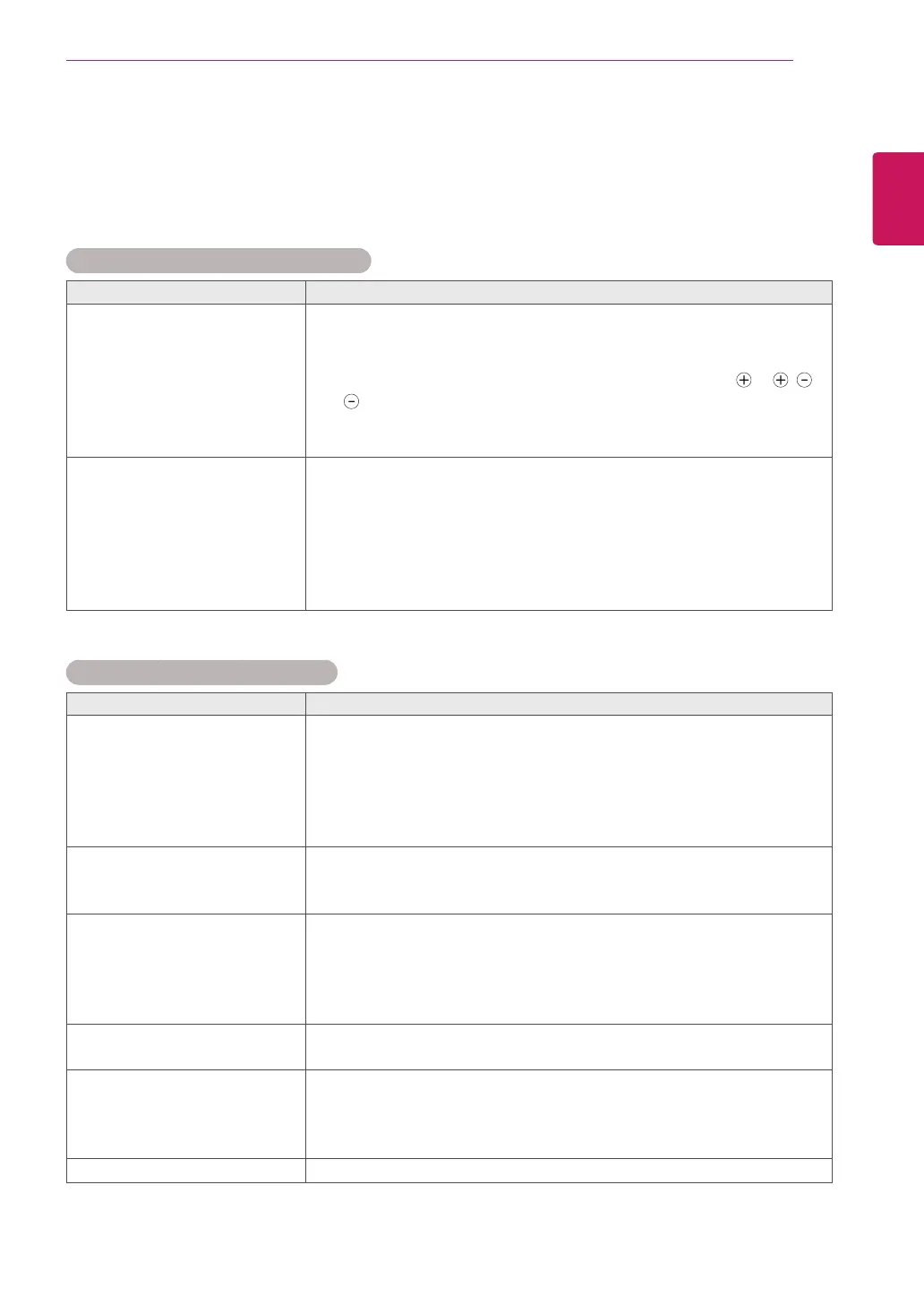
General
The operation does not work normally.
Problem Resolution
Theremotecontroldoesn’twork
Checktoseeifthereisanyobjectbetweentheproductandthe
remotecontrolcausingobstruction.Ensureyouarepointingthe
remotecontrol
Ensurethatthebatteriesareinstalledwithcorrectpolarity( to ,
to ).
Ensurethatthecorrectremoteoperatingmodeisset:TV,VCR,etc.
Installnewbatteries.
Powerissuddenlyturnedoff
Isthesleeptimerset?
Checkthepowercontrolsettings.Powerinterrupted.
IftheTVisswitchedonandthereisnoinputsignal,itwillswitchoff
automaticallyafter15minutestosavethepowerconsumption.
WhenabrokenfilewasplayedintheUSBmode,theTVmayturnoff.
Pleasecheckthefileinyourusbstorage.
Exceptthescreenoffmodeoftheenergysavingmenu.
The video function does not work.
Problem Resolution
Nopicture&Nosound
Checkwhethertheproductisturnedon.
Tryanotherchannel.Theproblemmaybewiththebroadcast.
Isthepowercordinsertedintowallpoweroutlet?
Checkyourantennadirectionand/orlocation.
Testthewallpoweroutlet,pluganotherproduct’spowercordintothe
outletwheretheproduct’spowercordwaspluggedin.
Pictureappearsslowlyafter
switchingon
Thisisnormal,theimageismutedduringtheproductstartupprocess.
Pleasecontactyourservicecentre,ifthepicturehasnotappeared
afterfiveminutes.
NoColour,poorcolour,orpoor
picture
AdjustColourinmenuoption.
KeepasufficientdistancebetweentheproductandtheVCR.
Tryanotherchannel.Theproblemmaybewiththebroadcast.
Arethevideocablesinstalledproperly?
Activateanyfunctiontorestorethebrightnessofthepicture.
Horizontal/verticalbarsorpicture
shaking
Checkforlocalinterferencesuchasanelectricalapplianceorpower
tool.
Poorreceptiononsomechannels
Stationorcableproductexperiencingproblems,tunetoanother
station.
Stationsignalisweak,reorientantennatoreceiveweakerstation.
Checkforsourcesofpossibleinterference.
Linesorstreaksinpictures
Checkantenna(Changethedirectionoftheantenna).



 To Next Page