Operating Instructions
181
Setting the VF Balance
Setting the balance on the raw P and Q channels for all available operating frequencies to maximise
sensitivity of the detector is carried out in the VF Balance screen. This is completed during the
machine manufacturing process so should not need adjustment under normal operating conditions.
However, if any of the electronics are replaced it is recommended that the setup is repeated. This is
normally done using the AutoBalance feature which automatically makes any P and Q channel
balance adjustments necessary for each of the available frequencies.
Manual adjustment is also possible and this is carried out by Loma Service Engineers when required.
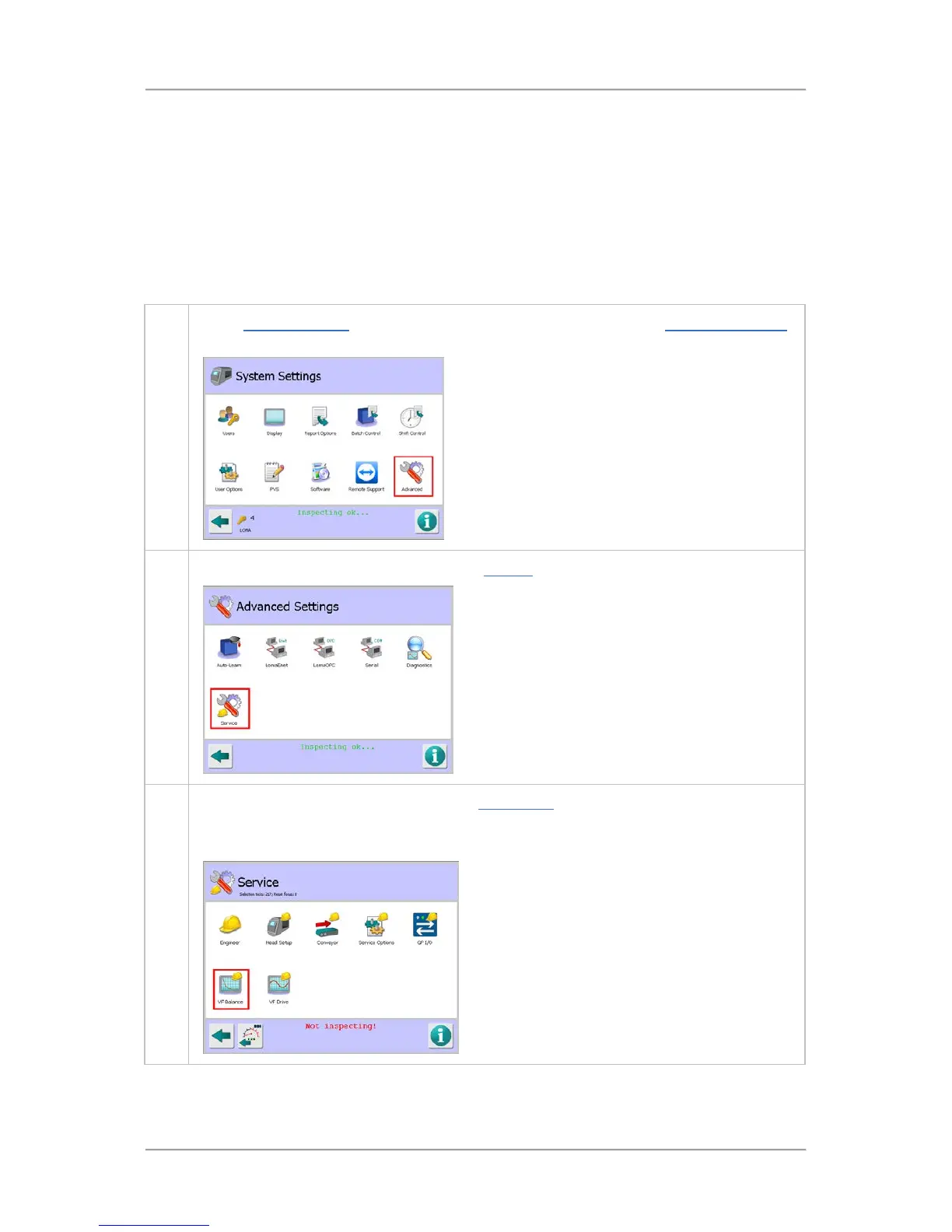
To set up the VF balance, proceed as follows:
1. In the System Settings screen, tap on the Advanced icon to display the Advanced Settings
screen.
2. Then tap on the Service icon to display the Service screen.
3. Tap on the VF Balance icon to display the VF Balance screen.
Note that the detector will stop inspecting whilst you are in any Service screen, as indicated
by the red message Not Inspecting!displayed at the bottom of the screen.



 To Next Page