Getting Started - 23
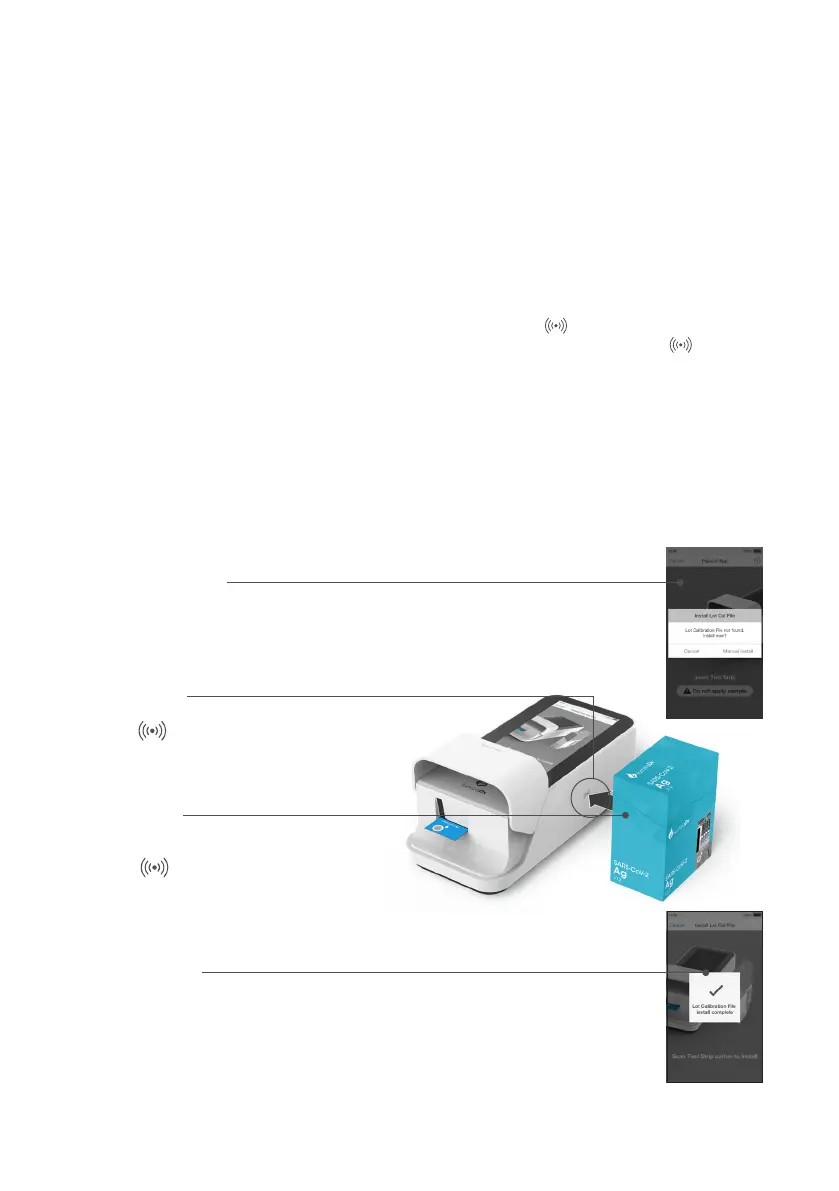
RFID reader
Locate symbol on Instrument.
Prompt to install
The Instrument will prompt the user to install the
Lot Calibration File if a new Test Strip Lot is used.
Installation
Place and hold back of Test Strip
Carton symbol to install.
2.8 LumiraDx Lot Calibration File Installation
LumiraDx Lot Calibration Files are required to provide the Instrument with the information
needed to perform diagnostic tests. Every manufactured Lot of Test Strips has a unique
Lot Calibration File. This contains information about the test method, the Lot number, the
calibration data and expiration date.
The Instrument will prompt the user to install the Lot Calibration File only when a new Test
Strip Lot is used. If no Lot Calibration is required then you can proceed with the test normally.
When prompted, click the manual install button. Locate the symbol on the side of
the Instrument. Then place and hold the back of the Test Strip Carton to the symbol
for 3 seconds. When the Lot Calibration File is installed, a message will appear on the
screen. The Instrument will also make a sound (if sounds are turned on in the Instrument
settings). Once installed, the Instrument will be able to run this and any future tests from
the same Lot of Test Strips. This process will need to be repeated when a new Lot of Test
Strips is used.
Alternatively ahead of time, in Administrator mode Lot Calibration Files can be
loaded on to the Instrument so that they are available for use. Select ‘Settings’, ‘Test
Management’ then ‘Install Lot Calibration File’. The Instrument will guide through the
steps that are required.
Conrmation
The Instrument will sound and a
confirmation message will be displayed.



 To Next Page