Document Name:
LX Eos user’s manual
14.10 SD Card
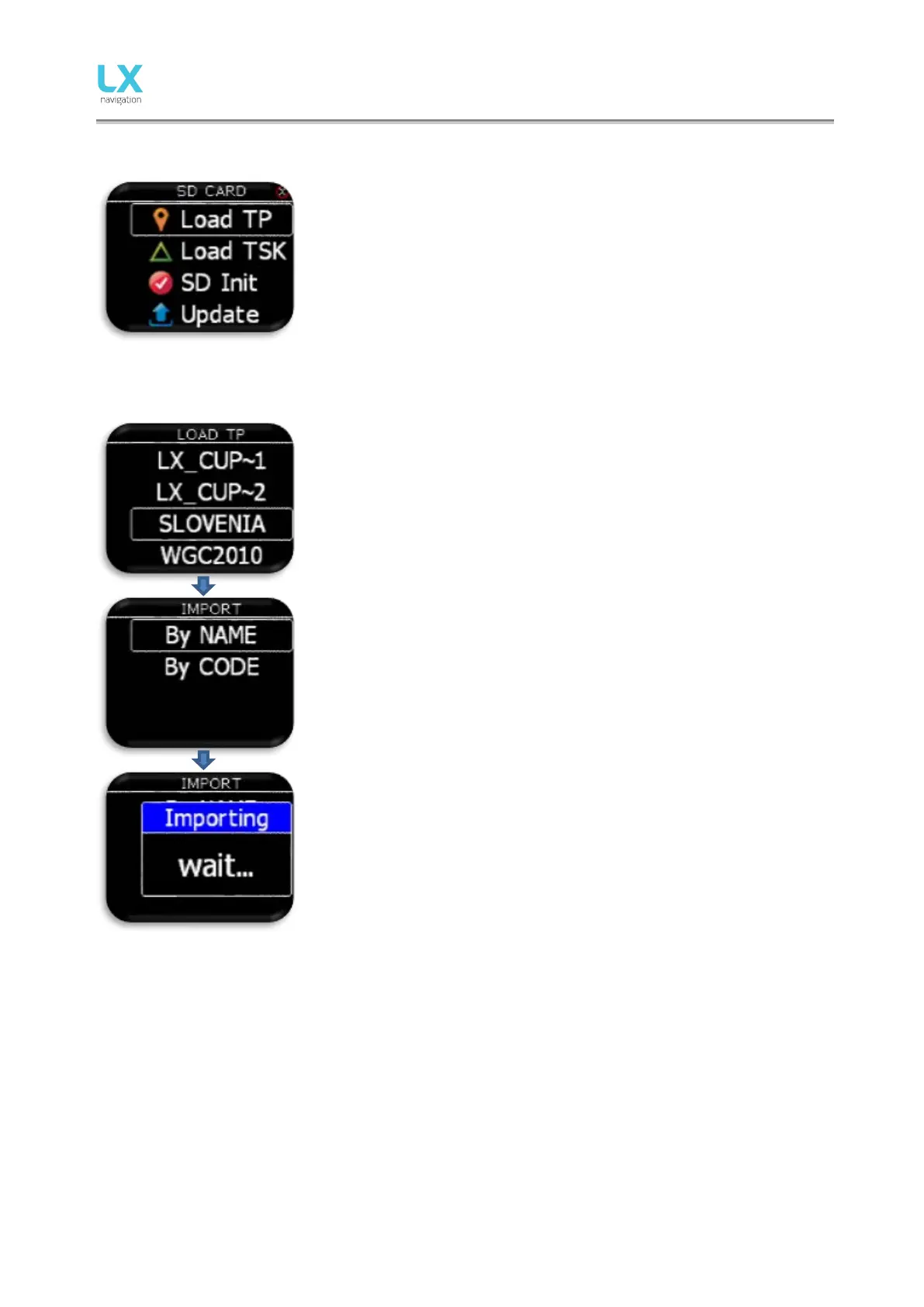
External SD card is used for all data transfers to LX Eos. In this menu all
import/load functions from SD card can be accessed.
14.10.1 Load TP
After selecting “Load TP” option, list of all CUP files (up to 20) found on
external SD card in LX/TP folder will be listed here.
Select file from which you wish to import TPs to internal database.
Cup file is commonly used file for transferring TPs and tasks
(optionally).
LX Eos can import turn points by name or by code.
Warning: CUP file is usually alphabetically sorte d by na me . Lx Eos
must have alpha sorted TP base or it will do it on import. If this is the
case, import can take a long time (depends on number of TPs). When
import by “Code” is selected, it will take much longer then import by
“Name”!
After selecting import mode, the process can take from 5 sec up to 10 min
(depends of TP number and alphabetical sort inside CUP file). Number of
TPs is not limited but we recommend to use CUP file with up to 1000
points. Name of every TP will be shorten to max 11 characters after
import.



 To Next Page