Document Name:
LX Eos user’s manual
14.10.2 Load TSK
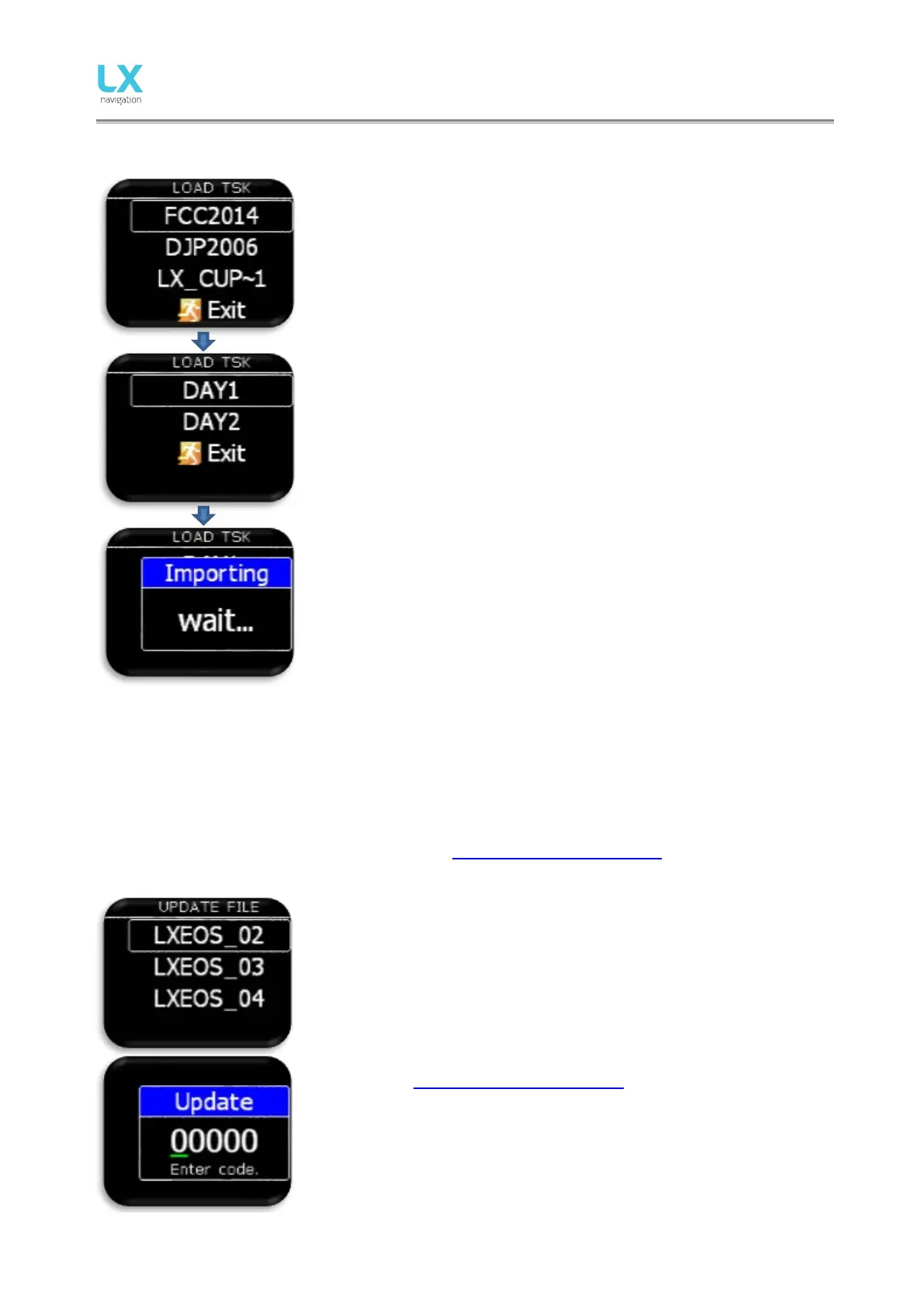
After selecting “Load TSK” option, list of all CUP files (up to 20) found on
external SD card in LX/TP folder will be listed here.
Select file from which you wish to import TSK to internal memory.
After selecting file from which you wish to import task, first 20 task found
in the file will be listed. Select task you wish to import and press enter.
Observation zones will be loaded as well if defined in file, else standard
FAI zones are used.
Warning: Due to internal task limitations, only first 18 points of
sele cted task will be loaded from file.
Wait until load is finished.
14.10.3 SD init
Pressing enter will create LX folders on external SD card. This function is recommended after use of new
SD card. The unit comes with already initialized SD card.
14.10.4 Update
Before update, user should request update code at: update-service@lxnavigation.si In email request, user
should provide serial number of the unit and version to which he wish to update to.
Pilot should copy new version to root of external micro SD card, then
insert it into the LX Eos and use “Update” option to make an update of the
unit. After selecting “Update”, list of all version (*.lxu) files will be listed.
Pilot should select version, which he wishes to update to.
After selection, update code request will be vis ible. Update code can be
accessed on update-service@lxnavigation.si



 To Next Page