214633 38 Revision C
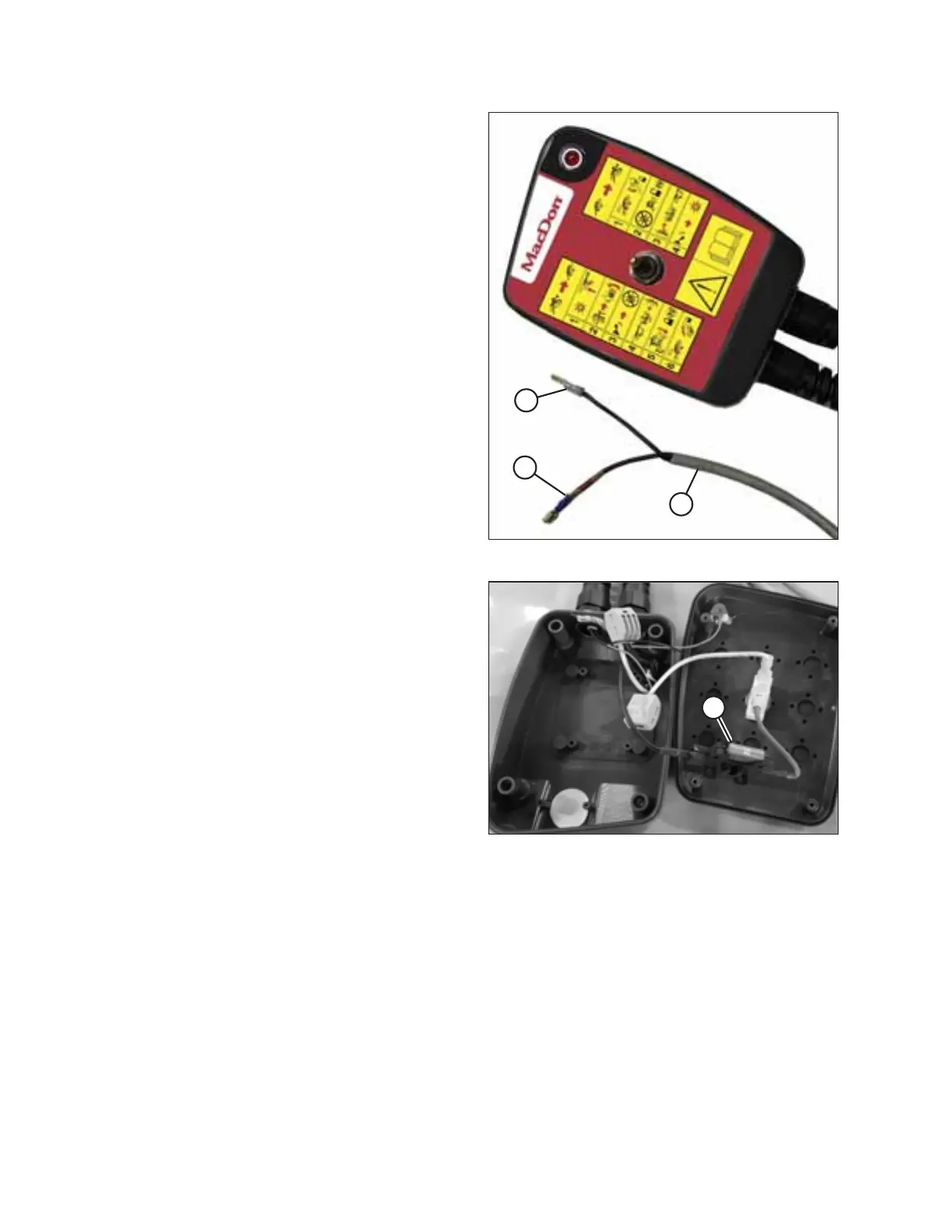
Figure 3.65: Remote Control
5. If your tractor does NOT have a three-pin auxiliary power
connection:
NOTE:
The remote control has internal protection which prevents
damage caused by incorrect wiring, short circuits, or
overload conditions.
Connect remote control wires (A) to the tractor’s power
supply:
• Connect wire (B) with no tag to tractor ground.
• Connect wire (C) with the red tag to tractor power.
NOTE:
If the red tag is missing, identify the power by locating the
wire with the number 1 printed on it. The ground wire has
a number 2 printed on it.
Figure 3.66: Control Box Interior
NOTE:
If connections are reversed, the lamp will not illuminate
when the toggle switch is in field mode. Try the following to
correct the issue:
• Check if 10 amp fuse (A) located inside the transport
control box has blown.
• Check for short in wires to solenoid valve on header.
• Check for incorrect wire connections (reversed) at the
power supply or solenoid valve.
6. Place the remote control inside the tractor cab.
INSTALLATION INSTRUCTIONS





 To Next Page