214633 16 Revision C
3.2.2 Installing Transport Assembly
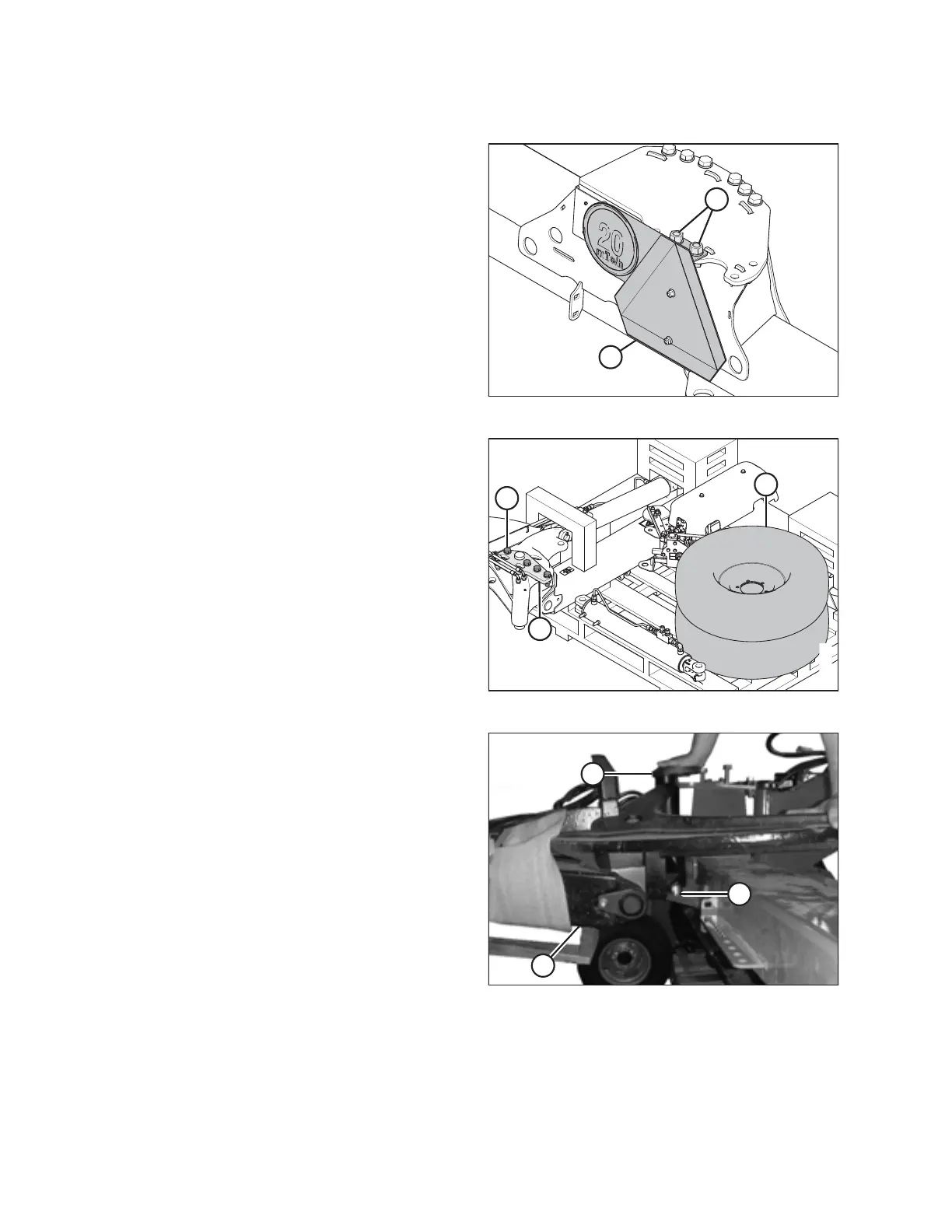
Figure 3.8: SMV Sign Attached to Carrier Frame
1. Remove bolts (A), hardened washers, and nuts securing
slow moving vehicle (SMV) sign (B) to the carrier frame.
Remove the sign. Retain the sign for reinstallation. Discard
the two bolts, washers, and nuts.
Figure 3.9: Transport Packing
2. Remove transport wheels (A) from the pallet.
3. Remove five M20 hex head bolts (B) (MD #136157),
washers (MD #112130), and nuts (MD #136122) in
transport assembly pin (C). Do NOT remove the pin.
Figure 3.10: Road-Friendly Transport
™™
4. Using a forklift, pick up the pallet holding transport
assembly (A) and align it with the rear of the rotary disc
pull-type.
5. Position the assembly close behind the frame and align
pin (B) in transport assembly with hole (C) in the carrier.
Use a soft hammer or equivalent to fully insert pin (B).
INSTALLATION INSTRUCTIONS





 To Next Page