778 ActionScript classes
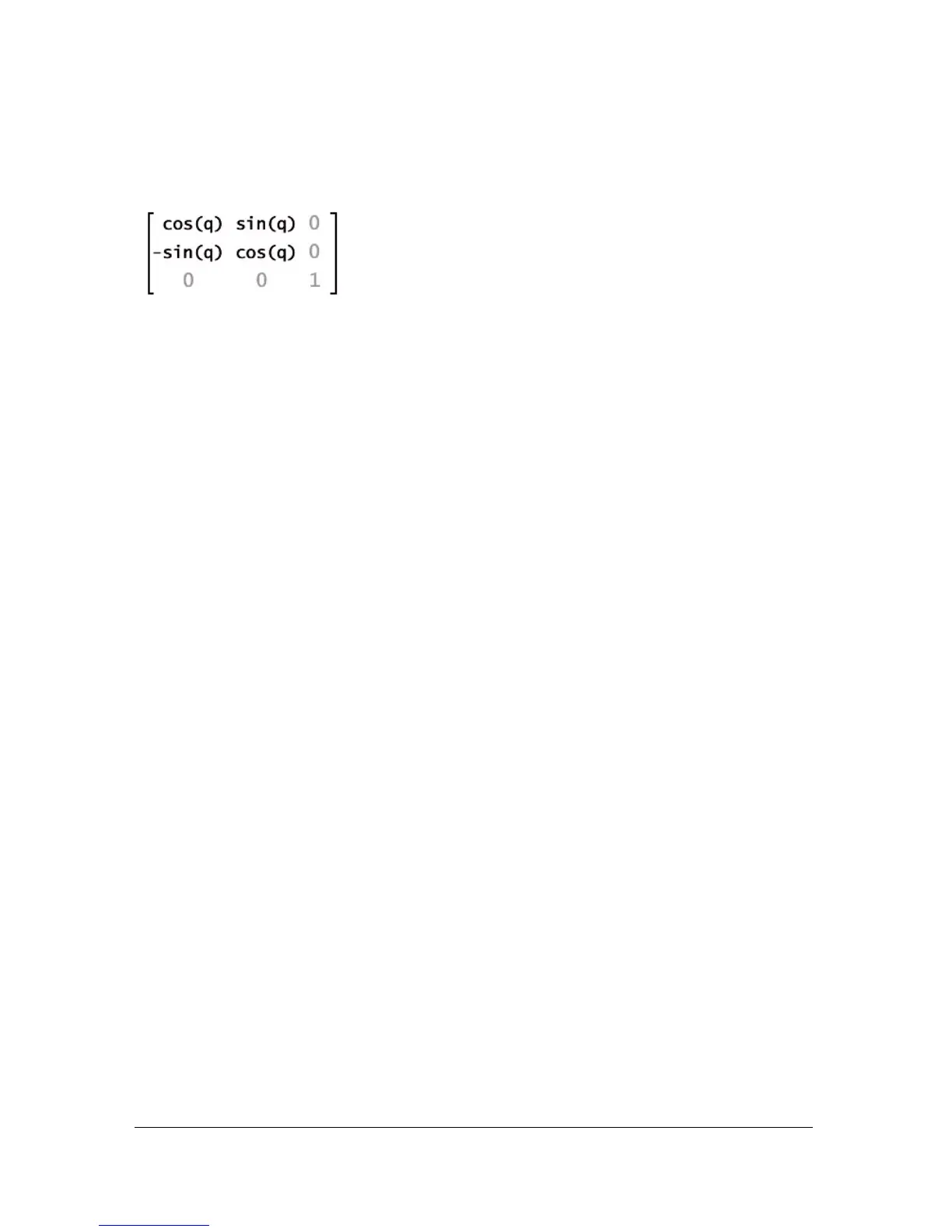
The rotate() method alters the a and d properties of the Matrix object. In matrix notation
this is shown as follows:
Availability: ActionScript 1.0; Flash Player 8
Parameters
angle:Number - The rotation angle in radians.
Example
The following example shows how the
rotate() method rotates rectangleMc 30° clockwise.
Applying
myMatrix to rectangleMc resets its _x value, leaving you to reset it to 100
manually.
import flash.geom.Matrix;
import flash.geom.Transform;
var myMatrix:Matrix = new Matrix();
trace(myMatrix.toString()); // (a=1, b=0, c=0, d=1, tx=0, ty=0)
var degrees:Number = 30;
var radians:Number = (degrees/180) Math.PI;
myMatrix.rotate(radians);
trace(myMatrix.toString()); // (a=0.866025403784439, b=0.5, c=-0.5,
d=0.866025403784439, tx=0, ty=0)
var rectangleMc:MovieClip = createRectangle(20, 80, 0xFF0000);
trace(rectangleMc._x); // 0
rectangleMc._x = 100;
trace(rectangleMc._x); // 100
var rectangleTrans:Transform = new Transform(rectangleMc);
rectangleTrans.matrix = myMatrix;
trace(rectangleMc._x); // 0
rectangleMc._x = 100;
trace(rectangleMc._x); // 100
function createRectangle(width:Number, height:Number,
color:Number):MovieClip {
var depth:Number = this.getNextHighestDepth();
var mc:MovieClip = this.createEmptyMovieClip("mc_" + depth, depth);
mc.beginFill(color);
mc.lineTo(0, height);



 To Next Page